Finding the most valuable use cases for in-app AI is picking the few AI moments that actually move a metric you care about, and ignoring the rest until you’ve earned them.
Most teams don’t fail because the model “wasn’t good enough.” They fail because they ship AI where users don’t feel pain, where the data is weak, or where the workflow doesn’t support it. So the real work is to start from proven value, map it to real user jobs, then rank ideas by impact, effort, and risk.
The sections below give you a practical way to do that, without turning your roadmap into a science experiment.

AI value isn’t hypothetical anymore, but it’s also not “everywhere.” It shows up in a few places where the work is repetitive, the speed matters, and the outcome is measurable. That’s why customer support is one of the first areas that keeps popping up where AI agents can handle routine questions 24/7, and your human team gets pulled into the cases that actually need judgment.
The same pattern across companies adopting these tools are higher engagement, better buyer satisfaction, and a lift in resolved chats per hour. It also calls out a bigger signal behind the scenes: AI startup funding hitting the $103B range in 2024. That doesn’t prove every AI feature is valuable, but it does explain why “proven” patterns are getting packaged fast and becoming easier for product teams to ship.
You see similar payoffs in content and growth workflows. When teams embed AI inside the workflow (instead of making users leave the app), they move faster, reduce manual steps, and can tie the feature directly to conversion outcomes. Companies attribute meaningful conversion jumps to generative features, plus average cost savings for businesses adopting genAI. The point isn’t to worship the numbers. It’s to recognize where AI has a track record and these are support automation, workflow acceleration, and personalization that’s tied to real intent rather than generic “recommended for you” fluff.
Once you’re clear on where AI generally works, the next step is the only one that matters: mapping those proven buckets to your product’s user jobs, your data, and the exact moments in the journey where AI can remove friction instead of adding it.

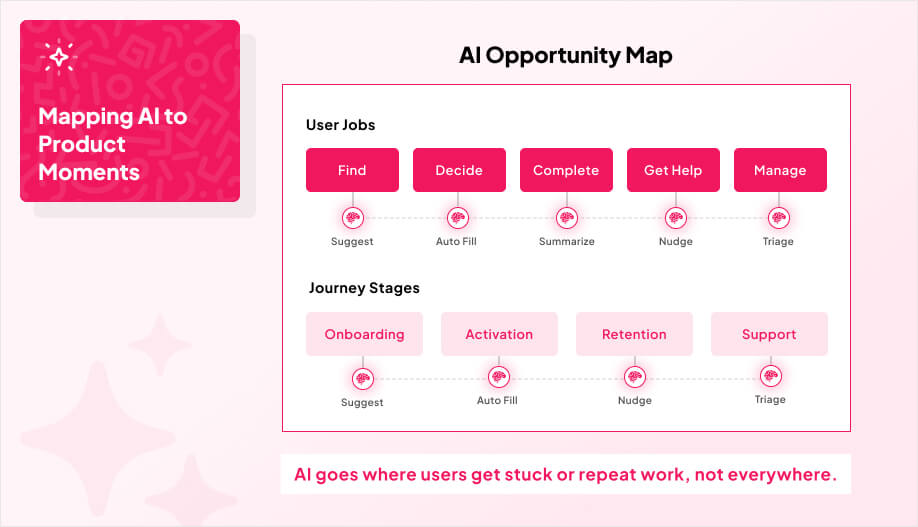
Before you brainstorm “AI features,” you need a clean map of where AI could realistically earn its place inside your product. Start by anchoring opportunities to what users are already trying to do in the app, then look for the points where they slow down, repeat work, or need help making a decision. That’s where AI tends to create real value, not in random “assistant” widgets.
Next, you organize ideas in two ways: by user job (what the user is trying to accomplish) and by journey stage (onboarding, activation, retention, support). This matters because 87% of organizations still struggle to turn raw data into actionable insights, so without a structured approach you end up shipping AI in the wrong places.
Lastly, if monetization is part of your model, don’t pretend it’s separate. Map AI to the moments that actually connect to revenue, like subscription tiers, paid boosts, or upgrades, so the feature is tied to a clear exchange of value.
With that framing in place, the next two subsections make this concrete: first by locking AI to Jobs-To-Be-Done, then by placing those use cases along the user journey.
Most teams start in the wrong place. They ask, “What can this model do?”
The better question is: what job is the user trying to get done?
Jobs-To-Be-Done (JTBD) forces you to treat users like people trying to make progress in a workflow, not like a pile of feature requests. That shift matters because it keeps you focused on real outcomes, instead of stapling AI onto screens just because it’s possible.
From there, the workflow is simple: define the target job, break it into steps, then mark where AI can remove friction or reduce risk. AI can also surface intent signals at scale, which helps you see where users struggle inside the job instead of guessing.
At AppMakers USA, we keep this honest by writing measurable hypotheses before anyone builds. If you can’t measure it, you don’t really know if it worked.

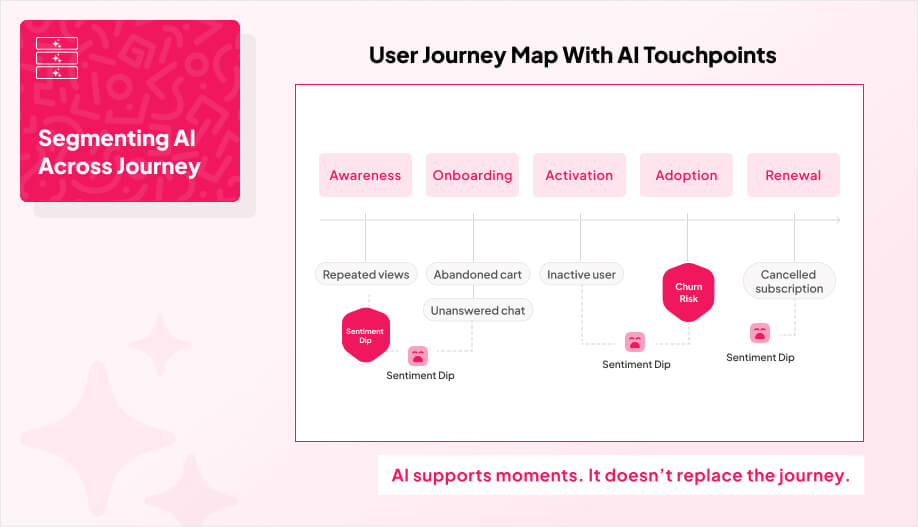
Instead of chasing generic “AI features,” segment your use cases along the actual user experience: awareness, onboarding, activation, adoption, and renewal.
That keeps you focused on fixing real moments in the product, not adding shiny layers that don’t map to how people actually behave. User journey maps force you to track real behaviors, emotions, and pain points, not some hypothetical funnel.
To make this work, start with unified data. Connect web, app, email, CRM, and even offline touchpoints so you’re not making decisions from siloed reports. When you can see the whole path, AI can spot friction that’s invisible when each team only looks at “their” channel.
Then you layer real-time triggers that react to micro-moments: abandoned carts, repeated views, unanswered chats. The goal is not to “message more.” It’s to choose the right channel and the right nudge at the right time, so users don’t fall off a cliff when they hit confusion or hesitation.
Finally, add prediction and sentiment where it matters. Use predictive models to flag likely churn, and sentiment signals to find the emotional low points where reassurance or guidance actually changes the outcome. Done right, this is how you surface the real causes of drop-off and prioritize fixes that move the biggest metrics.
This is how we keep teams from boiling the ocean. We map the pathway, design the AI flow per stage, and keep it measurable so you can tell what’s working and what’s just noise.

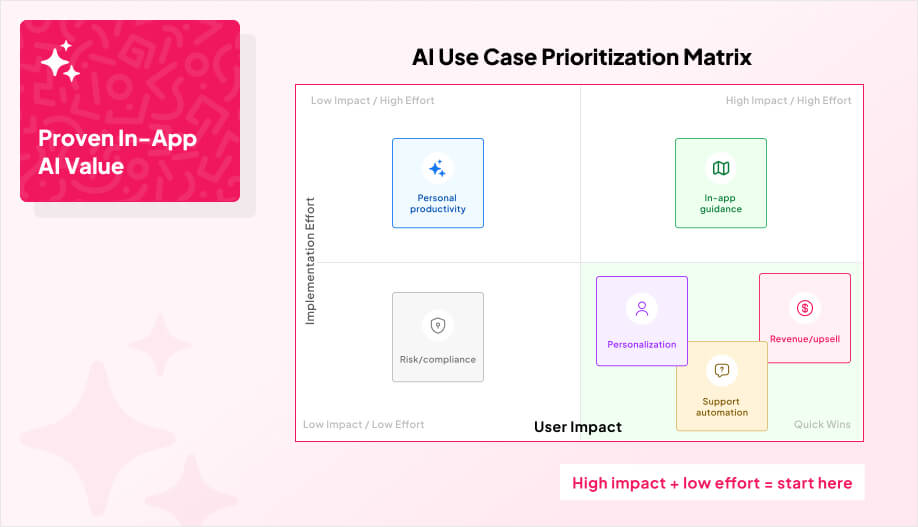
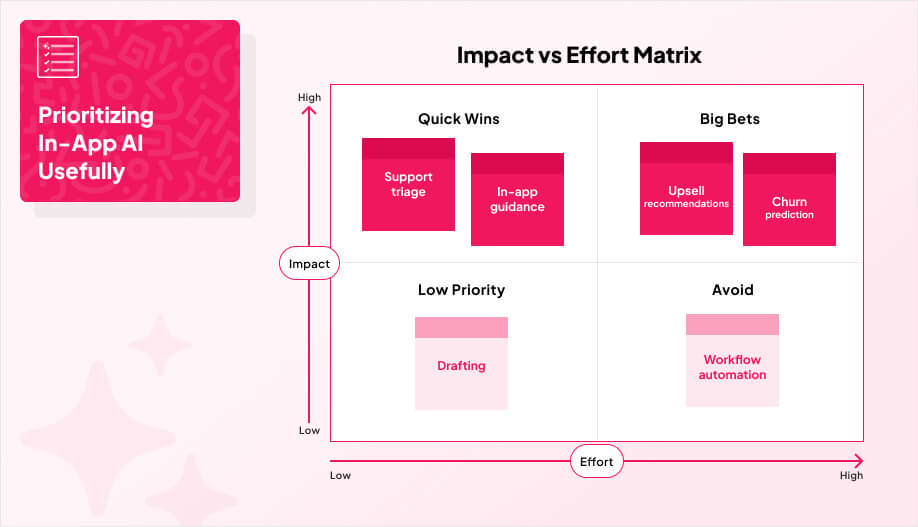
Once you’ve mapped AI opportunities to real user jobs and journey moments, the next problem is obvious: you will have too many “good” ideas. This is where teams usually start guessing, or they build whatever sounds impressive in a demo. A basic ROI-and-effort framework keeps you honest. It forces every AI idea to earn a slot on the roadmap.
The core approach is scoring each use case across impact, feasibility, and risk, then plot it on an impact vs effort matrix to surface quick wins and avoid expensive science projects. You can also roll those scores into a clean Now / Next / Later list so the team is not debating the same ideas every sprint.
Here’s a lightweight scoring sheet you can use:
| Score Area | What You’re Really Asking | Examples Of What To Check |
|---|---|---|
| Economic Value / ROI | Will this move be a KPI that matters? | Revenue lift, conversion, retention, support cost, time saved |
| Effort / Feasibility | Can we ship it without heroics? | Data availability, integration complexity, workflow change, latency constraints |
| Risk / Constraints | What could blow up later? | Compliance, privacy, model failure modes, operational disruption |
One extra detail that’s worth keeping is decision logs. For each shortlisted use case, write down the KPI, the data you need, the risks you’re accepting, and how you’ll measure success. It sounds boring, but it prevents the usual failure mode where the AI feature ships and nobody can tell if it worked.
Our team’s experience building mobile app development and web apps helps ensure feasible integration paths, so the ideas you shortlist are actually shippable, not just impressive on a slide.

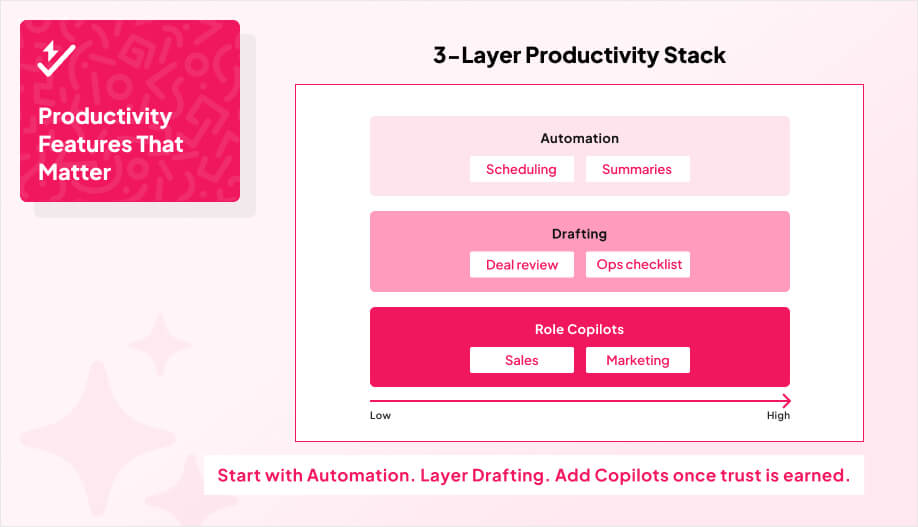
If you want a safe place to start with in-app AI, start with productivity. It’s the fastest path to obvious value because time saved is easy for users to feel and easy for teams to measure. This category keeps winning because automation alone can save workers 2–3 hours a week, and chat-style assistants have been shown to shave over 2 hours per day in some studies. People using AI are also 90% more likely to report high productivity, which is a blunt signal that “help me move faster” is a real demand, not a gimmick.
The practical takeaway is that you don’t need ten AI features. You typically get the biggest gains by embedding three feature sets that map to real work: automation, drafting, and role copilots. Across large samples of workplace tasks, AI assistance has reduced completion time by around 80% on average. Workflow automation is usually the first win because it hits scheduling, documentation, and repetitive data entry. Done well, it can cut task time by 70–80%, and users don’t have to change how they work to benefit.
Next comes drafting. This is where you let users generate first drafts of emails, briefs, and summaries without leaving your app. It’s not about “writing for them.” It’s about removing the blank-page problem and keeping context inside the workflow. It’s also important to note that cross-platform tooling can speed adoption and reduce overhead, which matters if you’re rolling these features out across iOS, Android, and web.
Finally, role-aware copilots are where productivity starts to feel like leverage. Think coding helpers, deal analyzers, or ops advisors that surface suggestions inside the flow of work (not buried in a chatbot tab).
The key is trust. Trust that AI can keep outputs editable, and give users simple controls so they can correct the AI instead of fighting it.

Productivity features save time. Customer experience features save the relationship.
If a user hits confusion, friction, or uncertainty inside your app, they don’t go open a help center and calmly research. They bounce, or they churn later.
Many teams see generative AI as a way to make digital interactions feel more human, and users now expect faster, more personalized experiences than most products can deliver with static UI alone. Which is why real-time support automation is the next layer because it is shown to deliver a 30% cost reduction in customer service operations. Instead of pushing users out to email or a ticket form, you give them contextual help right on the screen where they got stuck, and the doc ties this to measurable cost reductions in customer service operations.
We’ll break that down into three concrete pieces in the following sections below.
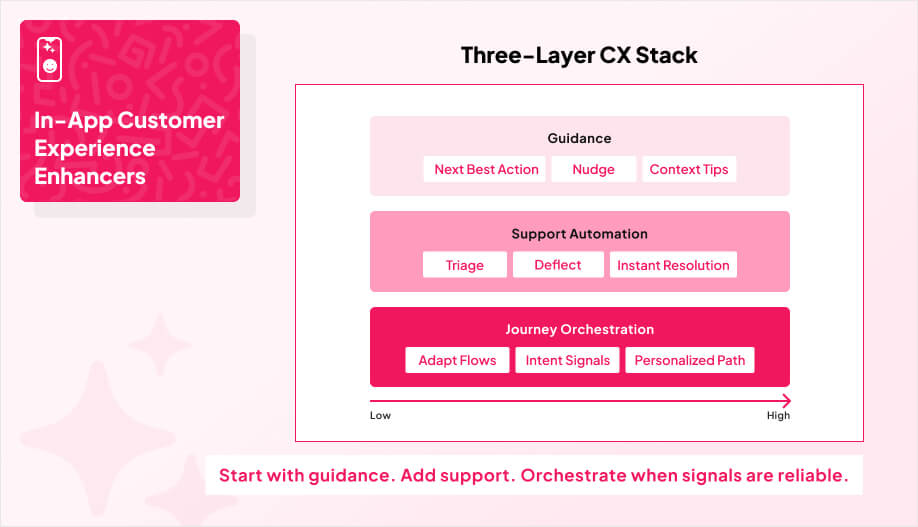
AI-powered in-app guidance is what you add when you’re tired of watching users hit a confusing screen, hesitate, then disappear. Instead of forcing people to dig through FAQs or bounce into support, guidance steps in right where they are with the next best action. That can help users finish what they started, and it also takes pressure off internal teams by handling routine “what do I do here?” moments automatically.
The reason this works is because you’re shaping behavior in real time, not dumping more help content into a corner no one visits. At the same time, the global AI market is pegged around $391B, and 70% of CX leaders plan to integrate generative AI by 2026. This means that users are getting trained to expect smarter experiences, and basic “static UI + help docs” is falling behind.
Practically, guidance layers usually do three jobs well:
We typically embed it in our onboarding, complex configuration screens, and any high-stakes checkout flow where confusion equals lost revenue.
Once guidance is working, the next layer is to solve the problem in the moment with real-time support automation.

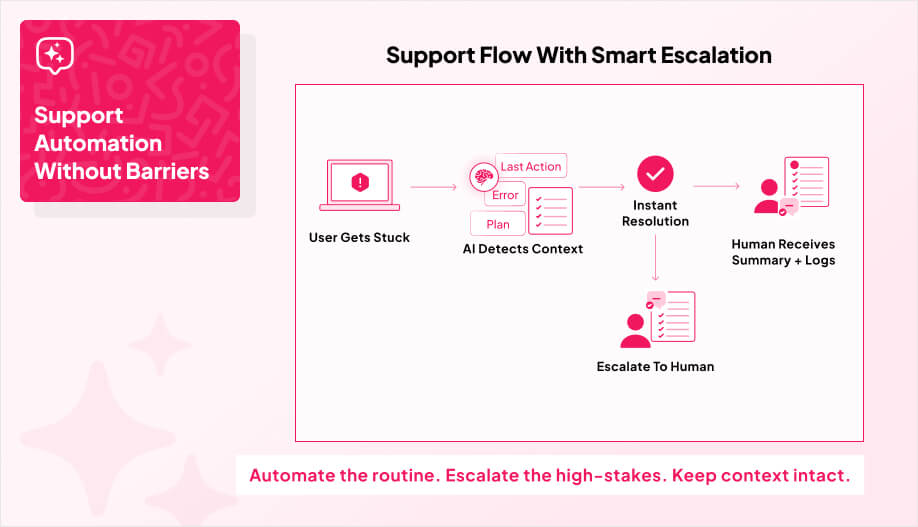
Real-time support automation is what happens when your app stops dumping users into a “contact us” dead end and starts acting like a first-line support channel.
The goal is not to “add a chatbot.” It’s to solve routine issues in the moment, route the messy stuff to a human, and keep people moving through the product instead of bouncing.
When AI agents are embedded directly in the flow, you can resolve a big chunk of requests without human help and cut response times by around 30%, and shrink the time spent on complex cases by 50%+. It also flags the direction the market is going: by 2027, AI is projected to resolve 50% of service cases.
That’s not a reason to automate everything. It’s a reason to stop treating support as an “outside the app” problem.
The best versions of this don’t feel like a support tool bolted on after the fact. They feel like the product knows what the user is doing, understands the last few steps, and can either fix the issue or hand off with context. That’s also how you protect margins layer to meaningful cost reduction in customer service operations, while still giving users a 24/7 path to answers.
Here at AppMakers USA, when we design these systems, we obsess over two things: (1) clean escalation paths so users can reach a human when it matters, and (2) tone and interaction quality so the support experience feels helpful, not robotic.
Once support can actually solve problems in real time, the next step is using those same signals to shape the experience itself which leads into personalized journey orchestration.
Most apps track clicks and page views. That’s not the same as orchestrating an experience.
Orchestration means your app reacts to what a user is doing right now and adjusts the path in-session. If someone is high-intent, you stop slowing them down and move them into a faster, conversion-focused flow. If they’re unsure, you give them more context and help before you push an offer. That’s the whole idea.
This matters because expectations have changed. 73% of customers expect personalized interactions, and CX leaders attribute up to 25% profit lifts to better experiences. The market is also not waiting. 95% of companies planned to implement AI-powered customer service by 2025, which means “always-on, personalized guidance” stops being a differentiator and starts being table stakes.
The implementation is less mystical than people make it:
We treat orchestration as a system, not a feature where real-time signals replace static campaigns, analytics expose friction, and predictive nudges (push, in-app, email) are tied to conversion and retention, not “engagement” vanity metrics.

If you’ve already picked the use cases worth building, this is the part that separates a “cool demo” from an AI feature people actually keep using. Your job now is to measure what’s happening, tighten what’s not working, and only then scale the things that prove they move the needle.
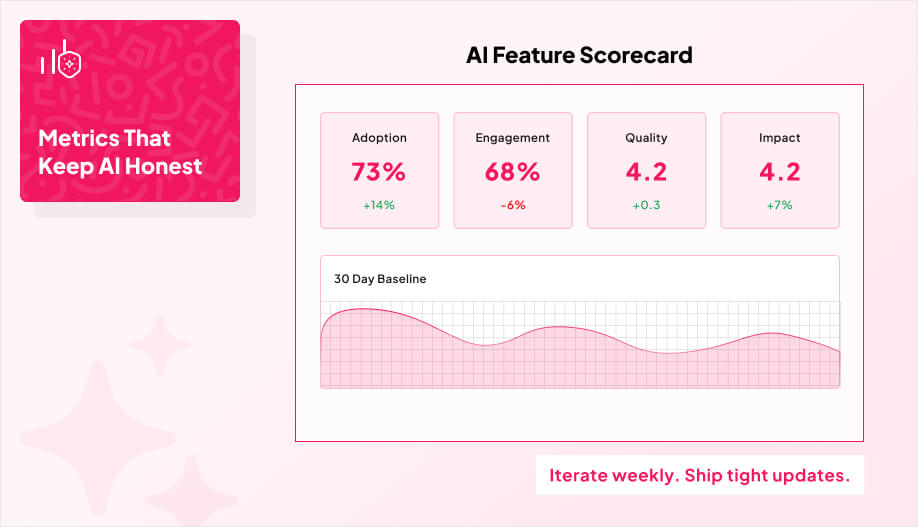
Start by tracking the basics: adoption, stickiness, satisfaction, and correctness. Then pair them with sentiment signals like NPS, CSAT, and first-contact resolution so you’re not just counting clicks, you’re measuring whether the experience feels helpful and trustworthy. Keep the dashboards, but don’t hide behind them. Mix in human evaluation so you catch the edge cases that numbers miss.


A clean way to begin is to set a 30-day baseline with simple, defensible metrics like tasks automated and time saved. After that, run lean build-and-test cycles: ship small improvements, read user feedback, and prioritize the changes that create real value. If you’re serious about scaling, an admin panel for analytics and control becomes part of the product, not a “nice later” item.
Here’s the measurement framework you can actually use:
| Dimension | Metric | What It Tells You |
|---|---|---|
| Adoption | Feature adoption rate | Confirms real demand |
| Engagement | DAU/MAU stickiness | Shows habit strength |
| Quality | AI reply accuracy | Guards against churn |
| Impact | Time saved per session | Ties AI to ROI |
Once you see a feature improving retention or productivity, scale it but keep an eye on the stuff that breaks quietly: resilience, downtime, and time saved as usage ramps. And yes, you should be iterating weekly: watch the dashboards, read the comments, and ship tight updates.
That discipline is also how you prove ROI internally without hand-wavy storytelling.
If you can’t tie it to one metric (conversion, retention, support cost, time saved) and explain how the feature moves that number, it’s not valuable yet. It’s a demo.
Productivity automation inside an existing workflow. It’s easier to measure, users feel the benefit immediately, and you’re not betting the product on a fragile “assistant.”
When you don’t have reliable data, you can’t support the workflow change, or the failure mode is expensive (trust, compliance, support load). Shipping the wrong AI feature is worse than shipping none.
Make escalation obvious and fast. Automate routine issues, but hand off with context when the case is high-stakes or the user is stuck. The goal is resolution, not deflection.
Start with adoption + impact. Are people using it repeatedly, and does it save time or improve outcomes? Then track quality (accuracy) so you’re not scaling something that quietly breaks trust.
If there’s one theme here, it’s this: in-app AI works when it’s tied to a job users already struggle with, shipped into the workflow (not bolted onto the side), and measured like a real product feature. Pick one use case you can defend, score it honestly, and launch it small enough that you can iterate weekly without drama. When the numbers prove it’s saving time, improving conversion, or cutting support load, then you scale it.
If you want a second set of eyes on what to build first (and what to avoid), AppMakers USA can help you map the use cases, pressure-test feasibility, and ship an integration path that’s realistic for your stack and team.