Home
Our Process
Portfolio
FAQ
Where can I see your previous work?
Check out our portfolio at AppMakersLA.com/portfolio
What services do you offer?
We are a Los Angeles app and web development company. As such, we offer: 1) Design for Apps, Webapps and Websites 2) Mobile App Development for iPhone Apps, Android Apps and iPad Apps & Web Development for Webapps. Each project includes full QA Services as well as a product manager.
Where are your app developers located?

Our app developers are mainly located at 1250 S Los Angeles St, Los Angeles, CA 90015, though we have other offices around the world, and we hire the best developers wherever and whenever we find them. If having engineers & designers in Los Angeles is critical to the project, we have the resources to make that happen.

How much do you charge for your services?
Our cost varies depending on the project. Please contact us for a mobile app development consulting session and we will get you an estimate + analysis pronto.
Can you build software for startups?
Yes, we consider ourselves a startup app development company, as well as an agency that builds software for already established firms.

Discover 30+ more FAQs
View all FAQs
Blog
About
Contact ussms IconCall Icon
We answer our phones!
Artificial Intelligence / Building Scalable Agent...

Building Scalable Agent Architectures That Actually Work

Building scalable agent architectures that actually work starts with admitting a hard truth: the demo is easy, production is not. 

The first version usually collapses under routing confusion, runaway tool calls, shared state bugs, and costs that spike without warning. The fix is not adding more agents. It is designing boundaries, contracts, and budgets so every agent has a job, limits, and an exit.

In this guide, we break down the patterns that scale, from a single tool-using agent to coordinators, hierarchies, and swarms. We will cover routing, memory, and event-driven backbones, plus the operational pieces that keep systems stable. 

This is the approach we use at AppMakers USA when an agent needs to ship.

Key Takeaways

  • Break a bloated “do-everything” agent into a small set of specialists so context stays clean and failures stay contained.
  • Give every agent a clear job, strict inputs/outputs, and a hard boundary so you can debug and replace parts without breaking the whole system.
  • Use a coordinator (router) to split work, dispatch to the right worker, validate results, and stitch outputs back into one response.
  • Prefer async, event-driven handoffs for anything non-trivial so retries and partial failures don’t cascade into outages.
  • Treat budgets as architecture: cap tokens, time, tool calls, and retries, then back it up with tracing and circuit breakers so runaway loops can’t burn your week.

The Real Failure Modes of Agent Systems at Scale

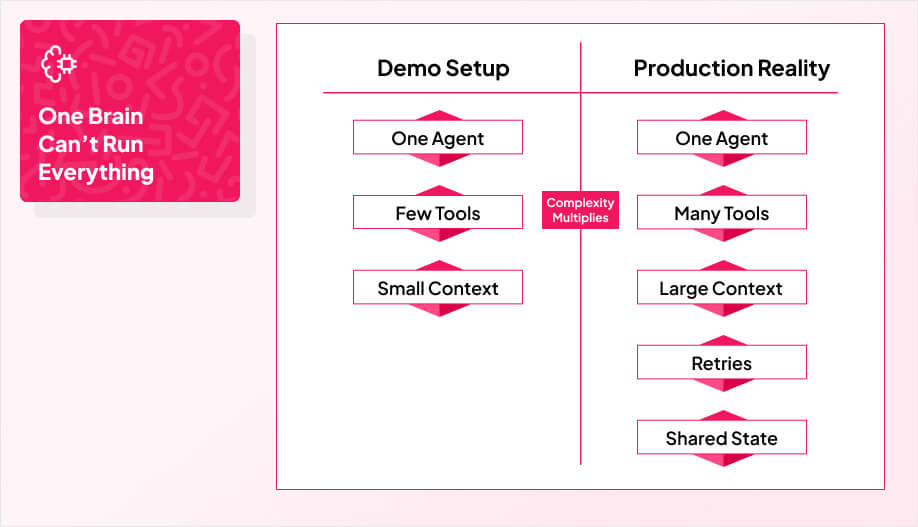
a simple side-by-side comparison with two columns labeled Demo Setup and Production Reality

Most agent systems don’t fail because the model is “bad.” They fail because the architecture assumes one brain can do everything. Interpret the request, fetch context, call tools, make decisions, handle edge cases, and still stay within time and cost limits. 

That works in a demo. In production, it turns into a tangled loop where one mistake contaminates everything that follows. Meaning, single-agent systems exhibit blind spots with applications involving multiple microservices and somehow, it can cause role confusion.

The typical breakdown looks like this: context gets bloated, the agent starts guessing, tool calls fan out, retries pile up, and nobody can tell which step caused the bad output. Debugging becomes painful because the “reasoning” is spread across prompts, hidden tool results, and side effects. If the agent also writes to shared state, you get a second problem: one wrong action can poison the next run.

That’s why chains and single agents hit a ceiling. A chain is great when the path is predictable. Agents become useful when the work is messy and conditional. But the moment you switch to agents, you need structure and this includes clear roles, explicit handoffs, and budgets that prevent runaway behavior. 

Otherwise you just traded a linear pipeline for chaos.

Core Principles That Make Agent Systems Scalable

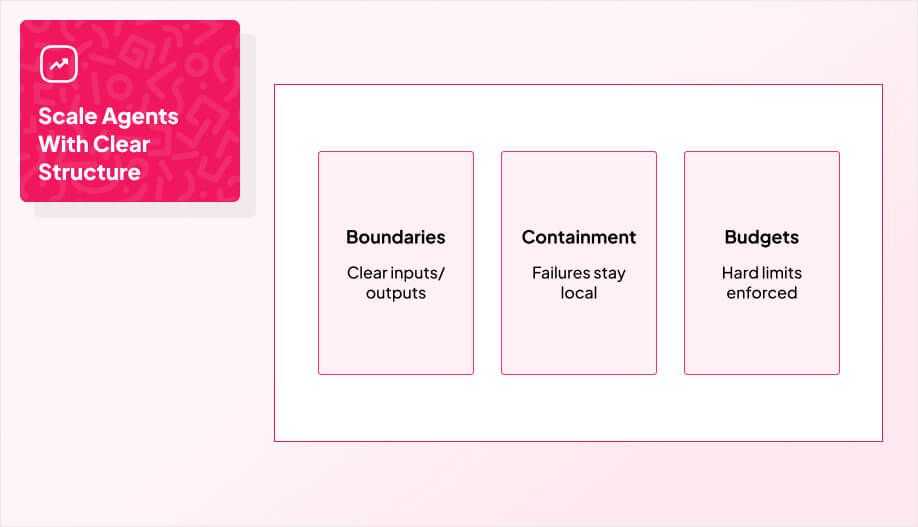
a three-card layout labeled Boundaries, Containment, Budgets

So, you fix it by stopping it from doing everything at once.

The clean way out is to break that monolithic agent into a coordinated fleet of specialized, domain-specific units. Now the system can evolve by swapping or improving individual pieces instead of forcing a full rebuild every time your use case changes.

As teams push automation deeper into the business, it’s common for the number of agents to grow into the dozens. That’s exactly why structure matters. Without it, more agents just means more chaos. With it, multi-agent setups distribute work cleanly, improve throughput, and make end-to-end workflows faster and more dependable.

To keep that fleet scalable, you need a few principles in place from the start: clear contracts and boundaries for each agent, containment so failures stay local, and hard budgets on tokens, tool calls, and latency so costs don’t spiral.

Boundaries and Contracts

Every agent needs a job description that can be written in one sentence. What inputs does it accept, what outputs does it produce, and what is it not allowed to do? 

Without contracts, agents start overlapping responsibilities, stepping on each other’s work, and producing outputs that are hard to validate. The more your system grows, the more this turns into silent failure where tasks get duplicated, results conflict, and the coordinator has no reliable way to judge which output to trust.

A good contract also makes replacement easy. If a worker agent is underperforming, you should be able to swap it out without rewriting the entire system. That only works when the interface is stable.

Failure Domains and Containment

Agent systems fail in ways that look fine until they cascade. One bad retrieval result can poison multiple steps. One broken tool integration can trigger retries that spiral. One “helpful” agent can keep calling tools to chase certainty it will never get. 

Containment means designing so failures stay local and this means, the planner fails without taking down execution, one worker fails without corrupting shared state, and the system can degrade gracefully instead of collapsing.

This is where strict timeouts, retry limits, and fallback paths matter. They aren’t “ops details.” They are part of the architecture.

Budgets You Enforce, Not Budgets You Hope For

If you don’t put hard limits around tokens, tool calls, and latency, you will eventually find out your real budget in production, and it will be ugly.

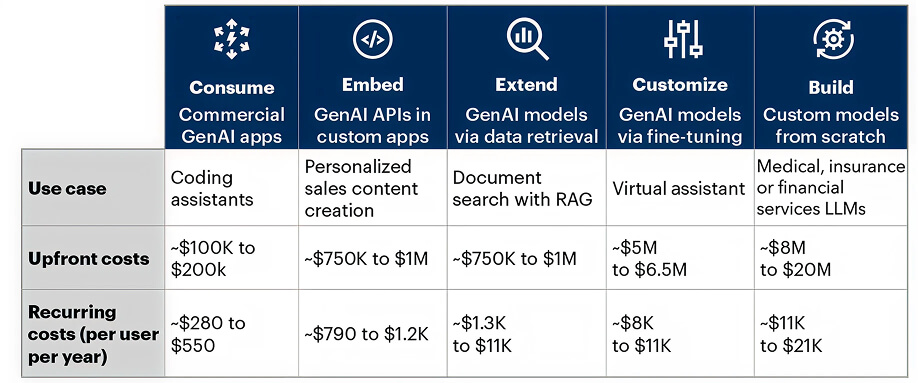
Cost blowups are a common reason agent initiatives get killed. Gartner predicts over 40% of agentic AI projects will be canceled by the end of 2027, citing escalating costs (alongside unclear business value and inadequate risk controls).
Costs Incurred in Different GenAI Deployment ApproachesGartner has made a similar call on GenAI overall, predicting at least 30% of GenAI projects will be abandoned after proof of concept by the end of 2025, with escalating costs listed as one of the drivers. 

In practice, this shows up as agents that keep retrying, looping, or over-calling tools and retrieval. One workflow bug can multiply calls per request, and you only notice after the bill spikes or systems start rate-limiting. Budgets should exist at multiple levels: per step, per agent, and per request. They should include explicit caps (max tool calls, max retries, max context size) and clear termination rules so the system knows when to stop.

The teams that scale agents successfully treat budgets like guardrails. They are enforced by code, visible in traces, and tied to rollback behavior when limits are hit.

Four Patterns for Scaling Agent Systems

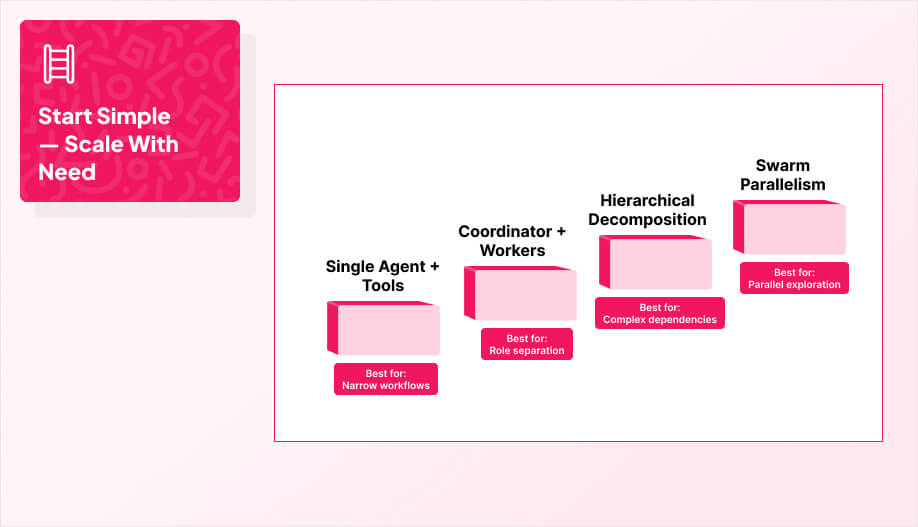
a 4-step ladder graphic labeled: Single Agent + Tools, Coordinator + Workers, Hierarchical Decomposition, Swarm Parallelism

Those principles are what keep agents from turning into a fragile black box. Next is how they show up in real architectures, there’s a progression that matches how messy the workflow is, how much reliability you need, and how many moving parts you’re willing to operate. 

Start as simple as you can, then climb the ladder only when the failure modes force you to.

Pattern 1: Single Agent With Tools
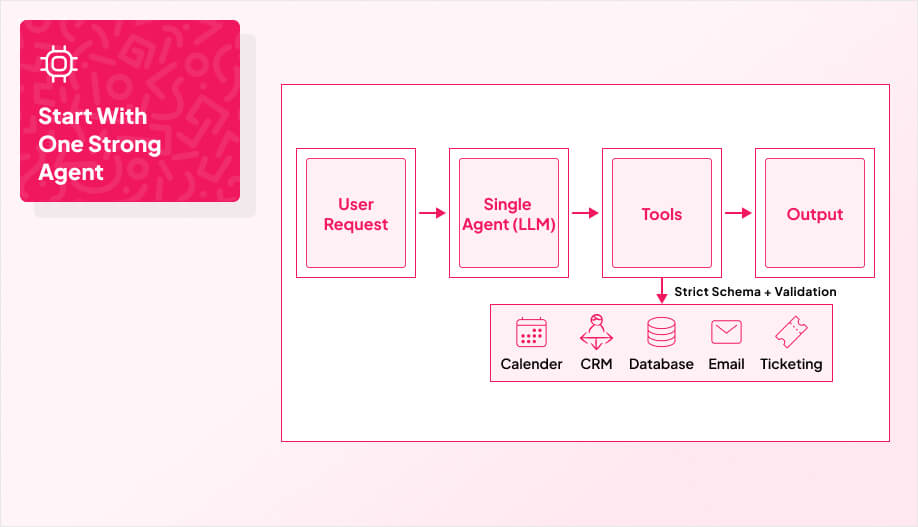
a simple flow diagram: User Request → Single Agent (LLM) → Tools (3–5 icons) → Output
Even though multi-agent systems get most of the attention, the most reliable production setups often start with Pattern 1: a single agent with tools. A strong architecture can outperform a “better” model if the system around it is controlled and predictable.

In this pattern, one LLM loop handles reasoning, planning, and execution by calling a small set of functions or APIs defined in a strict schema. You grow capability by adding tools, not by adding more agents. That’s why it works well for repetitive, bounded workflows like scheduling, triage, ticket updates, and follow-ups, and it’s also a practical way to run always-on support for routine questions without needing round-the-clock staff.

The upside is control. With one agent, you simplify debugging, policy enforcement, and context management. You also avoid the overhead and failure modes that come with inter-agent coordination. This is a good fit for linear, sequential workflows where you don’t need parallel exploration or complex handoffs.

To make it work in production, the tool layer has to be designed deliberately. Keep interfaces specific, validate parameters aggressively, and avoid “do-anything” tools. Model domain actions as concrete operations with clear intent. That reduces ambiguity for the model and keeps the system safer, more predictable, and easier to scale.

When To UseWhen Not To Use
The workflow is mostly linear and predictableThe workflow needs parallel work or complex handoffs
You can keep the tool set small and well-definedThe agent is juggling planning, retrieval, validation, and execution in one loop
You want faster shipping and simpler debuggingYou need strict separation of duties or independent failure domains
Wrong tool calls are low-risk and recoverableTool mistakes are costly or hard to detect
You can enforce schemas, validation, and limits easilyCosts and latency are already spiking due to retries, long context, or tool thrash


Pattern 2: The Central Coordinator

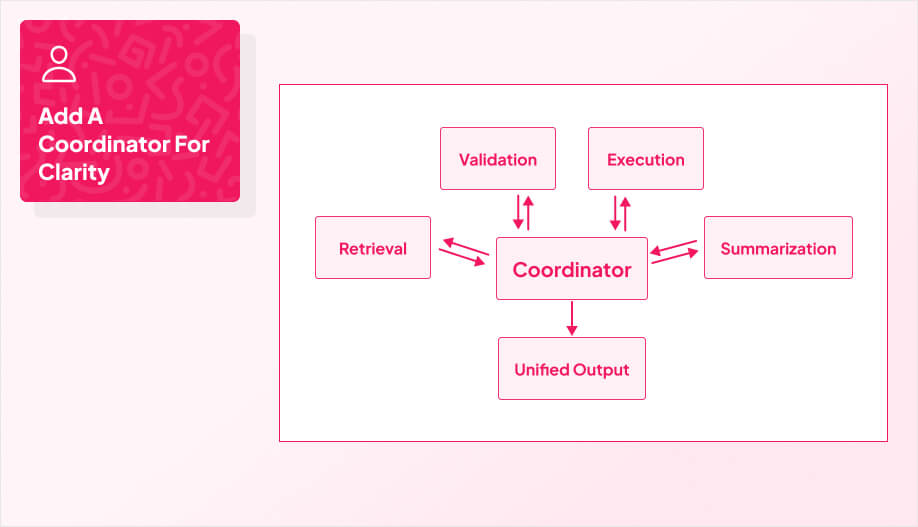
a hub-and-spoke diagram with a Coordinator box in the center connected to 4 worker boxes
You move to a central coordinator when a single agent starts carrying too much. Instead of one loop trying to reason, plan, retrieve, validate, and execute, the coordinator breaks the request into subtasks and routes them to specialized worker agents. 

Think of it as a “traffic controller” that keeps global oversight while workers handle focused jobs in parallel.

This structure reduces cognitive load on any one model and improves reliability because each worker operates inside a tighter scope. It also makes real-world integrations easier to manage. The coordinator can orchestrate calls into external services and legacy systems without turning the whole system into a tangled prompt. 

When workers return results, the coordinator aggregates them, resolves conflicts, and synthesizes a single unified output so the user experiences one coherent response, not a bundle of disconnected parts.

When To UseWhen Not To Use
Requests naturally break into roles (retrieve, validate, execute, summarize)You need the ability to swap or upgrade parts without rewiring everything
You need parallel work to reduce latency or improve throughputYou can’t define clear worker responsibilities and interfaces
You want cleaner debugging and traceability by agent roleYou don’t have routing rules or termination conditions yet
You rely on multiple external systems or legacy integrationsWorker outputs can’t be validated, causing conflicts and noise
You need the ability to swap or upgrade parts without rewiring everythingThe orchestration overhead will slow you down more than it helps


Pattern 3: Hierarchical Task Decomposition
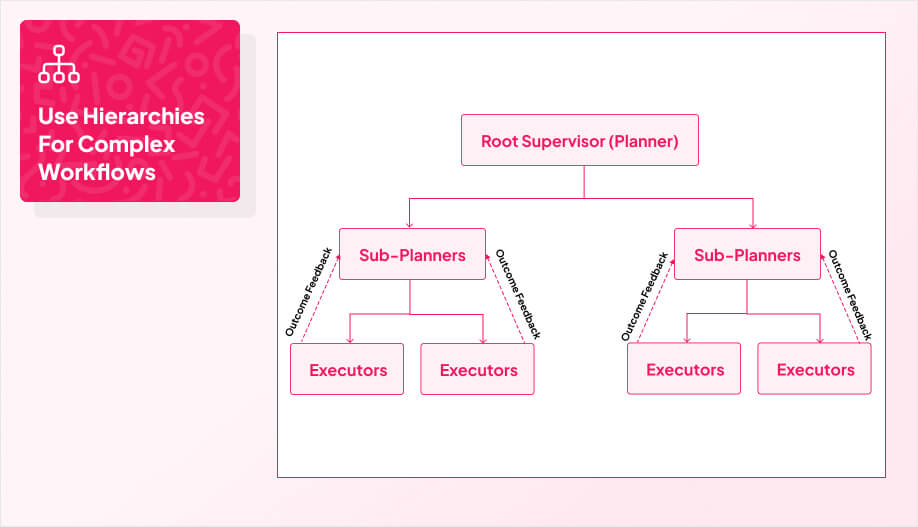
a tree diagram with a top box labeled Root Supervisor (Planner)
Single-agent loops can handle linear reasoning, but they struggle once the workflow becomes multi-step, multi-objective, and full of dependencies. That’s where a hierarchical structure starts to make sense. A root supervisor takes the high-level goal, interprets intent, and breaks the work into a structured set of sub-tasks that get delegated down to specialized layers. 

The key shift is separation of concerns where strategic planning stays at the top, execution happens below.

This approach also makes complex workflows survivable. Lower-level agents report outcomes back up the tree so the supervisor can adjust the plan in real time. Without that tiered structure, systems tend to fail in predictable ways: coordination stalls, top-level decision making becomes a bottleneck, and a single mistake can cascade through the entire workflow. Hierarchies also unlock dependency mapping, which is how you keep prerequisites in order and avoid doing steps in the wrong sequence.

The tradeoff is latency. Delegation layers add overhead, and the system can feel slower if you over-structure simple work. But when the workflow is truly complex, the hierarchy buys you operational clarity and modularity. You can update an execution layer or swap a specialized “sensor” agent without rewriting the planner that defines the strategy.

When To UseWhen Not To Use
The workflow has many steps with prerequisites and dependenciesThe task is mostly routing and can be handled by a coordinator + workers
You need separation between planning and executionLatency is extremely tight and planning overhead will hurt UX
You want checkpoints and re-planning based on outcomesYou don’t have clear task representations or dependency rules
You want checkpoints and re-planning based on outcomesYour team can’t maintain multiple layers and interfaces
You need modular upgrades over time (swap execution layers independently)Your team can’t maintain multiple layers and interfaces


Pattern 4: Collaborative Swarm Architectures
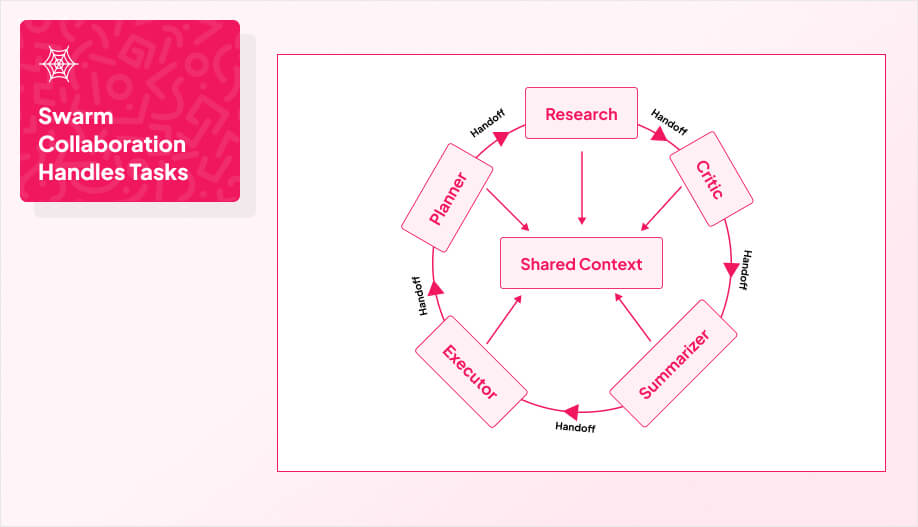
a peer-to-peer network diagram with 5 agent nodes in a circle labeled: Research, Critic, Planner, Executor, Summarizer
Hierarchies work well when the work can be planned top-down. They start to struggle when the problem needs debate, consensus, or nonlinear exploration, like comparing competing hypotheses, exploring many data paths, or iterating toward a better solution. 

That’s where a swarm pattern fits. Instead of a single coordinator calling the shots, control is decentralized. Agents operate as peers, each with a specific role, and they share a common context so they can “see” what the other agents have done and pick up work when their role is relevant.

The core idea is emergent collaboration. You do not hard-code a strict execution flow. You define distinct personas and allow lateral handoffs based on what the task needs as it evolves. The system stays adaptable because the best next step can come from any agent, not just a manager layer. 

This can also be paired with personalization logic so the system assigns the right agent based on observed behavior or segment needs, which helps keep outputs relevant as contexts shift.

Core ComponentTechnical FunctionSystem Impact
Shared ContextStores global message stateAgents access total history
Dynamic HandoffTransfers control laterallyRemoves managerial bottlenecks
Agent RegistryMaps metadata to skillsEnables hot-swapping logic

To make swarms workable, a few building blocks matter. You need shared context that all agents can read, a way for agents to hand off control laterally without waiting on a manager, and an agent registry so roles can be swapped or upgraded without changing the whole system. Many swarm-style frameworks implement this with a lightweight “client” layer that tracks agents, handoffs, and shared context variables.

When To UseWhen Not To Use
You need exploration, debate, or multiple perspectives to converge on an answerYou need strict determinism and a predictable step order
You need exploration, debate, or multiple perspectives to converge on an answerThe task is execution-heavy and mistakes are costly
The workflow benefits from lateral handoffs between specialistsYou cannot validate outputs well, so the swarm becomes noisy
Async execution matters and agents can work while waiting on responsesYou cannot validate outputs well, so the swarm becomes noisy
You have a clear stop condition for convergenceBudget predictability is critical and you can’t cap work tightly

How to Route, Hand Off, and Terminate Agent Work

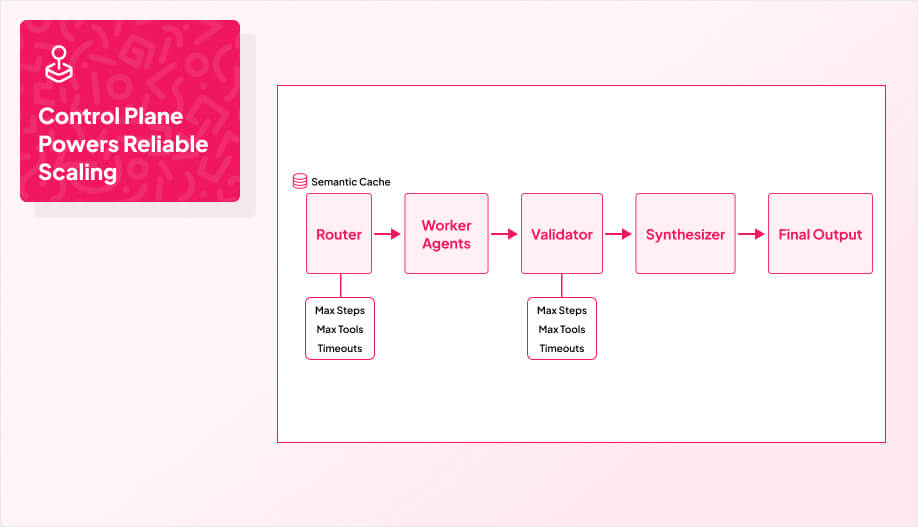
a flow diagram: Router → Worker Agents → Validator → Synthesizer → Final Output

Once you pick an architecture pattern, the next make-or-break layer is the control plane that routes work, enforces handoffs, and decides when the system is done. 

Scaling agents is mostly a routing problem. If the system can’t consistently pick the right worker, pass the right context, and stop at the right time, the architecture doesn’t matter. Good orchestration is what turns “multiple agents” into a system that behaves predictably.

In real builds, this is usually where teams get stuck. The model is “good enough,” but routing logic is brittle, handoffs are sloppy, and termination rules are missing, so costs creep and reliability drops. This is also one of the first things we pressure-test when helping teams ship AI agent systems, because once the control plane is solid, everything else gets easier to scale.

Routing Strategies

Start with the simplest router that works, then graduate only when it stops being reliable.

  • Rule-based routing works when intents are clear and stable (keywords, endpoints, deterministic flows). It’s fast, cheap, and debuggable. This approach utilizes pure code routing to deliver superior performance with complete control over the logic.
  • Semantic routing works when intents are fuzzy. You embed the request and route based on similarity to known task clusters.
  • LLM router works when requests are nuanced and classification logic is hard to hand-code. It can also route based on constraints like risk, confidence, and required tools.
  • Hybrid routing is what most production systems end up with: rules for the obvious cases, semantic for the gray area, and an LLM router as a last resort.

Handoffs and Contracts

Routing is useless if handoffs are sloppy. Every handoff should carry a contract: what the next agent is responsible for, what inputs it’s allowed to use, and what output format it must return. If you let agents “figure it out,” you get context bloat and inconsistent results.

A clean handoff includes:

  • A compact task instruction (one sentence).
  • The minimum required context (not the full transcript).
  • Tool permissions for that step.
  • Output schema and validation rules.

This is also where you enforce boundaries. A retrieval agent should not execute actions. An executor should not rewrite policies. The contract makes those violations visible.

Synthesis and Termination

Multi-agent systems break when they don’t know when to stop. You need explicit termination rules, not “keep going until you feel done.”

Synthesis should be owned by one component (coordinator/supervisor), and it should do three things:

  1. Aggregate outputs from workers.
  2. Resolve conflicts (choose, merge, or escalate).
  3. Produce a single final response in the required format.

Termination needs hard limits:

  • Max tool calls.
  • Max retries per step.
  • Max total steps.
  • Timeouts per agent.
  • “Stop conditions” (confidence threshold met, required fields filled, validation passed).

If termination is fuzzy, costs spike and quality gets worse because the system keeps generating new guesses instead of converging.

Caching (Optimization, Not Architecture)

Caching doesn’t fix bad routing, but it can make a good system cheaper and faster.

  • Semantic caching reuses prior answers for similar requests, which reduces repeated model calls.
  • Tool result caching avoids re-hitting the same external APIs when inputs didn’t change.
  • Retrieval caching stores top-k results for common queries, reducing vector search and token stuffing.

Caching works best when your requests repeat and your data doesn’t change every minute. If the underlying knowledge is dynamic, you need TTLs and invalidation rules so you don’t serve stale answers.

Operating Agent Systems in Production

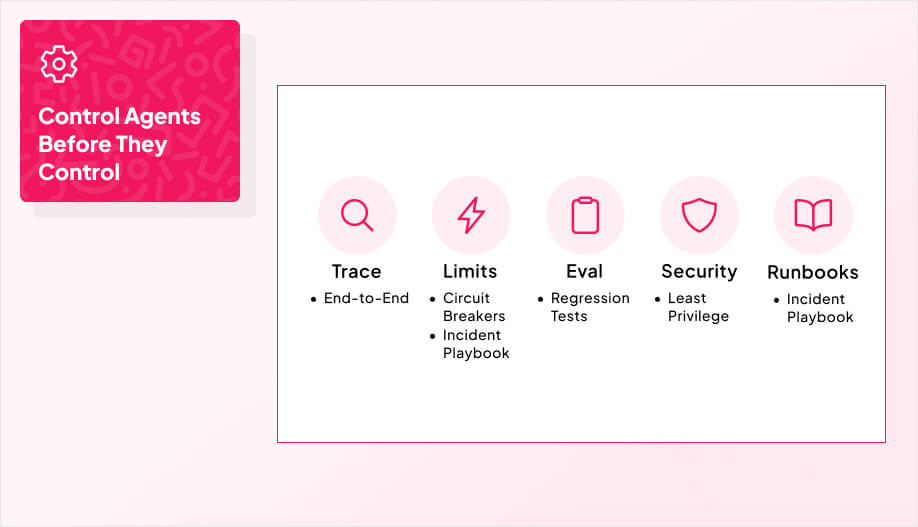
a 5-icon row labeled Trace, Limits, Eval, Security, Runbooks

Once you have multiple agents in play, the real system is no longer the prompt. 

It’s the operations layer that tells you what happened, stops damage fast, and keeps quality from drifting as the product evolves.

Observability

If you can’t trace a request end-to-end, you can’t scale. 

At minimum, you need a unified trace that shows: which agent was invoked, what it was asked to do, what tools it called, what it returned, how long each step took, and what version of the system ran. Log structured events, not raw text dumps, so you can slice by agent, tool, customer segment, failure type, cost, and latency. 

Treat token usage and tool-call counts as first-class metrics, because “it works” isn’t useful if the bill triples.

Circuit Breakers

Circuit breakers are how you keep an agent system from burning money or corrupting workflows when it goes sideways. Put hard limits on time, steps, retries, tool calls, and spend per request. Add stop conditions that terminate early when confidence is low or validation fails. 

For action-taking agents, enforce approval gates for high-risk actions and a kill switch that can disable tool execution without taking down the entire product. The point is not perfection. It’s containment.

Evaluation Loops

Agents degrade quietly unless you measure them. Build evaluation into the lifecycle that includes offline tests before release, canary tests in production, and ongoing sampling after launch. 

Score outputs against the behaviors you care about (accuracy, policy compliance, grounding, tool correctness, latency, cost). Track regressions per agent and per route, not just “system quality,” so you can pinpoint what changed. 

When you ship prompt updates, routing updates, or tool updates, treat them like releases and require an evaluation pass.

Security and Compliance

Agent systems expand your attack surface because they ingest more context and interact with more systems. 

Lock down permissions with least privilege, isolate secrets, and validate tool inputs and outputs. Assume prompt injection and data exfiltration attempts will happen, especially if the agent can read untrusted content or follow links. Keep audit logs for tool actions and sensitive retrieval, and implement retention rules so logs don’t become a liability. 

If you use third-party models, treat vendor transparency and change notices as part of your risk model.

Runbooks

Runbooks are what keep incidents from turning into chaos. Define what “bad behavior” looks like (looping, repeated tool failures, hallucination spikes, cost anomalies, latency spikes), who gets paged, and what the first mitigation steps are. 

Document rollback paths, feature-flag toggles, and safe-mode behavior. After incidents, write the postmortem and add a guardrail or test so the same failure doesn’t return quietly.

This is the layer most teams underestimate, and it’s why “agent demos” die in production. 

For teams shipping agent features inside consumer or enterprise apps, these controls matter even more. Mobile release cycles, offline states, and device-to-cloud latency make failures feel immediate to users.

That’s why our mobile app development work often pairs agent builds with the same production-grade monitoring, guardrails, and rollback paths you’d expect from any core app feature, not an experiment.

Daniel Haiem

Daniel Haiem

Daniel Haiem has been in tech for over a decade now. He started AppMakersLA, one of the top development agencies in the US, where he’s helped hundreds of startups and companies bring their vision alive. He also serves as advisor and board member for multiple tech companies ranging from pre-seed to Series C.

Ready to Develop Your App?

Partner with App Makers LA and turn your vision into reality.
Contact us

Frequently Asked Questions (FAQ)

Start with 2–4: one router/coordinator and a couple of specialists (like retrieval and execution). If you can’t trace, budget, and stop that setup cleanly, adding more agents just multiplies confusion.

You’ll see repeated retries, long-running tool loops, rising token/tool costs, and inconsistent outputs for the same request. If debugging takes longer than building, that’s usually your signal the system needs clearer contracts, tighter routing, or stronger termination rules.

Build a small suite of “known bad” scenarios: prompt injection attempts, missing data, tool timeouts, and conflicting worker outputs. Then run them on every change to prompts, routing logic, tools, or memory so regressions show up immediately.

For anything that affects money, permissions, user data, or external systems, default to approval gates. Once you’ve proven reliability with logging and runbooks, you can gradually automate low-risk actions with tight limits and a kill switch.

Keep memory scoped (per user, per org, per project), sanitize what gets stored, and log retrieval access separately from normal app logs. If the agent can read untrusted content, assume prompt injection is coming and enforce strict tool permissions and content filtering.

See more
Chevron-1

Build the Control Plane First

Most “scaling problems” in agent systems are really control problems. If routing is fuzzy, contracts are loose, and termination is optional, the architecture won’t hold up no matter how good the model is. The fastest path to a scalable system is to start with a small set of specialists, wire in tracing and budgets from day one, and prove you can stop the system safely when it’s wrong.

Once that control plane is stable, scaling becomes a choice instead of a gamble. You can climb the pattern ladder deliberately, add memory or retrieval without leaking data, and expand automation while keeping humans in the loop where it matters.

If you’re planning to ship agents inside a real product and want help building a production-ready architecture, AppMakers USA can help.


Exploring Our App Development Services?

Share Your Project Details!

Vector-60
We respond promptly, typically within 30 minutes!
Tick-4
  We’ll hop on a call and hear out your idea, protected by our NDA.
Tick-4
  We’ll provide a free quote + our thoughts on the best approach for you.
Tick-4
  Even if we don’t work together, feel free to consider us a free technical
  resource to bounce your thoughts/questions off of.
Alternatively, contact us via phone +1 310 388 6435 or email [email protected].
    Copyright © 2026 AppMakers. All Rights Reserved
    Follow us on socials:
    linkedin facebook pinterest youtube rss twitter instagram facebook-blank rss-blank linkedin-blank pinterest youtube twitter instagram