An app launch checklist for a Chinese company entering the US starts with company paperwork, because Apple and Google check it against your Dun & Bradstreet record. Both stores verify the legal entity behind each organization account, show its name to American users and pay out only to it. Settle the name, the D-U-N-S Number and the account roles first, because every later step is checked against them.
Here is the order we run on the app side, checked against what Apple and Google publish as of October 2026.
What is the app launch checklist for a Chinese company, in order?
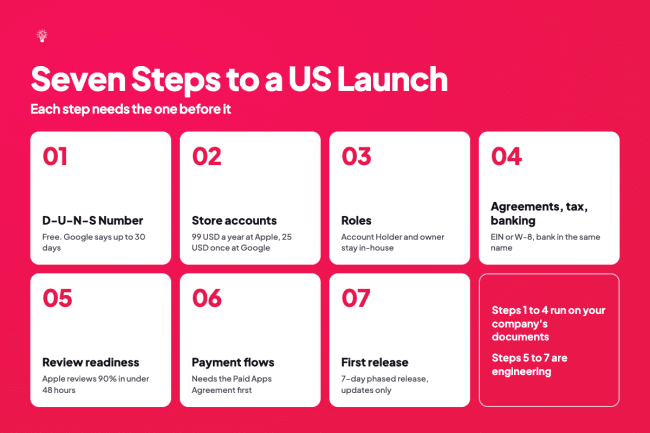
The checklist has seven steps, in this order: the D-U-N-S Number, the store accounts, the roles, agreements with tax and banking, review readiness, payment flows and the first release. Each step needs the one before it, starting with the D-U-N-S Number that both stores use to confirm your company exists.
| Step | Who acts | Needs first | Published cost or wait |
| 1. D-U-N-S Number | Your company, with Dun & Bradstreet | Exact legal name and address | Free. Apple: up to 5 business days plus up to 2. Google: up to 30 days |
| 2. Apple and Google organization accounts | A person who can sign for your company | D-U-N-S Number, company website, work email | 99 USD a year (Apple), 25 USD once (Google) |
| 3. Roles | Apple Account Holder, Google account owner | Open accounts | None |
| 4. Agreements, tax and banking | Account Holder signs, Admin or Finance enters the rest | EIN or a W-8 form, a bank account in the same company name | None published |
| 5. US review readiness | Your app team | SDK list, privacy policy, demo login | Apple reviews 90% of submissions in under 48 hours |
| 6. Payment flows | Your app and finance teams | Active Paid Apps Agreement and payments profile | None published |
| 7. First release | Your app team | TestFlight and Play testing builds | 7-day phased release, updates only |
Steps 1 to 4 run on documents only your company can produce. Steps 5 to 7 are engineering, and that is where AppMakers USA's iOS development and Android app development teams do most of the work, adapting the build, the privacy disclosures and the payment code to US store rules. A few of the documents in steps 1 to 4 have to come from people outside the app team.
What the app side needs from your lawyers and accountants

Before step 1, the app team needs seven items that only your company and its advisers can supply. AppMakers USA's mobile app development team adapts and ships apps for the US market. It does not form companies, apply for EINs or open bank accounts. Those stay with your lawyers and accountants. They also decide which company holds the store accounts, a new US company or your existing parent.
Google Play, for example, supports developer and merchant registration for companies in mainland China, so a US company is a choice your advisers make for banking, payments and contracts. It is not a Google Play requirement.
Whichever company they pick, these are the seven items:
- The company's exact legal name, spelled the same way on every form. Apple does not accept DBAs, trade names or branches.
- The legal address. Google requires the name and address on your payments profile to match your Dun & Bradstreet record, and the profile does not accept PO boxes.
- The D-U-N-S Number, or approval to request one.
- The tax identity. Apple asks a US-based company for a W-9 with its EIN and steers a company outside the US to a W-8 form.
- A business bank account in that same company's name. Apple asks for the bank account number of the legal entity enrolled in its program.
- A person with legal authority to sign for the company.
- A public website on the company's own domain, and a work email address on that domain.
One choice is hard to undo. Google says you can't change your business location country on a payments profile, and both stores show the company's legal name to buyers. Settle which company is the seller with your advisers before anyone opens an account, because the D-U-N-S Number has to match that company.
Step 1. Get a D-U-N-S Number in the exact legal name
A D-U-N-S Number is the company identifier Dun & Bradstreet assigns, and Apple uses it to check your organization's identity and legal entity status. Google Play requires one for organization accounts. Dun & Bradstreet issues it free. Apple says D&B may already have assigned your company a number, and its lookup tool lets you check before you apply (Apple D-U-N-S help).
Plan ahead. Apple tells you to allow up to 5 business days to get the number from D&B, plus up to 2 business days for Apple to receive it. Expediting does not shorten that wait (Apple D-U-N-S help). Google says the process can take up to 30 days, and it warns about third parties that charge fees for this free registration. Request the number well before you plan to open accounts.
The trap is spelling. A Chinese company name can be written in English more than one way, and the suffix can appear as "Co., Ltd." on one form and "Limited" on another. Fixing a D&B record means emailing D&B, then waiting up to two more business days for Apple to see the change (Apple D-U-N-S help). Agree on one English spelling of the legal name, suffix included, before you request the number. Then use it on every form that follows. With the number in hand, your company can open its own developer accounts.
Step 2. Open Apple and Google accounts that your company owns
An organization developer account is a store account held by your legal entity, and it makes your company the seller of record. Apple states that the organization's name is listed as the seller when it distributes apps on the App Store.
Apple Developer Program
Apple charges 99 USD per membership year, and prices may vary by region. The person who enrolls becomes the Account Holder and must have legal authority to bind your company. Apple accepts an owner or founder, an executive team member, a senior project lead, or an employee given that authority by a senior employee (Apple enrollment help).
Apple also wants a work email address on your organization's domain and a public, working website on a domain your organization owns. It rejects links to social media pages and sites with minimal content, and it may ask for notarized copies of business documents (Apple enrollment help). If your company's online presence at home lives on a social account or a mini program, build a real website on a domain your company owns before you enroll.
Google Play Console
Google charges a one-time 25 USD registration fee. An organization account needs a D-U-N-S Number, plus the name and address from its linked payments profile, a phone number and a website. The contact email and phone are verified with one-time passwords. Google displays your legal name, legal address, developer email address and developer phone number on Google Play, so American users will see that address.
Register as an organization. Google requires personal accounts created after November 13, 2023 to run a closed test with at least 12 testers for 14 continuous days before they can apply for production access. Its published rule names personal accounts only. Google is also tightening developer identity checks.
In Brazil, Indonesia, Singapore and Thailand, certified devices running Android 7 or later now install apps from Google Play and six other participating stores only when the app is registered to a verified developer. That rule took effect September 30, 2026, and Google plans to take it global in 2027 (Android developer verification). Play developers also had to register their remaining Play apps by September 30, 2026 to avoid global removal from Google Play.
Why the accounts must belong to you and not to your agency
Apple's developer agreement settles this. A note under section 1.2 says apps a contractor builds for you must be owned by you and submitted under your own developer account. Section 2.9 says you may not use a service provider to submit an app to the App Store on your behalf (Apple Developer Program License Agreement).
Apple's enrollment help says the organization adds the contract developer to its team and "must be the one to submit the app for review" (Apple enrollment help). Guideline 5.2.1 points the same way. It says apps should be submitted by the person or legal entity that owns or has licensed the rights (App Review Guidelines).
That is the structure AppMakers USA works in. Your company owns its Apple and Google accounts, and our engineers work inside them as members of your team. We ruled out two alternatives. Publishing your app under our account would break Apple's agreement. Renting a slot from a publish-for-you service puts your app inside an account you do not control, so that account's risk becomes yours.
Apple reports that it terminated 193,000 developer accounts over fraud concerns in 2025. Google Play states that when it terminates a developer account, any related developer accounts are also permanently suspended.
Owning the account does not protect it from enforcement. It does make your company the party Apple and Google deal with, and it keeps the apps, the reviews and the payouts in your name.
Once the accounts exist, the next decision is who inside them can do what.
Step 3. Assign roles so your company keeps control
Roles decide who can sign agreements, change bank details and push builds, so set them before any outside engineer joins. On Apple, the Account Holder accepts legal agreements, renews the membership, adds the first Admins and approves banking changes (Apple roles help).
Admin, App Manager, Developer, Finance, Marketing, Sales and Customer Support roles cover everyone else. An App Manager can create app records, upload builds, submit apps and manage in-app purchases and TestFlight.
On Google Play, the account owner is the first account registered in Play Console. It is the only user who can link a payments profile to sell paid apps, and the only one who can edit the Payments settings page (Play Console users and permissions). Admin permission includes every other permission. Other permissions can apply to the whole account or to a single app.
Two rules follow from this:
- The Apple Account Holder and the Google account owner should be people at your company, signed in with company email addresses. If an agency registers the Play Console account, the agency's Google account becomes the owner, and the payments profile goes with it.
- Give an outside team the narrowest role that lets it ship, such as App Manager or Developer on Apple and app-level permissions on Google. When the engagement ends, you remove those users and keep publishing.
Once roles are set, the Account Holder can sign the Paid Apps Agreement, which opens step 4.
Step 4. Finish agreements, tax and banking inside the consoles
To sell and get paid, the company that owns the accounts signs the paid-app terms, files a US tax form and adds a bank account in its own name. Each store runs these steps in its own order.
In App Store Connect
- The Account Holder signs the Paid Apps Agreement. Apple says you can't create a new app or in-app purchase until you have agreed to the most recent version.
- The Account Holder, an Admin or a Finance user completes the US tax form. A US-based company gets a W-9 with its EIN. A company based outside the US answers a set of questions that point it to a W-8BEN, W-8BEN-E or W-8ECI (Apple tax help). Apple requires the agreement before the tax forms.
- The same roles add banking. Apple asks for the account of the legal entity enrolled in the program, entered exactly as it appears at the bank, and it processes banking only after the required tax forms are in (Apple banking help).
In Play Console
The payments profile carries your legal business name, which customers see on receipts, and a legal business address. It links to Play Console automatically once you create it. Tax details go into the same profile. A US corporation or LLC enters its EIN and the exact name registered with the IRS, and a company outside the US submits a certificate of foreign status (Play merchant tax help).
Do all of this the week the accounts open, not the week before launch. Each form asks for an EIN, foreign-status details or bank data that your accountants hold, and Apple will not process banking until tax is done, so one missing document stalls the whole chain. Ask your accountant which tax form applies before anyone opens the questionnaire. With money able to move, the app itself has to clear US review.
Step 5. What does US app review check before a Chinese app goes live?
US review checks four areas: privacy disclosures, login and account deletion, age ratings, and how a reviewer reads your product. Each one deserves a fresh look on a build made first for another market. We cover the code-side causes of rejection in our post on why apps keep failing App Store review. The account and policy side is below.
Privacy labels and the Data safety form
Apple requires privacy details in App Store Connect to submit new apps and updates. They cover your own data practices and those of third-party partners whose code sits in your app, such as analytics tools, ad networks and SDKs, and you must update them when your practices change.
If your app includes an SDK on Apple's list of commonly used third-party SDKs, Apple requires that SDK's privacy manifest, plus a signature when it ships as a binary dependency. Since May 1, 2024, uploads also need approved reasons for listed APIs, including APIs called by SDKs.
Google requires the Data safety form for any app on a closed, open or production track, and it must reflect data collected by third-party libraries and SDKs. Google says you alone are responsible for complete and accurate declarations.
So the work starts with an SDK list. Every analytics, push, payment, ad and login SDK in the build goes on it, with the data it collects and where that data goes. The Apple labels, the Google form and your privacy policy are then written from the same list, so all three say the same thing.
Login and account deletion
Apple's guideline 4.8 names WeChat Login. An app that uses a third-party or social login, WeChat Login included, to set up or sign in to the user's primary account must also offer an equivalent login option. That option must limit data collection to name and email, let users keep their email address private, and not collect app interactions for advertising without consent (App Review Guidelines).
An app that only uses your company's own sign-in system does not need it.
Account creation brings account deletion. Apple requires apps that support account creation to offer account deletion within the app under guideline 5.1.1(v). Google Play requires an in-app path and a web link where users can ask to delete their account and its data, and you declare both in the Data safety form.
Reviewers also need a way in. Under guideline 2.1, Apple asks for demo account details, with your back end turned on, if the app has a login (App Review Guidelines). Google asks for sign-in details when any part of the app sits behind a login, and its form has a field for unusual methods such as one-time passwords.
That field is where a phone-code login gets explained.
Age ratings and US age-assurance laws
Both stores make you rate the app. Apple added 13+, 16+ and 18+ to its 4+ and 9+ ratings, plus new required questions whose answers were due by January 31, 2026 for apps already on the store. Apple also says developers must consider how AI assistants and chatbot features affect how often sensitive content appears in the app (Apple developer news).
Guideline 2.3.6 tells you to answer those questions honestly. Google Play requires an IARC content rating questionnaire for each new app and removes apps that have no rating.
State law adds a second layer. Texas's app store age law has been enforceable since June 2026 while a court challenge continues, and Apple applies it to new Apple Accounts in Texas from June 4, 2026 (Apple developer news). Alabama's law starts January 1, 2027 for new accounts, Utah's May 6, 2027, and Louisiana's July 1, 2027. Also from January 1, 2027, California will require operating systems and app stores to pass apps an age-range signal.
Apple's Declared Age Range API and Google Play's Age Signals API pass that age information to apps. Apple's age-assurance guidance says that in regions where the law requires it, you must check the age of the people using your app. If minors can download your app in Texas, plan for the app to read those signals.
Talk to a US lawyer about how each law applies to you.
How a reviewer reads your app
An app can meet every written rule and still stall on how a reviewer reads it. A couples date-planning app we shipped, milder than many apps in its category, went through a long run of rejections and escalations with Apple. Reviewers flagged the logo. Then they raised user-generated content concerns about content the app never shared publicly, and asked for blocking and reporting features.
Approval took several appeals, calls with Apple and changes to how the product was presented.
Since then, our team checks store-policy risk during product discovery instead of leaving it to release week. For an app built first for users in China, make that check before the US adaptation starts, while the logo, the wording and any user content features are still easy to change. Once the app can pass review, decide how Americans will pay you.
Step 6. Set up payment flows that work for US users
Digital features unlocked inside an iOS app use Apple's in-app purchase under guideline 3.1.1. The US storefront is the exception on links. Apple's guidelines say developers need no entitlement to include buttons, external links or other calls to action toward other purchase methods in their United States storefront apps (guideline 3.1.1(a)).
Google says it will not require Google Play Billing for apps serving US users on phones and tablets, under a court injunction in its case with Epic Games. Its alternative billing and external content links programs launched December 9, 2025. Developers in both programs were due to start reporting transactions and paying service fees on October 1, 2026. On September 17, 2026, Google moved that date to December 1, 2026 for the external content links program.
A March 2026 settlement with Epic may change these rules again, so check that page before you choose a path.
That leaves two US paths, store billing or a web checkout reached from the app. US subscription law can reach either path.
- Store billing adds the store's own subscription rules. Apple's guideline 3.1.2 requires a subscription to provide ongoing value and to describe what the user gets for the price before they subscribe (App Review Guidelines). Google Play requires trial screens to state the trial length, the price afterward and how to cancel (Play subscriptions policy). Our guide on how to create a subscription in-app purchase for iOS walks through the App Store Connect side.
- A web checkout puts sign-up, billing and cancellation in your own code. In September 2025, Amazon agreed to pay 2.5 billion USD to settle FTC charges under the FTC Act and the Restore Online Shoppers' Confidence Act. It must now disclose cost, billing dates, auto-renewal and cancellation terms at sign-up, and let people cancel the same way they joined. New York's auto-renewal law also requires cancellation in the same medium as sign-up. Talk to a US lawyer before you move subscriptions to the web.
Whichever path you take, test the purchase code against both stores' sandboxes before the first submission. On a real-time social map app we built, we found that the purchase library can report success before the store connection is ready to finish the transaction. The store then keeps re-delivering the purchase on every cold start, and users feel double-charged.
Separately, on Google Play, purchases not acknowledged within three days are refunded automatically and the entitlement is revoked. Once purchases pass in both stores' sandboxes, the build is ready for release testing.
Step 7. Ship the first release, then stage the updates
The first release of a new app goes to every user in the countries you choose. On both stores, version 1.0 is a hard launch in those countries, so testing is the only check before real users see it. Check the build requirements first, because they block the upload itself.
Build requirements that block uploads
- Since April 28, 2026, Apple requires uploads to be built with Xcode 26 or later using the iOS 26 SDK. Since September 9, 2026, iOS and iPadOS apps must also target iOS 13 or later (Apple upcoming requirements).
- Since August 31, 2026, new apps and app updates on Google Play must target Android 16 (API level 36), with extensions available to November 1, 2026.
- On Google Play, apps targeting Android 15 and higher must support 16 KB memory page sizes on 64-bit devices, and from February 1, 2027, updates that don't cannot be released (Android page sizes guide). Apps with native code, including native libraries pulled in through SDKs, are the ones that need work.
On a React Native assessment app we built for a client, the 16 KB check surfaced late in Android release prep, and older native dependencies made it slow to fix. On the same app, TestFlight builds crashed at runtime in ways the simulator never reproduced. Neither problem showed up in day-to-day development. Both surfaced only once builds went through the store pipelines.
Apple's guideline 2.1 asks you to test on-device before you submit, and on this app the simulator was not enough.
Test with US accounts before day one
TestFlight takes up to 100 internal testers and up to 10,000 external testers. The first build you send to an external group goes to App Review, and each build stays testable for 90 days. Google Play offers internal testing for up to 100 testers, closed testing through email lists or Google Groups, and open testing that is visible on Google Play.
Recruit testers who use US accounts. Apple says a customer's Apple Account country or region determines which App Store they buy from, so a team testing on China accounts sees a different storefront than your American users will. The same help page lets you make the app available in specific countries or regions out of 175, which is how you keep the first release to the US.
Stage every update after 1.0
Neither store stages a brand-new app. Google says staged rollouts "can only be used for app updates, not when publishing an app for the first time", and you can halt one if something breaks. Apple offers phased release when you submit a version update. It rolls out over 7 days to 1, 2, 5, 10, 20, 50 and 100 percent of users with automatic updates, and you can pause it for up to 30 days in total (Apple phased release help).
Plan a small follow-up version for the first week, because it is the first build that can use both controls. On Echo Journal, the voice journaling app we own and run, recording-related bugs were hard to reproduce consistently, and small features touched several parts of the app at once. The lesson our PM took from it was the value of phased releases, strict separation of staging and production builds, and QA time built into the schedule. The same habit applies to upkeep.
We moved Echo Journal from Expo SDK 45 to 54 one version at a time, because each step surfaced small compatibility issues that were easy to isolate. If you want a quieter start in a few markets first, our post on the soft launch covers that route.


