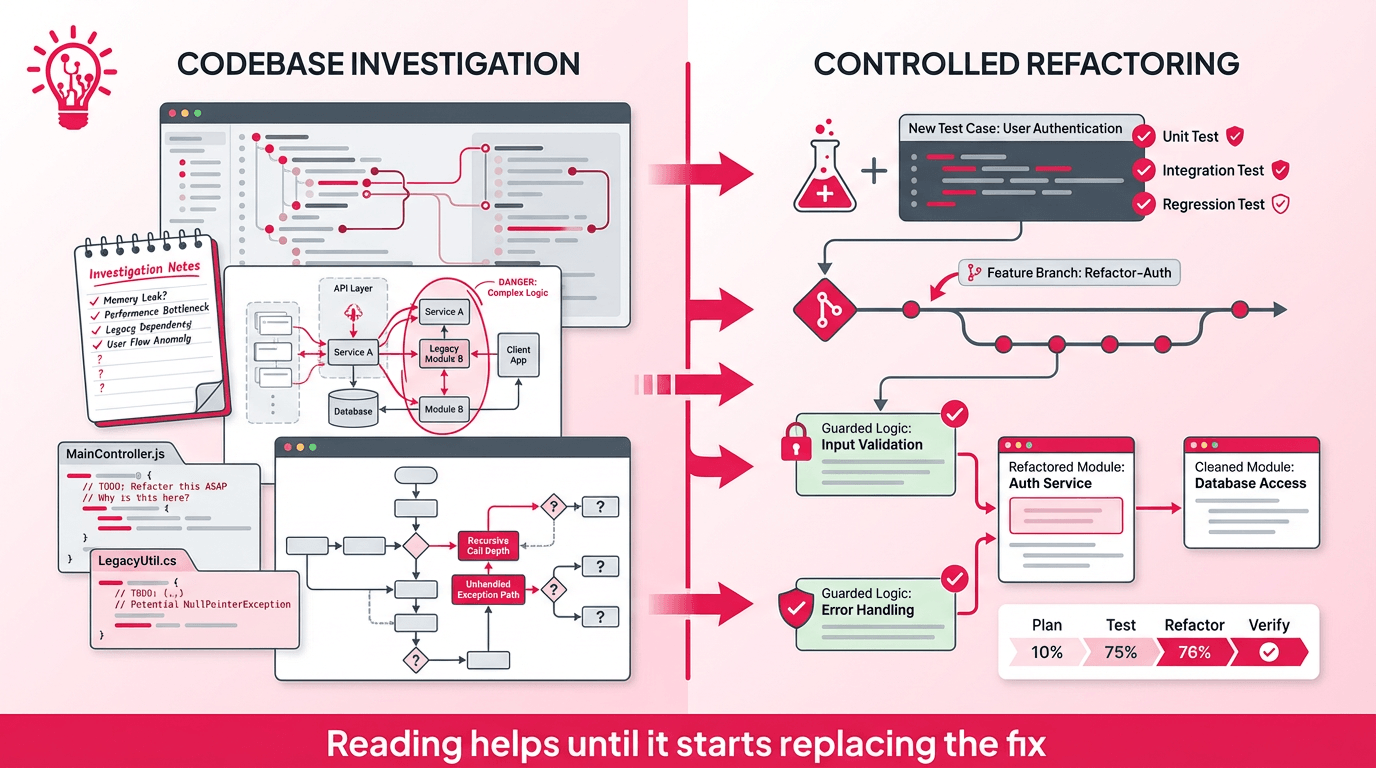
How senior engineers read a codebase is usually misunderstood. From the outside, it can look like great engineers just open a messy legacy app and somehow know where everything is. That is not what happens.
The first few hours in an unfamiliar codebase are where bad assumptions get made, time gets wasted, and expensive mistakes start. Read too narrowly and you miss the real failure point. Read too broadly and you burn days without learning what actually matters. The difference is having a method, and in this article, we will explore the methodology that AppMakers USA follows before we fix your app.
This process is what keeps a rescue project from turning into another source of damage.
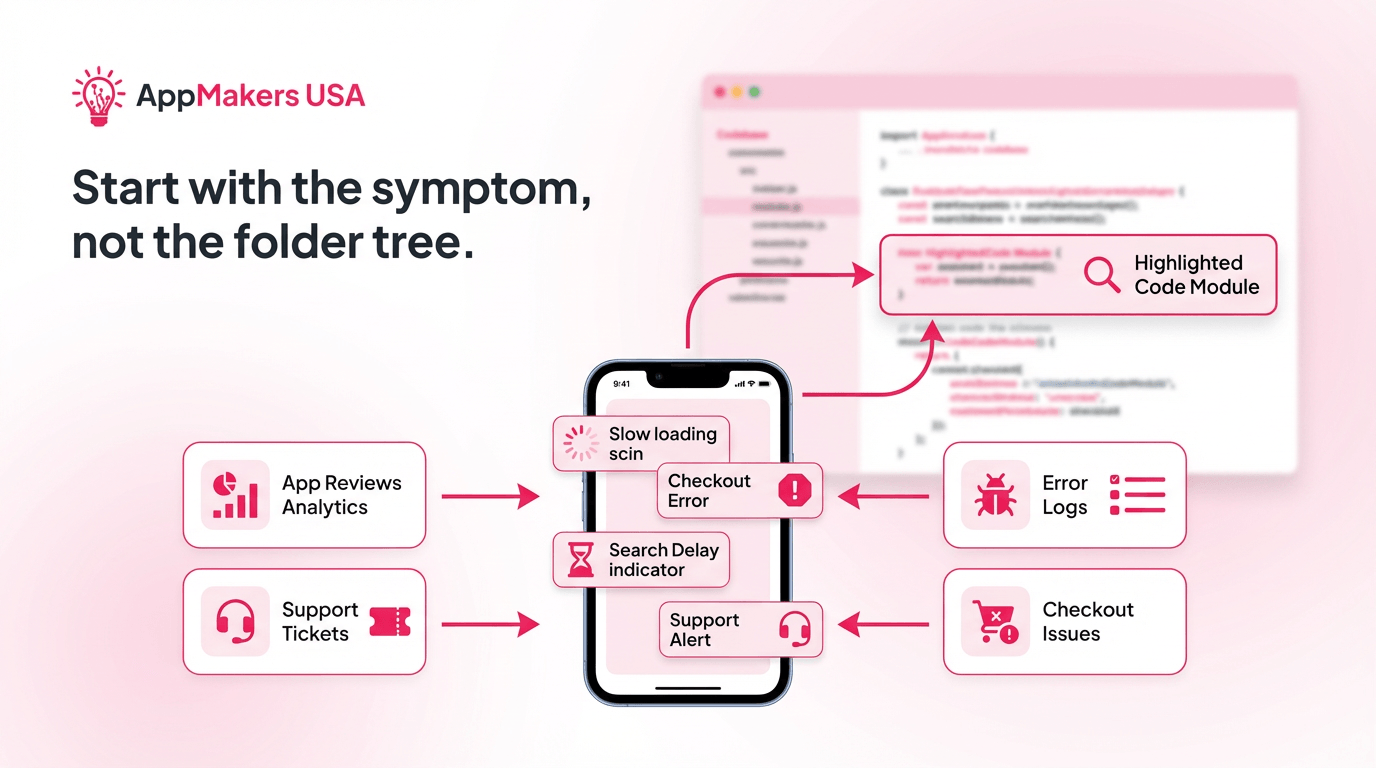
Before a senior engineer opens an unfamiliar legacy codebase, the smarter move is to start with the symptoms the app is showing in the real world.
Where is it slow? Where do users get stuck? Which screens generate support tickets? Where is revenue leaking?
Those are better entry points than wandering through folders and hoping the right file jumps out.
That means talking to support, product, or sales, then checking reviews, analytics, and error logs for patterns. You’re not hunting for clever code yet because you are still defining measurable pain. The goal is to turn this messy pain into specific, testable statements like checkout fails on certain devices, search takes too long on high-traffic pages, and onboarding drops off after one step.
Once the symptom is concrete, the code reading has a target.
This is what keeps engineers out of rabbit holes. Instead of reading everything, you start reading with a business reason. The work becomes more disciplined because you are tracing real user pain, not abstract technical curiosity. That usually leads to better fixes and fewer wasted hours, especially when the system is large and the context is thin.
The first pass through an unfamiliar codebase should be fast on purpose.
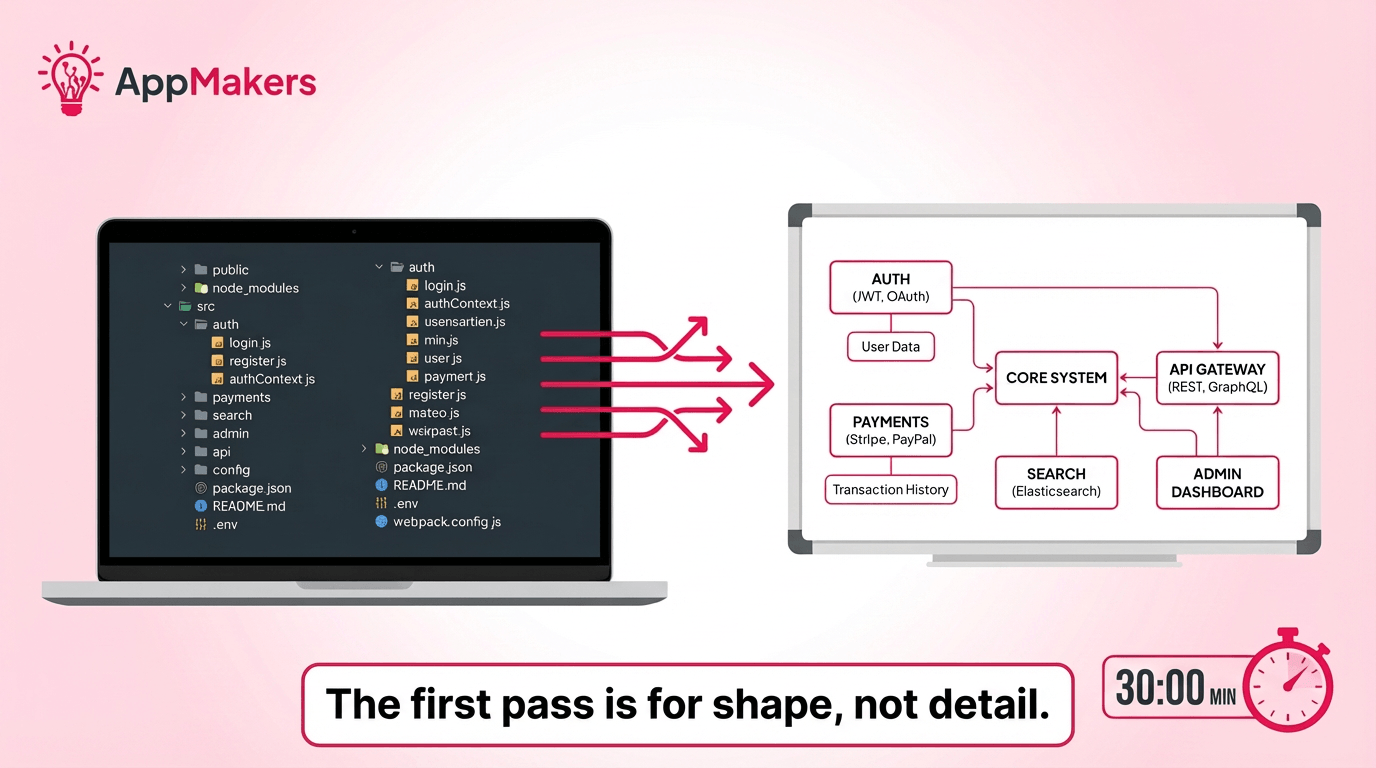
Give yourself about 30 minutes to sketch the shape of the system instead of diving line by line. You want to build a working mental map before the details start pulling you in, instead of finding the bug first.
Start with the top-level structure. Look at the main folders, modules, and domain boundaries such as auth, payments, search, admin, or messaging. Then scan the package manifests, environment files, and configuration layers to see which frameworks, build tools, and integrations are in play. That first sweep usually tells you where the age, complexity, and risk are likely hiding.
From there, skim a few core models and services just enough to understand how data is represented and where responsibilities seem to live. Capture names, relationships, and obvious dependencies. Then stop. That short window matters because it forces structure before obsession.
By the end of it, you should have a rough legend of the system and a better sense of where deeper reading will actually pay off. Teams like AppMakers USA use this kind of fast mapping to get oriented without getting trapped in low-value detail too early.
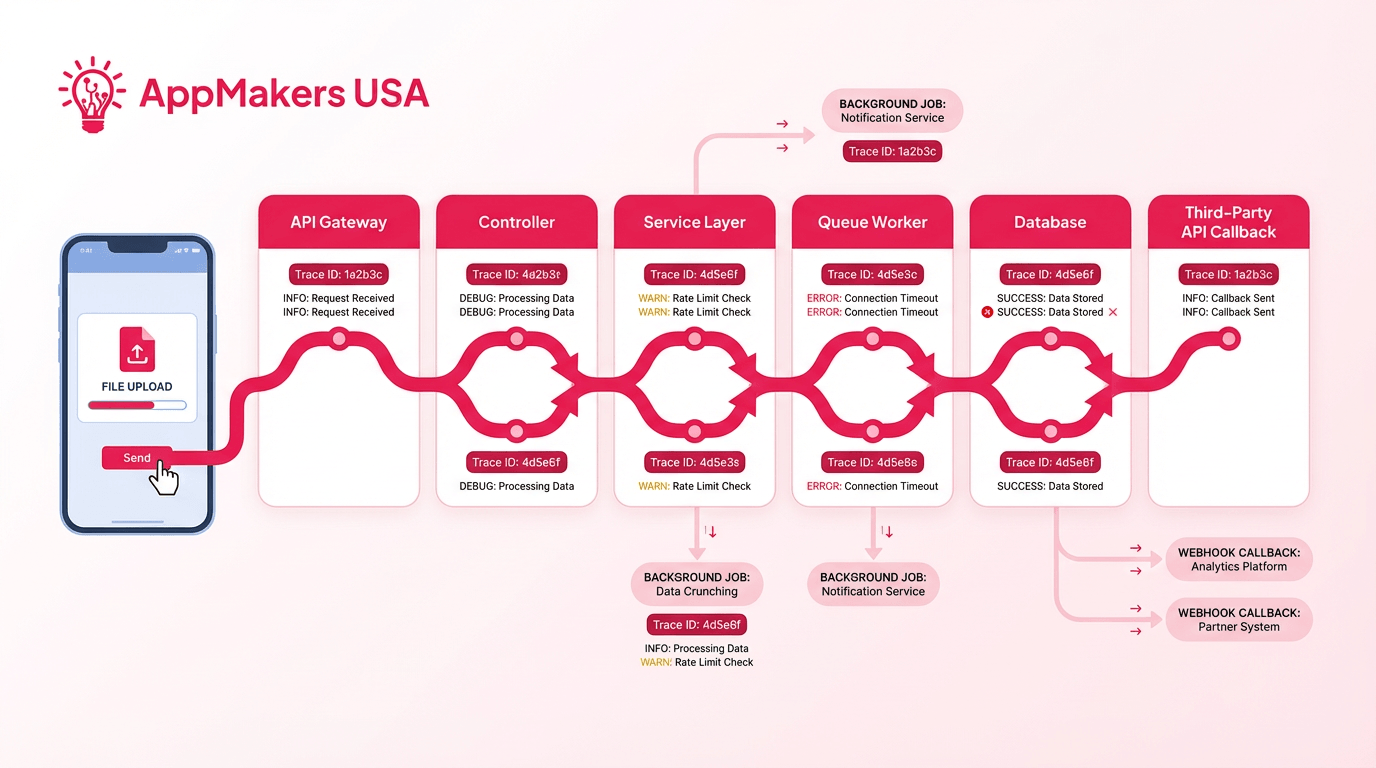
A static map helps, but it only gets you so far. Once you have the shape of the system, the next job is to see how it actually behaves when a real request moves through it.
Start with the true entry points. That usually means HTTP routes, mobile API calls, background jobs, schedulers, queue workers, webhook handlers, or OAuth callbacks. These are the places where the outside world touches the system, which makes them the fastest way to understand what the app is really doing under load.
From there, pick one concrete scenario and trace it end to end.
A user logs in. An order gets placed. A file gets uploaded. Follow that path from the controller or handler into the service layer, through the database or external APIs, and back out to the response. Use logs, trace IDs, breakpoints, or temporary instrumentation if needed.
The point is not to imagine the flow. It is to prove it.
This is also where hidden complexity starts showing up. A request that looks simple from the UI can fan out into queues, retries, background workers, third-party callbacks, and side effects that are easy to miss if you only read the happy-path code.
That is why experienced development teams trace live flows early. It shows where the fragile dependencies are, where latency builds, and where a small change could break something more important than the original bug.
At this stage, the goal is to map the parts of the system that tell you how the app actually runs. This table breaks down the first places to look, where to find them, and what each one reveals about runtime behavior.
| What to map | Where to look | Why it matters |
|---|---|---|
| HTTP and mobile entry points | Routers, controllers, API gateways | Shows the public surface area of the app |
| Background jobs | Schedulers, queues, workers | Reveals side effects and non-request load |
| Third‑party callbacks | Webhook handlers, OAuth flows | Exposes external dependency risk |
| End-to-end request paths | Logs, trace IDs, breakpoints | Logs, trace IDs, breakpoints |
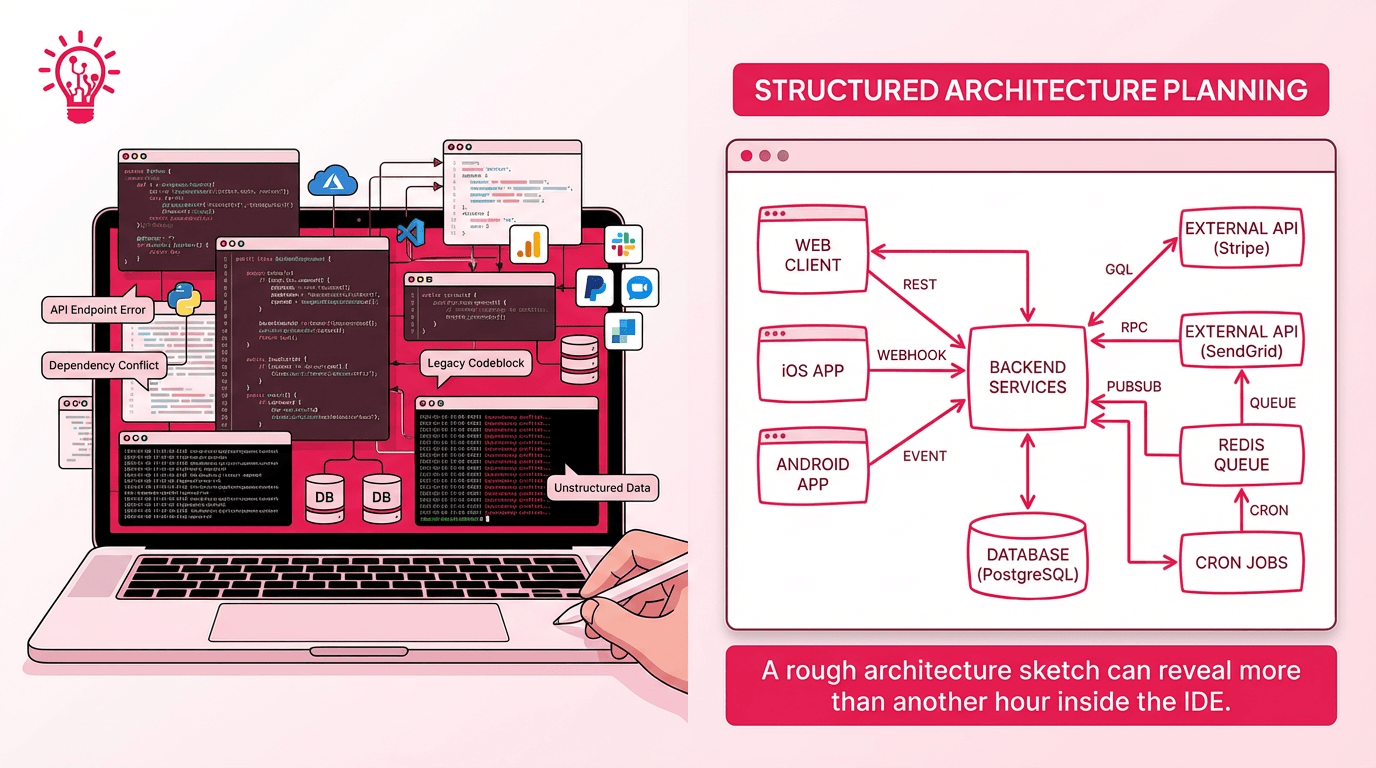
Once you have traced a few real flows, the next step is to get the system out of your head and onto paper. You do not need a polished diagram. You need a working model you can update fast as your understanding improves.
Start with the client side first: web, iOS, Android, or any internal tools that trigger the app’s core behavior. Then draw the backend services, databases, queues, caches, and third-party integrations those clients depend on. Label the connections with the simplest useful detail, such as REST, webhook, queue, cron job, or direct database read.
That alone can expose where the system is tightly coupled, where requests branch in risky ways, and where a “small” fix may ripple farther than expected.
This kind of visual reduction solves a real problem. In a Fraunhofer IESE survey of 147 industrial developers, participants said they wanted architecture information that was easier to search, navigate, and connect back to code, which lines up with why rough system sketches are so useful early on. They give engineers a faster way to orient themselves before deeper debugging or refactoring begins.
A rough architecture sketch also makes it easier to explain the system to non-engineers, compare what the code appears to do against what the product actually needs, and spot obvious bottlenecks before you start changing behavior. Rapid approaches like prototyping help validate those architectural assumptions early.
It forces clarity too. If you cannot sketch the major components and how they talk to each other, you probably do not understand the system well enough yet to refactor it safely.
The point is to create a shared mental model that helps everyone see risk sooner and make better decisions before the first invasive fix goes out.
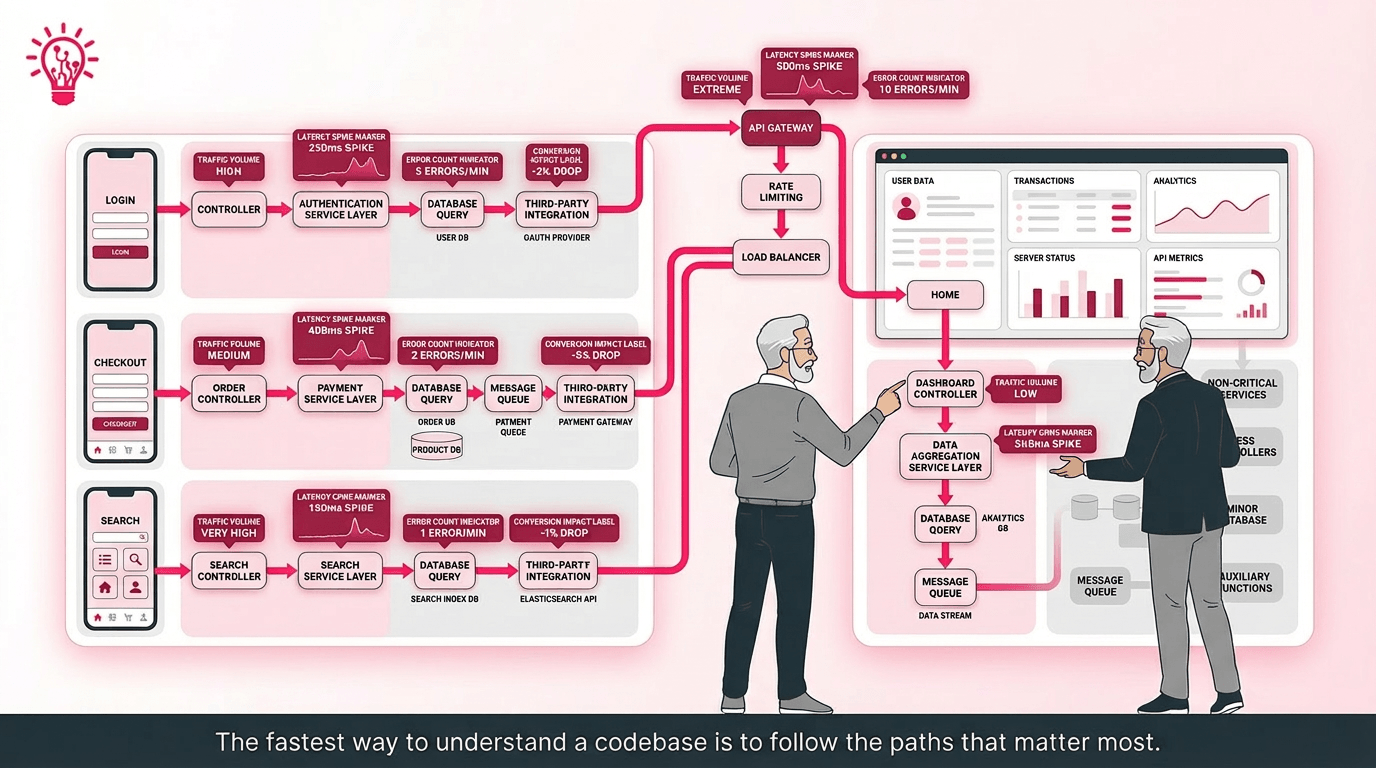
Once the architecture is clear enough to follow, the next move is to stop reading broadly and start reading where the system actually carries weight. Hot paths are the routes, queries, jobs, and services that users hit constantly or that the business depends on most. Those are the parts worth understanding first because they expose real behavior, real risk, and real tradeoffs faster than a general tour ever will.
That focus matters because performance problems in critical flows tend to show up in business metrics quickly. Google’s web performance case studies note that Renault saw a 1-second improvement in Largest Contentful Paint correlate with a 14 percentage point drop in bounce rate and a 13% increase in conversions.
When a key route gets faster or more stable, the payoff is rarely theoretical.
Start with production telemetry, not instinct.
Look at APM traces, database query logs, queue metrics, error rates, and traffic volume. Then rank endpoints, background jobs, and shared queries by how often they run, how slow they are, and how close they sit to revenue, retention, or SLA risk. Many organizations report reduced review cycles through automation, which can inform how you prioritize fixes.
The goal is to find the handful of flows the product cannot afford to get wrong.
Shared bottlenecks usually surface here first like overloaded tables, bloated services, utilities called everywhere, or expensive queries hiding behind simple screens. Those are the areas where a small change can either unlock real gains or create real damage, which is why experienced engineers look for traffic and dependency concentration before they start refactoring.
Not every hot path deserves the same attention. The best starting point is usually the set of routes tied directly to core outcomes: login, checkout, onboarding, account creation, search, dashboards, and any workflow that drives revenue or trust.
If one of those paths is slow, fragile, or noisy, the product feels broken even when the rest of the system is technically fine.
There is a practical reason to prioritize them first. In a Google Cloud case study, Maxeda said that making its checkout process easier and faster led to more than 20% higher online conversion rates. That is exactly why senior engineers do not start with the most interesting route. They start with the route the business would feel first if it failed.
This is where AppMakers USA tends to narrow the reading fast where they focus on the routes that carry real user intent, prove how they behave, and only then decide where changes are safe enough to make.

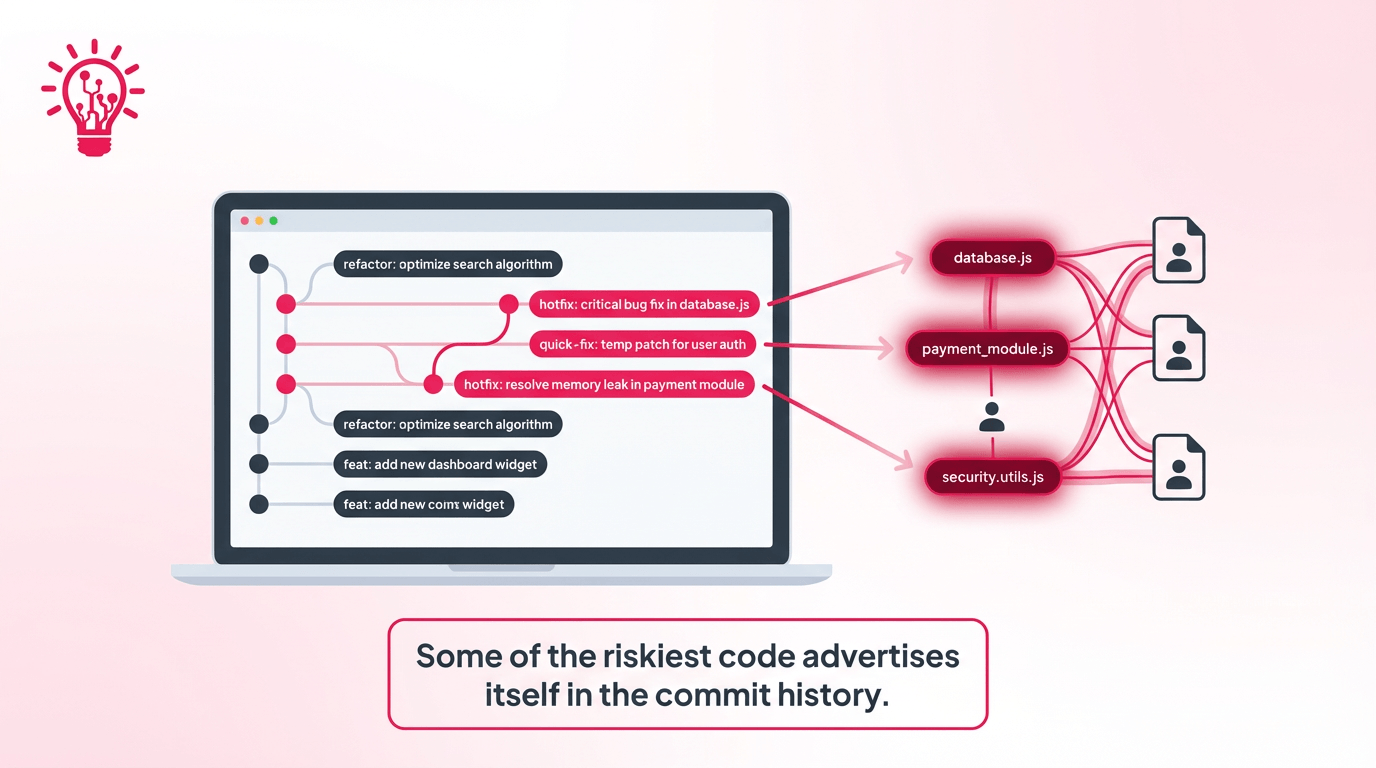
Once you know which flows matter, the next question is where the system has already been struggling. Git history is one of the fastest ways to answer that because it shows where the code keeps changing, who has been patching it, and how often the same area seems to come back for more attention.
Start with git log --stat to see which files churn the most, then use git blame on suspicious functions to understand what changed, when it changed, and what kind of fixes keep landing there.
That pattern matters because churn is not just noise. Microsoft Research reported that, in a Windows Server 2003 case study, a suite of relative code churn measures could distinguish fault-prone and not fault-prone binaries with 89.0% accuracy.
That is a strong reason to treat high-change modules as risk signals before you touch them.
Look for the kind of history that suggests fragility: lots of small reactive commits, vague messages like “quick fix” or “hotfix,” repeated edits to the same file across short stretches of time, or rollbacks that suggest earlier changes did not hold. Those patterns usually point to one of three problems: unclear ownership, hidden coupling, or code that never got stabilized properly in the first place.
This is also where changing history becomes more useful than static reading. A file might look ordinary in the IDE but still be one of the riskiest parts of the system because it keeps absorbing emergency fixes.
For legacy rescue work, AppMakers USA uses this step to separate code that is merely old from code that is actively fragile.
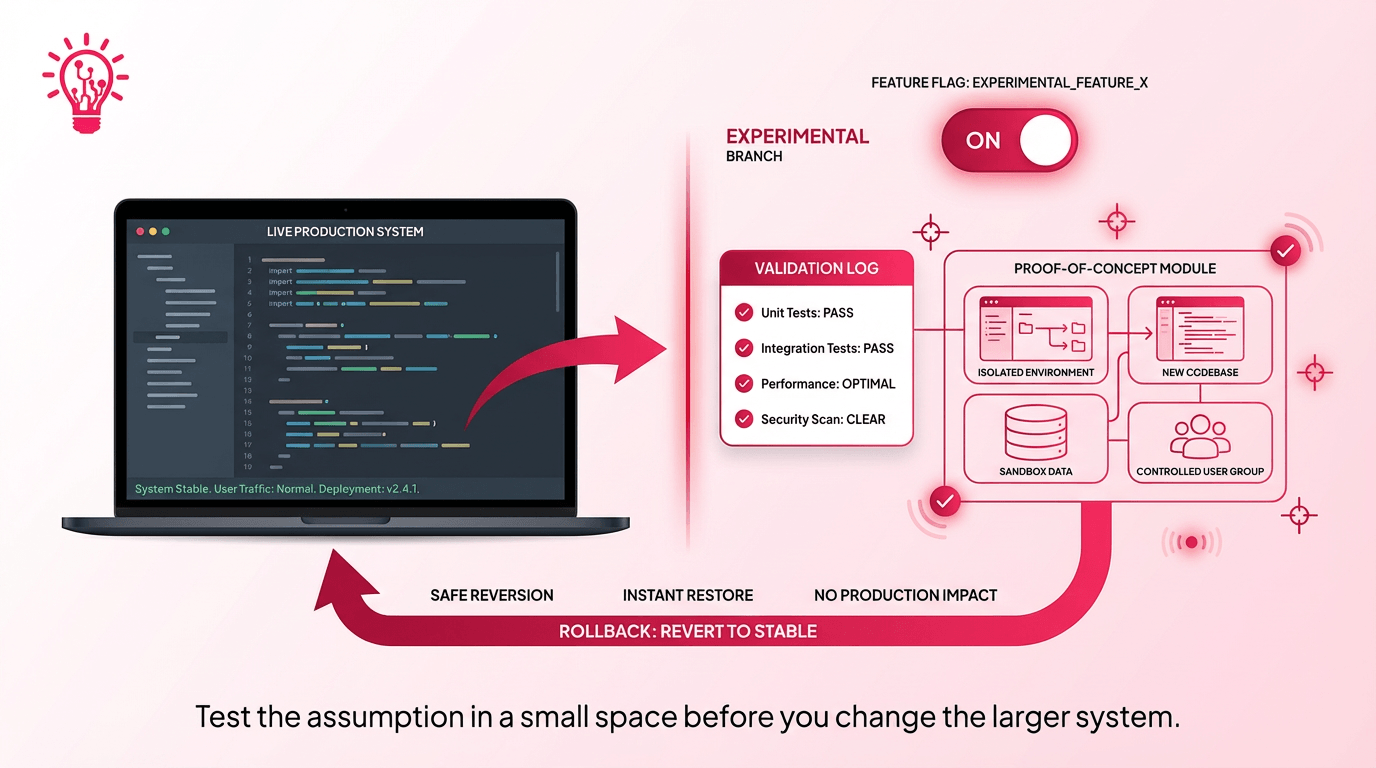
Once you have a working read on the system, the next risk is acting too confidently on a wrong assumption. AppMakers USA engineers break uncertainty down into smaller, reversible experiments that confirm what is actually true before the real change starts.
That usually means changing less and observing more. Add targeted logs before rewriting a flow. Put new behavior behind a feature flag instead of pushing it straight into production. Create a small proof of concept around one risky assumption rather than touching a full module all at once.
The goal is not to look busy. It is to learn cheaply, with as little blast radius as possible.
Good experiments are narrow by design. They isolate one question, make the result visible, and stay easy to roll back with Git, toggles, or configuration. That approach helps you understand the codebase faster because you are testing the system’s behavior directly instead of relying on guesswork or stale mental models. It also protects everyone around the project. Product, engineering, and stakeholders can move forward with more confidence when the learning process itself is controlled.
This is one of the clearest differences between senior code reading and random exploration. The point is to reduce risk while understanding more.
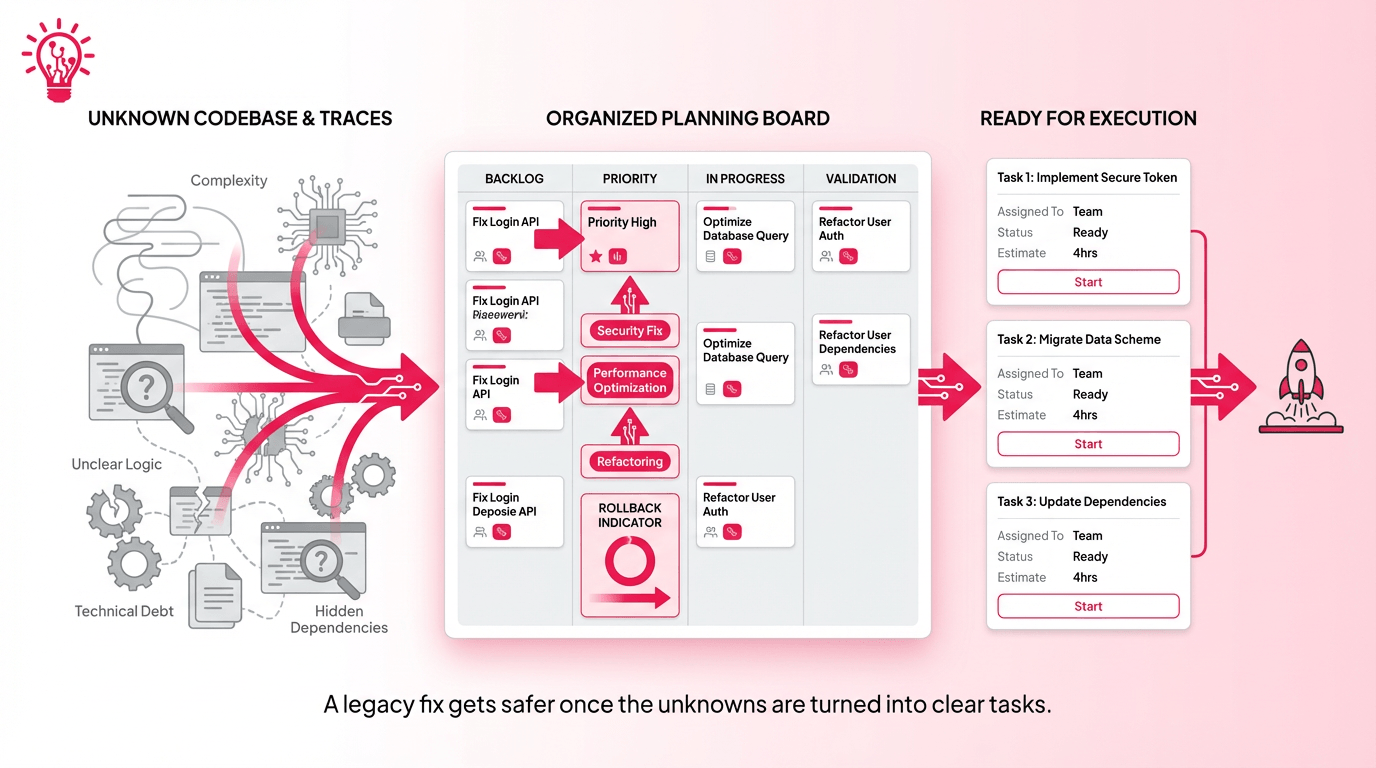
At some point, the investigation has to stop being a collection of insights and start becoming a plan. Notes, diagrams, traces, and experiments are useful on their own, but they only start creating value when they point toward specific work.
Start by writing the problem down in plain terms: what is happening now, what should be happening instead, and which part of the system appears to be responsible.
From there, list the candidate fixes and sort them by impact, risk, and effort. Some changes belong at the top because they protect revenue or stability. Others can wait because they improve cleanliness without solving the immediate problem.
It also helps to separate action items by type.
Guardrails come first and this includes better logging, clearer metrics, test coverage around fragile paths, or a feature flag that reduces release risk. Low-risk refactors usually come next. More invasive changes should come last, once the system is better observed and the unknowns are smaller. Any open questions should stay visible as explicit research tasks instead of getting buried inside estimates or wishful thinking.
A solid fix plan should be easy to review. Each task needs a reason, a success signal, and a rollback condition. When that structure is in place, legacy rescue work stops feeling like guesswork and starts feeling manageable.
This is where a team like AppMakers USA can bring order to a messy handoff. Not by rushing into code changes, but by reducing the work into steps that are easier to trust, scope, and ship.
Eventually, more reading stops adding clarity and starts delaying the fix.
There is a point where investigation turns into avoidance, especially in a large legacy system where every folder opens into three more questions. Senior engineers watch for that point on purpose because good code reading only earns its value when it leads to a safer change.
A few signals usually make the handoff obvious. You can explain the bug path or feature flow without constantly reopening the IDE. You keep revisiting the same files without learning anything meaningfully new. You can already see the seams where tests, guards, logging, or a cleaner abstraction would reduce risk.
At that stage, more context is not the bottleneck anymore. The bottleneck is action.
That does not mean jumping into a giant rewrite. It means opening a branch and making the first deliberate move in a controlled way. Add the test around the fragile path. Introduce the guardrail. Isolate the risky logic behind a smaller seam. Make the smallest refactor that improves safety, clarity, or confidence, then reassess from there.
This is where disciplined teams separate themselves from curious ones. Curiosity helps you understand the system. Judgment tells you when understanding is good enough to start improving it. In legacy rescue work, that shift matters because the real win is making the next change with less risk than the last team would have.
That is the standard AppMakers USA aims for when stepping into unfamiliar systems. Our process pairs this mindset with agile methodologies to ensure small refactors deliver measurable business value.
Yes, in many cases they can get far enough to diagnose risk and plan fixes without that handoff. It is slower when context is missing, but symptoms, logs, architecture clues, request tracing, and Git history can still reveal a lot.
They start too deep in the code too early. That usually leads to rabbit holes, wasted time, and fixes aimed at the wrong layer of the problem.
Not always, but it helps. Even limited access to logs, analytics, traces, and real error patterns makes the investigation much more grounded than reading files alone.
They keep the early work reversible. That usually means tracing live flows, adding targeted logs, using feature flags, and validating assumptions in small controlled experiments before making invasive changes.
Give them source code access, environment details, deployment history, crash logs, analytics, app store accounts, and a clear list of the biggest user-facing problems. The faster they can connect symptoms to system behavior, the faster the fix plan gets credible.
A cold read is not about looking clever in a messy system. It is about lowering the chance of making the wrong change. In legacy app rescue work, that discipline matters because one rushed assumption can waste weeks and make the next fix harder than the last one.
A better approach gives every change a reason. That is how unfamiliar systems become manageable, and how AppMakers USA steps into messy codebases without adding more damage to them.