Home
Our Process
Portfolio

FAQ
Where can I see your previous work?
Check out our portfolio at AppMakersLA.com/portfolio
What services do you offer?

We are a Los Angeles app and web development company. As such, we offer: 1) Design for Apps, Webapps and Websites 2) Mobile App Development for iPhone Apps, Android Apps and iPad Apps & Web Development for Webapps. Each project includes full QA Services as well as a product manager.
Where are your app developers located?

Our app developers are mainly located at 1250 S Los Angeles St, Los Angeles, CA 90015, though we have other offices around the world, and we hire the best developers wherever and whenever we find them. If having engineers & designers in Los Angeles is critical to the project, we have the resources to make that happen.

How much do you charge for your services?
Our cost varies depending on the project. Please contact us for a mobile app development consulting session and we will get you an estimate + analysis pronto.
Can you build software for startups?
Yes, we consider ourselves a startup app development company, as well as an agency that builds software for already established firms.

Discover 30+ more FAQs
View all FAQs
Blog
Contact ussms IconCall Icon
We answer our phones!
App Development / How Long Does...

How Long Does It Take To Fix A Vibe-Coded App? A Realistic Timeline By Problem Type

How long does it take to fix a vibe-coded app depends on more than the bug you can see. 

A broken screen, failed checkout, or glitchy login may look like one isolated issue, but the visible symptom is often only part of the problem. Once a developer gets into the codebase, they may find messy logic, unstable integrations, duplicated code, or rushed architecture that makes even a simple fix harder to handle safely. That is why repair timelines are hard to predict from the outside. 

The real timeline depends on what is broken, what sits underneath it, and how much of the app has to be understood before the fix can be made without creating new problems.

What “Vibe-Coded” Usually Means in Practice

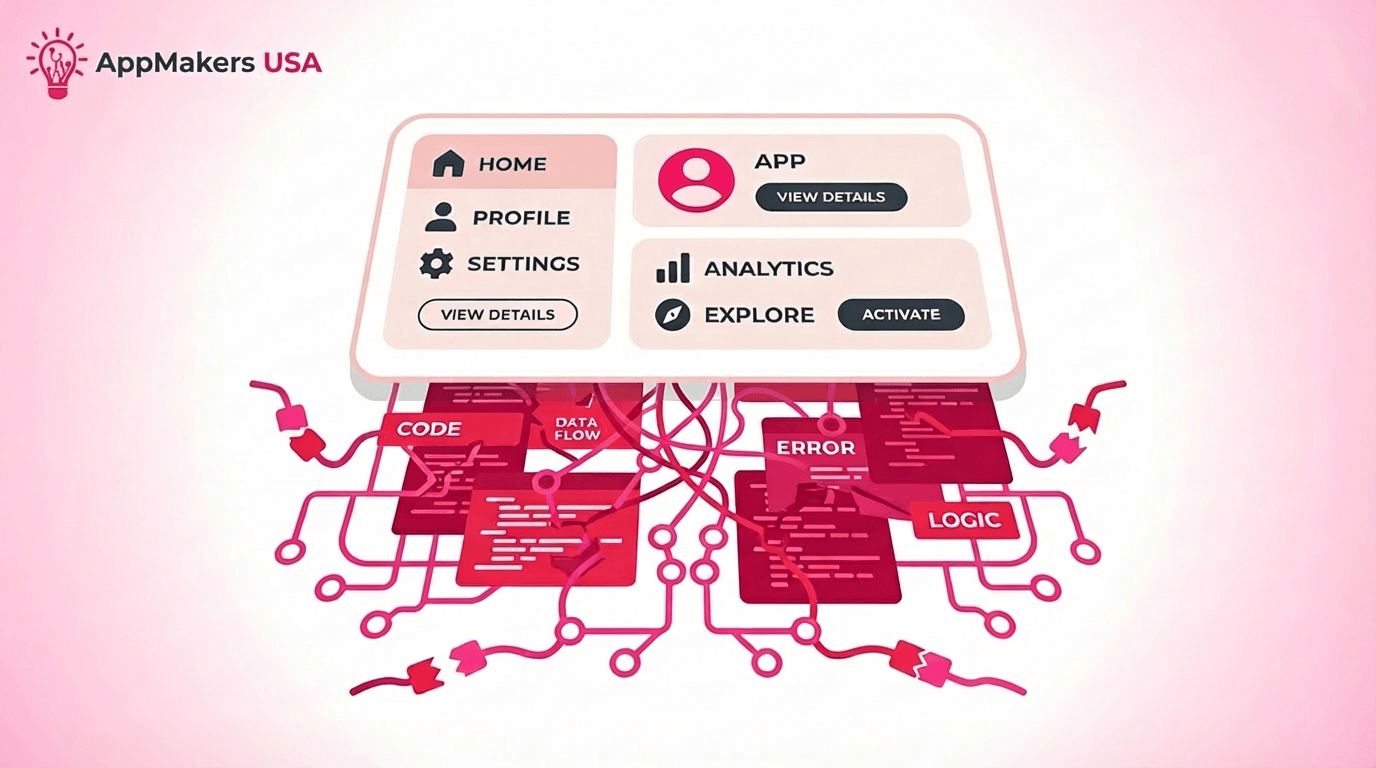
Illustration of a polished app dashboard sitting above tangled code, data flow, and error logic, showing how clean UI can hide unstable app architecture.

A vibe-coded app usually feels better than it is.

The interface looks polished, the flow seems smooth, and the product gives off the impression that everything is working the way it should. That surface-level confidence is part of what makes these apps tricky. Nielsen Norman Group notes that visually appealing interfaces can make users more tolerant of usability issues, which is exactly why fragile products can look stronger than they really are.

In practice, “vibe-coded” usually means the app was shaped more by instinct, speed, or visual momentum than by durable structure. It may demo well, but once real users start moving through edge cases, the gaps show up fast.

That is where shaky logic, duplicated behavior, inconsistent patterns, and unstable workflows start turning a polished front end into a repair problem.

Different Build Styles, Similar Repair Problems

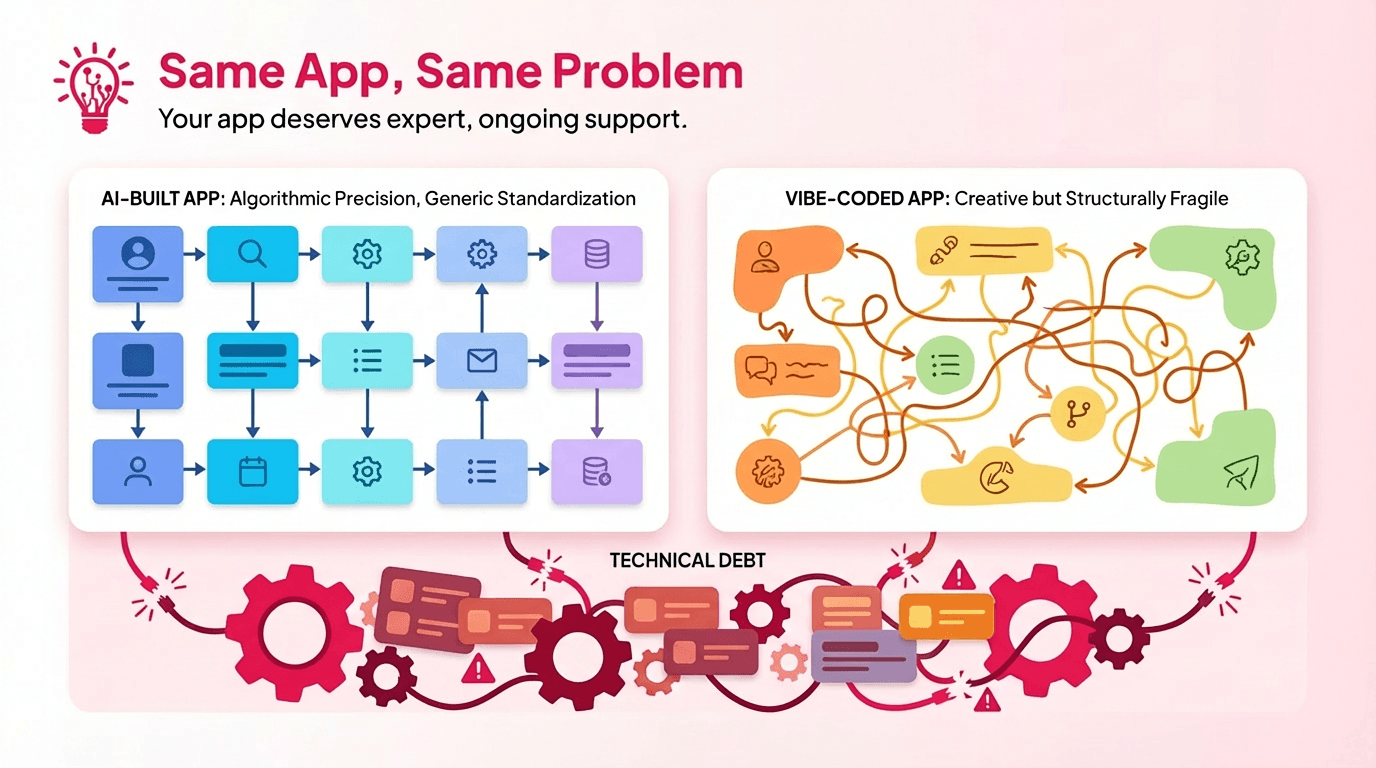
Side-by-side comparison of an orderly AI-built app flow and a messy vibe-coded app flow, with technical debt shown underneath both systems.

AI-built apps and vibe-coded apps do not fail in exactly the same way, but they often create the same kind of repair problem. Both can look polished early on. Both can feel functional enough in a demo.

The trouble usually shows up later, when the product runs into edge cases, real usage patterns, or business rules that were never thought through properly, which is exactly where enterprise app development tends to demand more structure than a rushed build can handle.

The difference is where the weakness comes from.

AI-built apps tend to inherit generic patterns, brittle logic, and assumptions that were never challenged. Vibe-coded apps are usually more human-led, but they can still be shaped too heavily by instinct, speed, or visual momentum instead of clear structure. In both cases, the result is similar: duplicated behavior, shaky workflows, and logic that starts breaking once the app has to do more than the “happy path.”

That matters for timelines because repairs take longer when the team first has to figure out what the original build was trying to do. The work is not just fixing one visible issue. It is reverse-engineering intent, tracing assumptions, and rebuilding enough structure underneath the surface so the product can behave predictably again.

Quick Answer: How Fix Timelines Usually Break Down

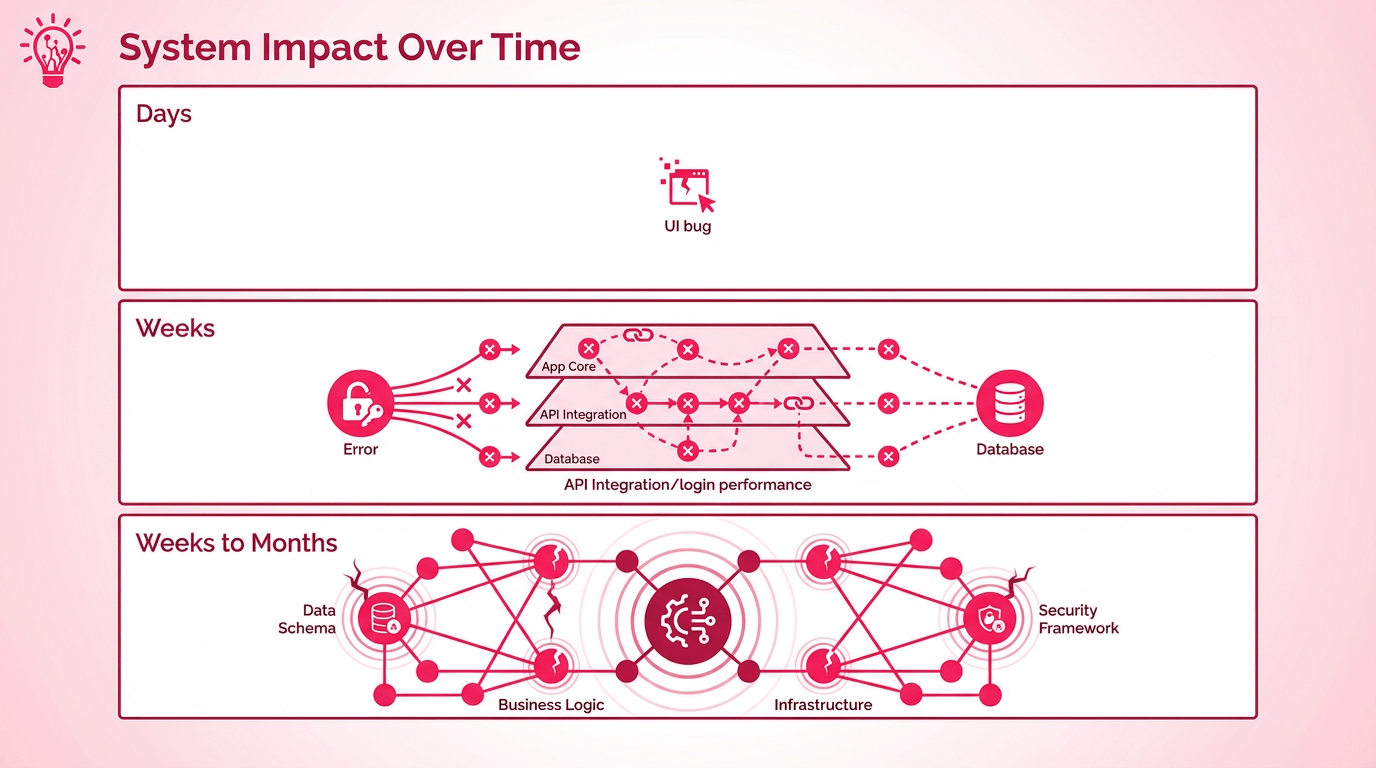
Infographic showing how app issues can expand from a small UI bug in days to deeper system, database, and security problems over weeks or months.

Most vibe-coded app fixes fall into three buckets. The easiest way to think about them is not by bug name, but by how deep the problem goes.
Google found that 53% of mobile users leave a page that takes longer than 3 seconds to load, which is why even “small” app issues can turn into real business problems fast once users start feeling friction. 

Days

These are usually the surface-level fixes.

You are often looking at UI glitches, small validation issues, minor copy problems, or one contained bug that can be traced without disturbing much else. The reason these move quickly is not that they are trivial. It is that the team can usually find the cause, test the fix, and ship it without untangling the rest of the app.
Weeks

This is where many real repair projects land.

The issue may look simple at first, but once someone starts tracing it, the fix touches more than one layer of the product. Broken integrations, slow performance, login problems, and messy navigation often end up here. This is the stage where the visible bug stops being the whole story.

Weeks to Months

This is the structural category.

At this point, the app is not just broken in one place. The structure underneath is part of the problem. Brittle data models, duplicated logic, unstable architecture, and code nobody fully understands usually push the work into a deeper stabilization effort. The timeline gets longer because the team is no longer just patching symptoms. They are making the product safer to keep building on.

Apple’s App Store Connect also tracks metrics like crashes, crash rate, sessions, and deletions, which is a useful reminder that stability issues do not stay technical for long once the app is already live. 

That is why two bugs can look equally small from the outside and still land in completely different timeline buckets once the team sees what is really underneath them.

Why Fixing a Vibe-Coded App Takes Time (Not Hours)

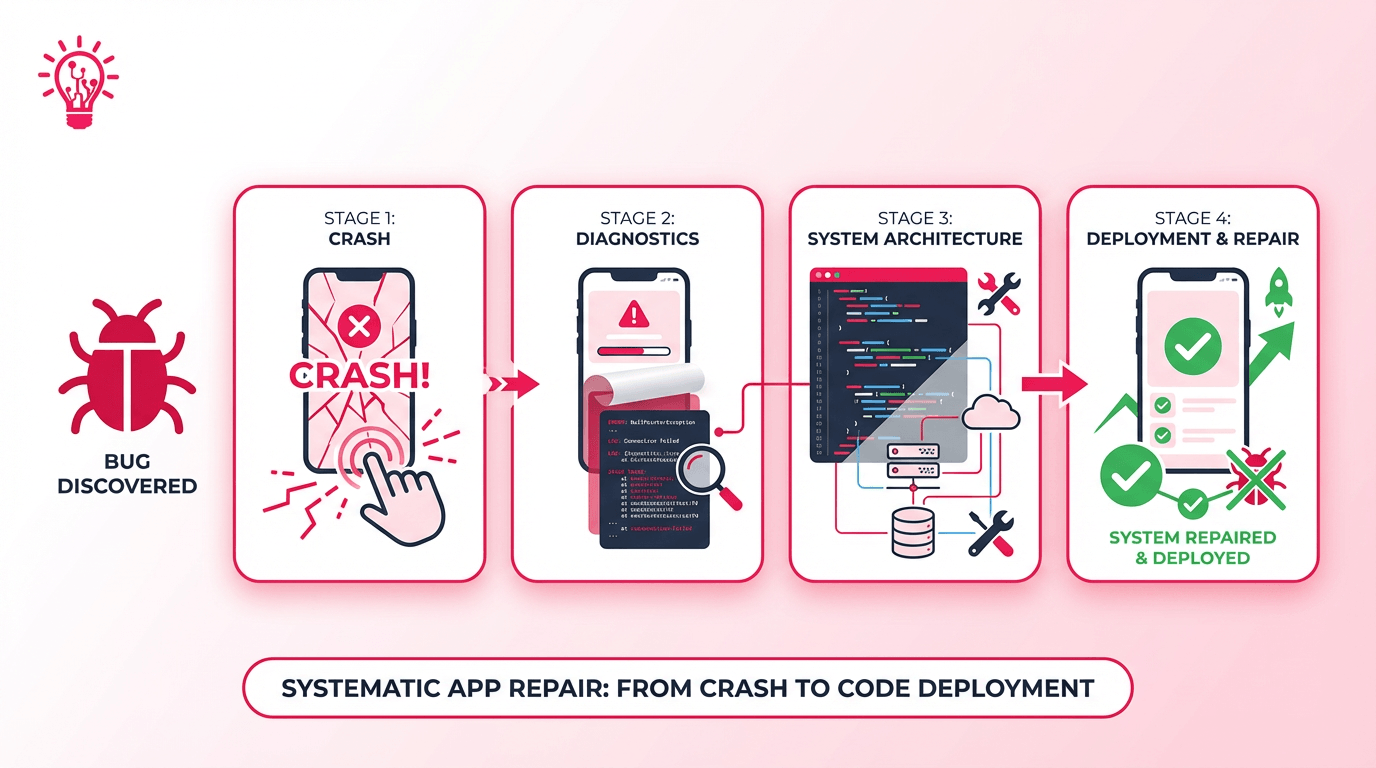
Step-by-step infographic showing app repair stages from bug discovery and crash to diagnostics, system architecture review, and final deployment.

Even when the symptom looks small, a vibe-coded app rarely gets fixed in one quick pass.

The visible bug is often sitting on top of a chain of hidden decisions. What looks like a broken button or a failed flow on the surface can trace back to tangled state, brittle integrations, duplicated logic, or data behavior that was never fully thought through.

That is why the work usually unfolds in stages. First, the team has to reproduce the issue reliably. Then they have to trace where it actually starts, which is often nowhere near where the bug shows up. That is also why it matters who you hire app developers from, because the real work starts with diagnosis, not guesswork.

Once the cause is clearer, the fix still has to be designed, written, tested, staged, and monitored. Apple’s developer documentation is a good reminder here: a crash report does not just tell you that the app failed, it shows the app’s state and the code running when it crashed, which is why diagnosis takes more than guesswork.

The timeline gets even longer when users are already live. At that point, the team is not just fixing the bug. They are trying to keep the product stable while they work, make sure the release does not trigger a second issue, and confirm that the app behaves better after deployment than it did before.

That is the part rushed estimates tend to ignore.

Why Messy Code Makes Small Fixes Take Longer

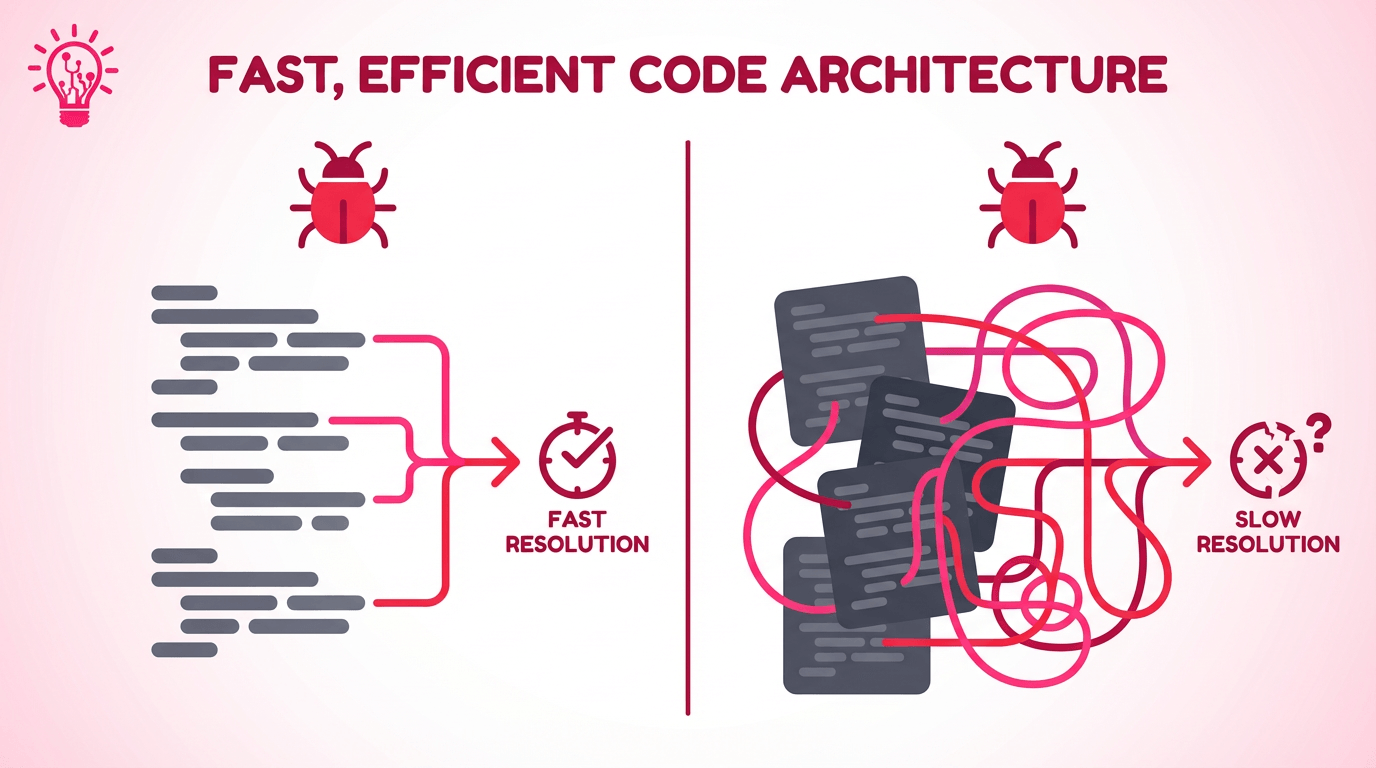
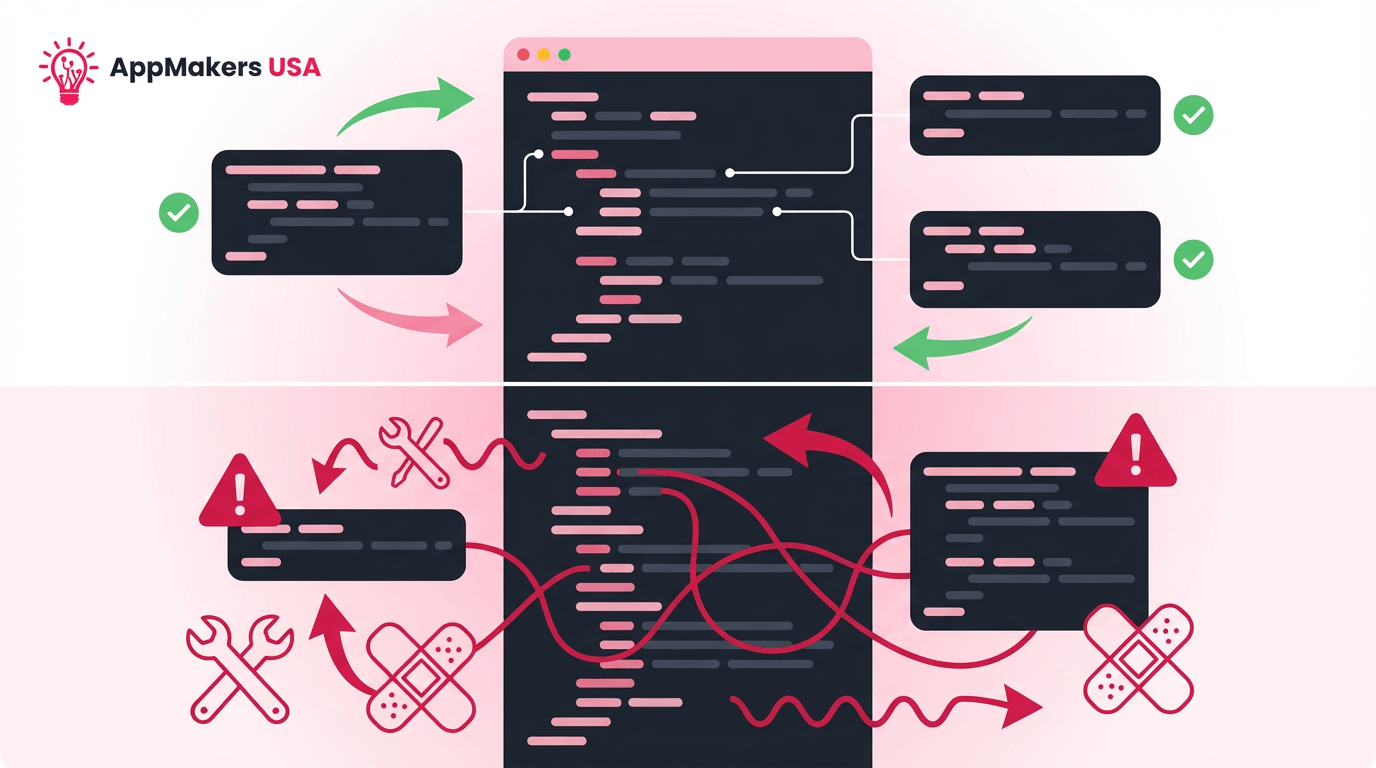
Split graphic comparing clean code architecture that leads to fast resolution with tangled code architecture that leads to slow resolution.

Two bugs can look identical on the surface and still take completely different amounts of time to fix. The difference is often not the bug itself. It is the shape of the codebase sitting behind it.

In a smaller, well-structured app, the team can usually trace the problem quickly, test the fix, and move on. In a larger vibe-coded project, a lot of time disappears before the real repair even starts. Teams first have to read unfamiliar code, untangle duplicated logic, and figure out which parts of the app are secretly tied together.

That is usually where the delay starts to feel real. One change looks small until it touches three mystery features no one expected. A quick fix turns into a longer repair because the team has to understand the structure well enough to avoid breaking something else.

At AppMakers USA, we often start fixes by untangling structure so future bugs stop turning into week-long distractions. The difference between off-the-shelf software and custom solutions becomes more obvious. Off-the-shelf options can be faster at the start, but they rarely solve deeper structural problems without customization. 

The point is that codebase size matters, but codebase clarity matters more. 

A larger app can still move quickly if the structure is clean. A smaller app can still become a drag if it was stitched together too fast and no one can tell where the logic really lives anymore.

How Your Tech Stack Speeds Up or Slows Down Fixes

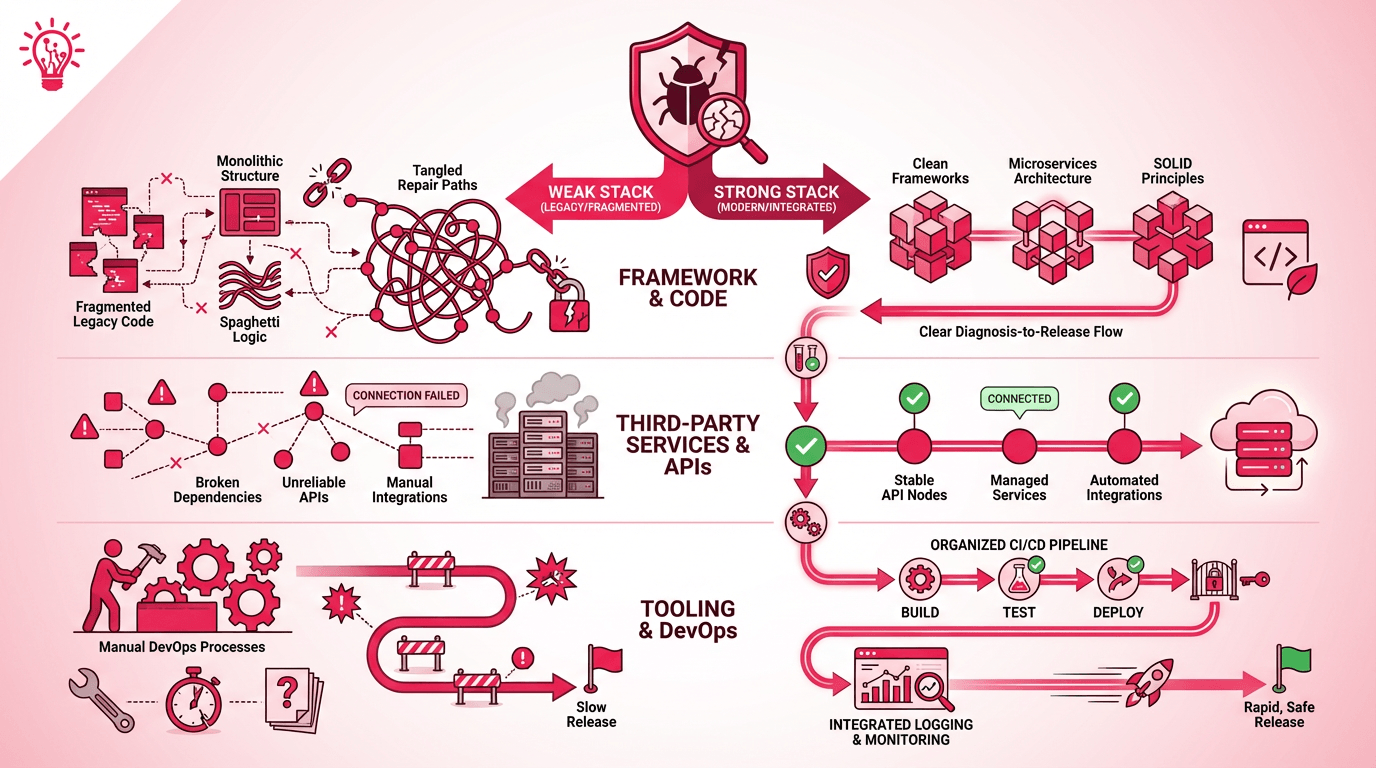
Diagram comparing weak and strong app stacks across code framework, third-party APIs, and DevOps processes, showing how better structure supports safer releases.

The stack underneath the app changes the timeline as much as the bug itself. 

A modern stack usually gives the team cleaner logs, safer releases, and fewer surprises once they touch the code. A brittle stack does the opposite. It turns even routine fixes into slower, riskier work because every change has to be treated like it might trigger something else. GitHub’s enterprise guidance says reusable CI/CD patterns can reduce configuration time by up to 40%, which helps explain why better delivery infrastructure often shortens repair work. 

Legacy stack vs. modern stack

If the app runs on outdated frameworks, weak tests, or manual deploys, even a small fix can become a wider cleanup job. A modern stack changes the pace because cleaner architecture and safer deployment workflows give the team more room to move without treating every release like a gamble.

Third-party services and APIs

The more the app depends on outside services, the less control the team has over the timeline. Clear docs, stable SDKs, and responsive vendor support can keep a fix moving. Brittle dependencies and too many providers usually do the opposite. 

Tooling, DevOps, and automation

Even when the team finds the cause fast, the timeline still stretches if staging is weak, logging is thin, or releases are manual. Google’s DORA research frames delivery performance around throughput and stability together, using metrics like lead time, deployment frequency, change failure rate, and time to restore service. 

It is a reminder that fast fixes only matter if they are also safe to ship.

What changes the timelineWhy it matters
Old frameworks and manual deploysSmall fixes become riskier
Too many third-party dependenciesDebugging spreads across systems
Weak staging, logging, or CI/CDTesting and release take longer

That is why a slow fix is not always a sign of a weak team. Sometimes it is the stack revealing how much friction has built up underneath the product.

Why Some “Simple” Fixes Stop Being Simple

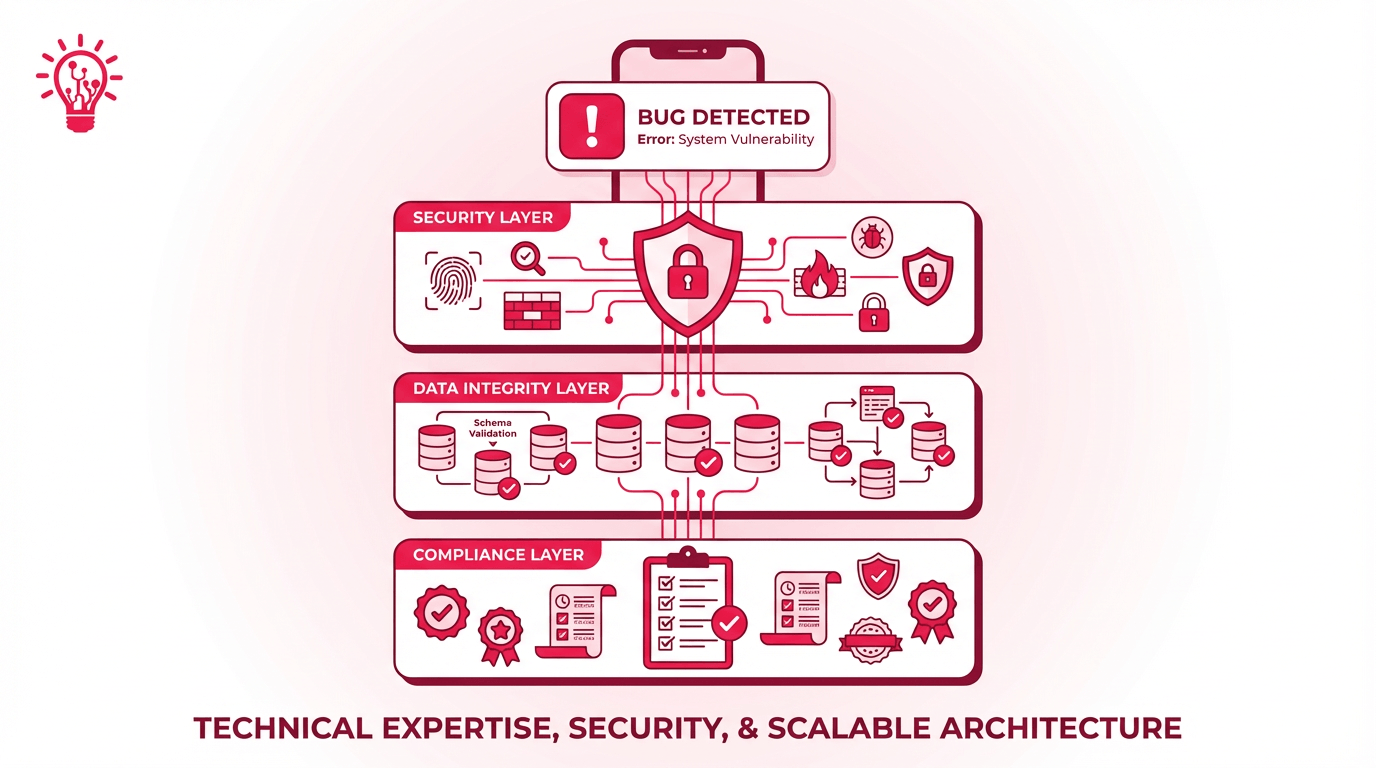
Layered security infographic showing a bug detected across security, data integrity, and compliance layers in a scalable app architecture.

Some app fixes take longer because the visible bug is not the whole job. 

Once security, data integrity, or compliance enter the picture, the timeline starts carrying work most teams never saw at the start. That is also why repair timelines often reflect the same kinds of hidden costs in mobile app development teams only notice after the product is already live.

1. Security Audits and Patching

A broken flow may look like one bug on the surface, but the real delay often starts when the team has to check what else the fix might expose. Permissions, third-party plugins, logging, and traffic handling all need review before the repair is safe enough to ship. IBM’s 2024 report found that the average global cost of a data breach reached USD 4.88 million, which is one reason rushed fixes in higher-stakes products need more care than a quick patch suggests.

2. Data Integrity and Migration

Sometimes the UI is only where the problem shows up. The real issue sits underneath it in mismatched schemas, duplicated records, or brittle migrations that were never designed cleanly in the first place. That is when a fix quietly turns into cleanup and a clearer cloud migration strategy becomes more useful than another narrow workaround.

3. Compliance Reviews and Remediation

Compliance stretches the timeline because the team is no longer just fixing behavior. They are proving the app handles data the right way. The HIPAA Security Rule establishes national standards to protect electronic protected health information and requires administrative, physical, and technical safeguards, which is why regulated app repairs often expand beyond the visible bug.

The bug may start the repair, but security, data, and compliance often decide how long it really takes.

AI Code Can Save Time Up Front and Cost Time Later

Comparison graphic showing modular, well-structured code with successful outcomes versus tangled code that leads to warnings, fixes, and instability.

AI-generated code can look usable faster than it proves itself. That is the trap. 

The output may compile, the screen may render, and the flow may work well enough in a demo, but the repair timeline usually changes once someone has to maintain it under real conditions. SonarSource’s 2026 State of Code report found that developers say 42% of their code is currently AI-generated or AI-assisted, and 38% say reviewing AI-generated or assisted code is more time-consuming than developer-written code

That lines up with what teams feel in rescue work where the speed gain at the start often turns into review and repair tax later.

The reason is not just “AI wrote it.” The bigger problem is that AI-generated code often carries weak naming, repeated patterns, missing context, and assumptions nobody on the team actually made on purpose. A small bug can take longer to fix because the team first has to figure out what the code was trying to do, whether the logic is trustworthy, and which parts were copied or improvised without much structure behind them.

That is where the timeline starts slipping. 

The work stops being a normal bug fix and turns into reverse-engineering. Before anyone can safely patch the issue, they may need to clean up duplicated logic, replace brittle shortcuts, or rebuild a section so the code behaves predictably under real usage. 

AI can speed up code generation, but that does not automatically speed up repair. If the output was produced faster than it was understood, the time you save upfront often comes back later in debugging, verification, and cleanup.

How to Spot the Difference Before the Audit Starts

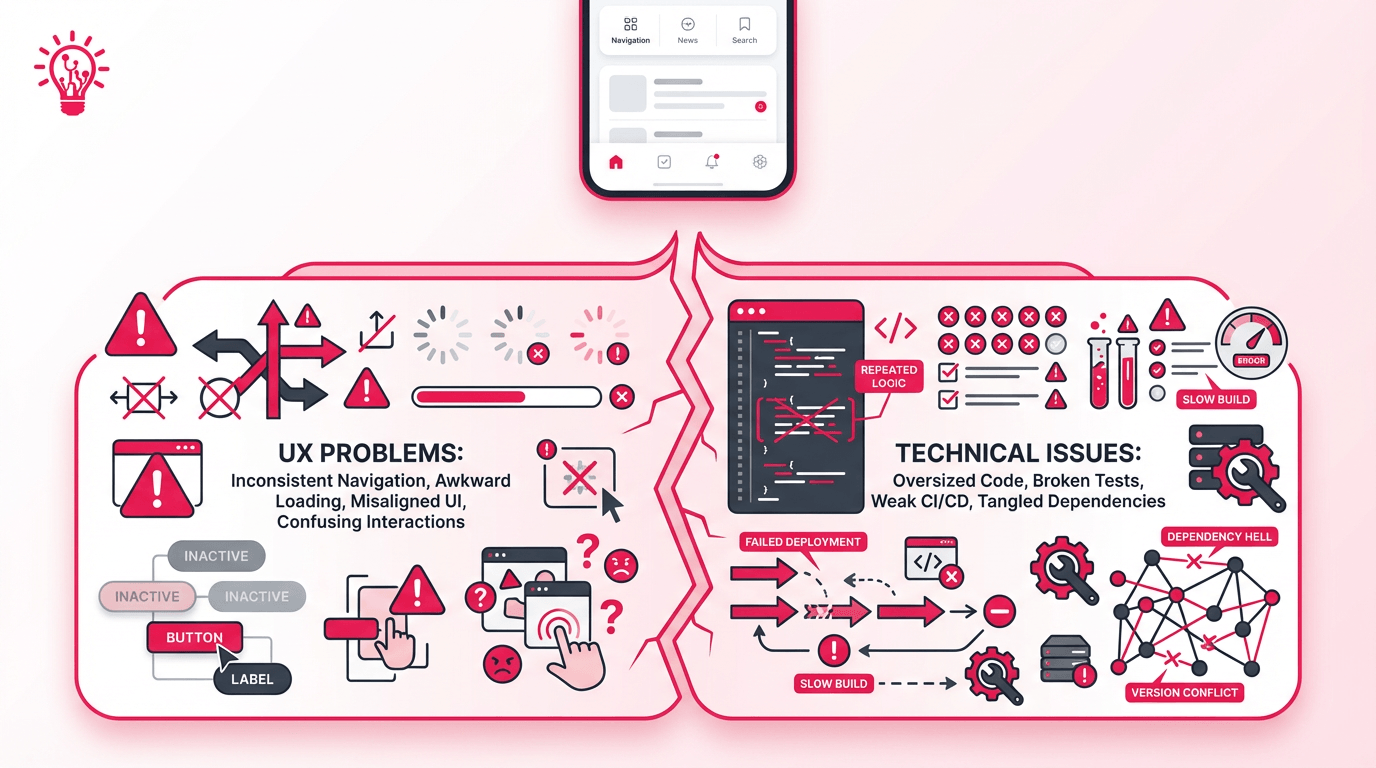
Split infographic showing UX problems on one side and technical issues on the other, connected to a mobile app interface above them.

You can usually feel it before anyone opens the repo.

The app may look polished at first glance, but something underneath it feels off. A flow that should feel obvious takes one tap too many. A screen looks finished, yet the logic behind it feels slightly improvised. The product works just enough to make you think the issue is small, until real users start moving through it in ways the build was never really prepared for.

That is why this question matters. 

Visual and UX Clues

The first signs usually show up in the experience itself. The app does not always look broken. It looks almost right.

A screen may be clean, but the flow feels awkward once you actually try to use it. Back buttons behave differently from one section to the next. Empty states feel forgotten. Small interactions such as loading, validation, or feedback after a tap do not carry the same logic across the product. Nothing looks disastrous on its own, but together it starts to feel like the app was assembled faster than it was thought through.

That is often the giveaway. A well-built app can still have bugs, but the behavior usually feels consistent even when something goes wrong. A vibe-coded or AI-built app tends to lose that consistency first. The product looks finished from a distance and starts feeling uncertain the moment a real user leans on it.

Codebase and Tooling Signs

Once you get under the surface, the picture usually gets clearer.

This is where you start finding huge files doing too much at once, repeated logic where reusable components should be, and naming that tells you almost nothing about what the code is meant to do. Tests are missing, stale, or too thin to trust. The folder structure feels improvised. CI/CD is weak or absent. Staging is unreliable. Dependency versions drift without much discipline behind them.

That combination usually tells you the same thing the UX already hinted at: the app may have been built quickly, but it was not built with much margin for maintenance. And once that is true, repair time stops being about the visible issue alone. It starts being about how much of the app has to be understood before anyone can change it safely.

From First 48 Hours to Full Rebuilds

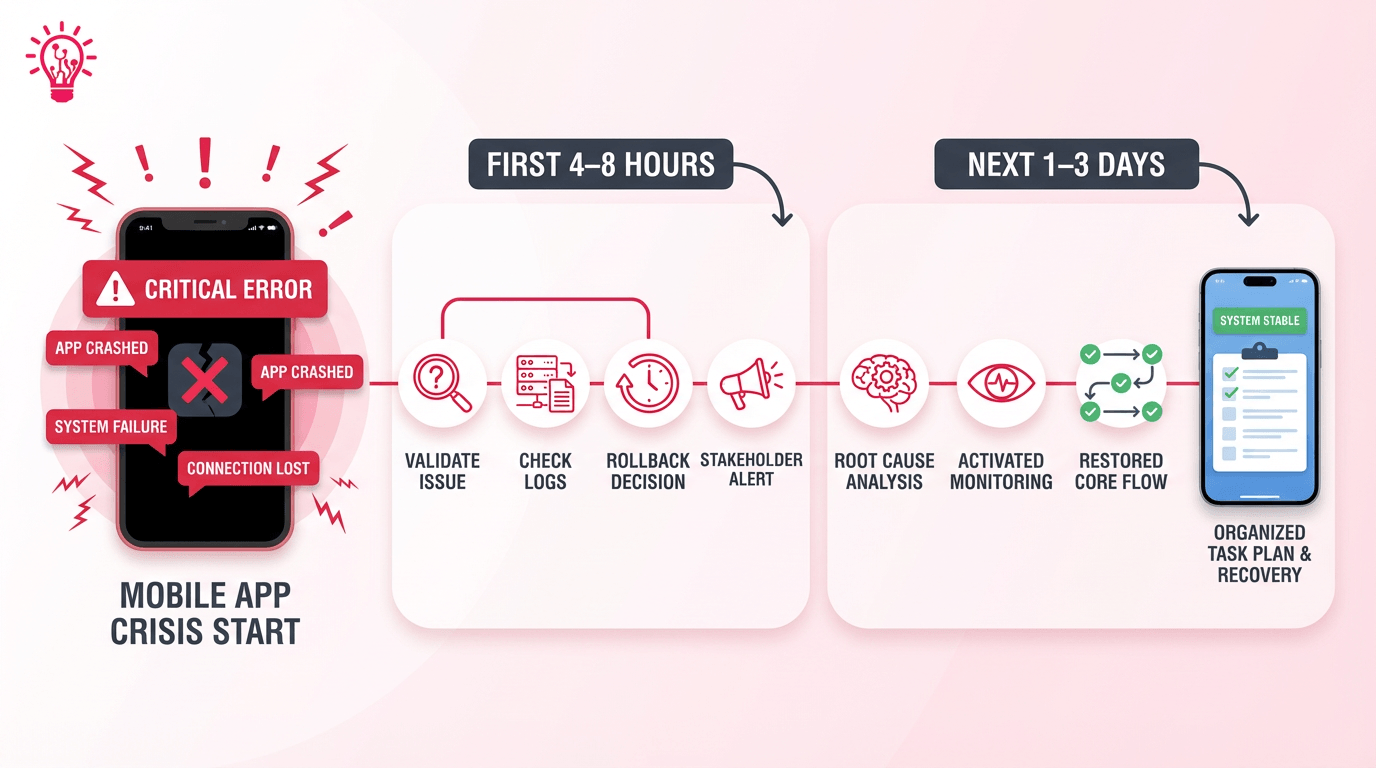
Timeline graphic showing the first hours and first few days after a mobile app crisis, from validating the issue and checking logs to restoring core flow.

The first 48 hours should not feel vague. A good team uses that window to reduce guesswork, narrow the problem, and decide what can be fixed safely first. The goal is not to promise a full repair in two days. It is to replace chaos with a plan.

First 4 to 8 hours:

Confirm the issue, protect users, and stop things from getting worse. That usually means validating the outage, checking logs, locking in a rollback or hotfix path, and deciding who needs updates right away. Apple’s guidance on diagnosing issues using crash reports and device logs is a good reminder that early diagnosis is about gathering evidence fast, not guessing from the symptom alone.

Next 1 to 3 days:

Move from triage to stability. This is where the team validates the root cause, hardens any quick patch, restores the most important user flows, and adds enough monitoring so the app does not fail the same way twice. Google’s SRE book treats monitoring distributed systems as a core part of understanding what is broken and why, which is exactly why this phase matters.

That early window matters because it tells you whether the repair is staying contained or quietly turning into something bigger.

Common Repair Windows by Problem Type

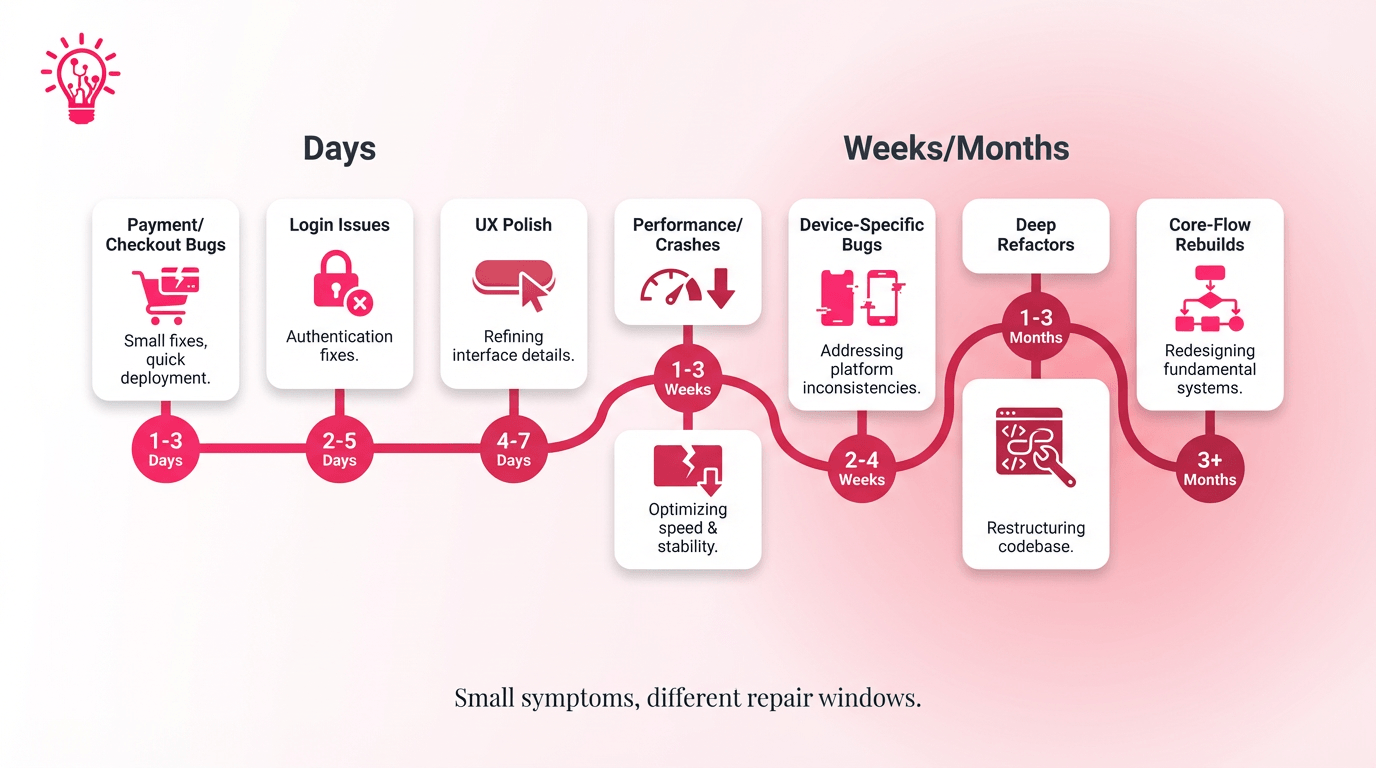
Repair timeline infographic showing how different app issues can take anywhere from days to months depending on complexity and depth of the problem.

One clean way to read these repair windows is to sort them by what they put at risk: issues that block money or access usually move fastest, stability problems often stretch into days or weeks, and deeper structural problems are what push repairs into weeks or months.

Problem TypeTypical WindowWhat Usually Extends It
Payment and checkout bugs1 to 5 daysgateway issues, edge-case testing, hotfix monitoring
Login and account issues1 to 7 daysauth logic, third-party sign-in, account merge flows
Slow performance and crashes3 to 10 daysprofiling, bottlenecks, stress testing
"It works on my phone" bugs3 to 14 daysreproduction across devices, OS versions, and network conditions
Small UX polish1 to 7 daysreview cycles, copy cleanup, and interaction tuning
Deep refactors3 to 8 weeksunstable logic, state cleanup, and test coverage
Core-flow rebuilds4 to 12 weeksarchitecture reset, redesign, and integration rebuild

The visible bug matters, but the real timeline usually stretches when the team has to reproduce the issue, test edge cases, or stabilize the structure underneath it.

When Patching Stops Being the Fast Option

Before-and-after architecture graphic showing a tangled, chaotic app system transformed into a cleaner mobile app flow with organized integrations.

A quick fix only stays quick while the app underneath it still behaves like a system. 

Once every small change starts breaking something else, patching stops being the faster option and starts becoming the thing that slows the product down.

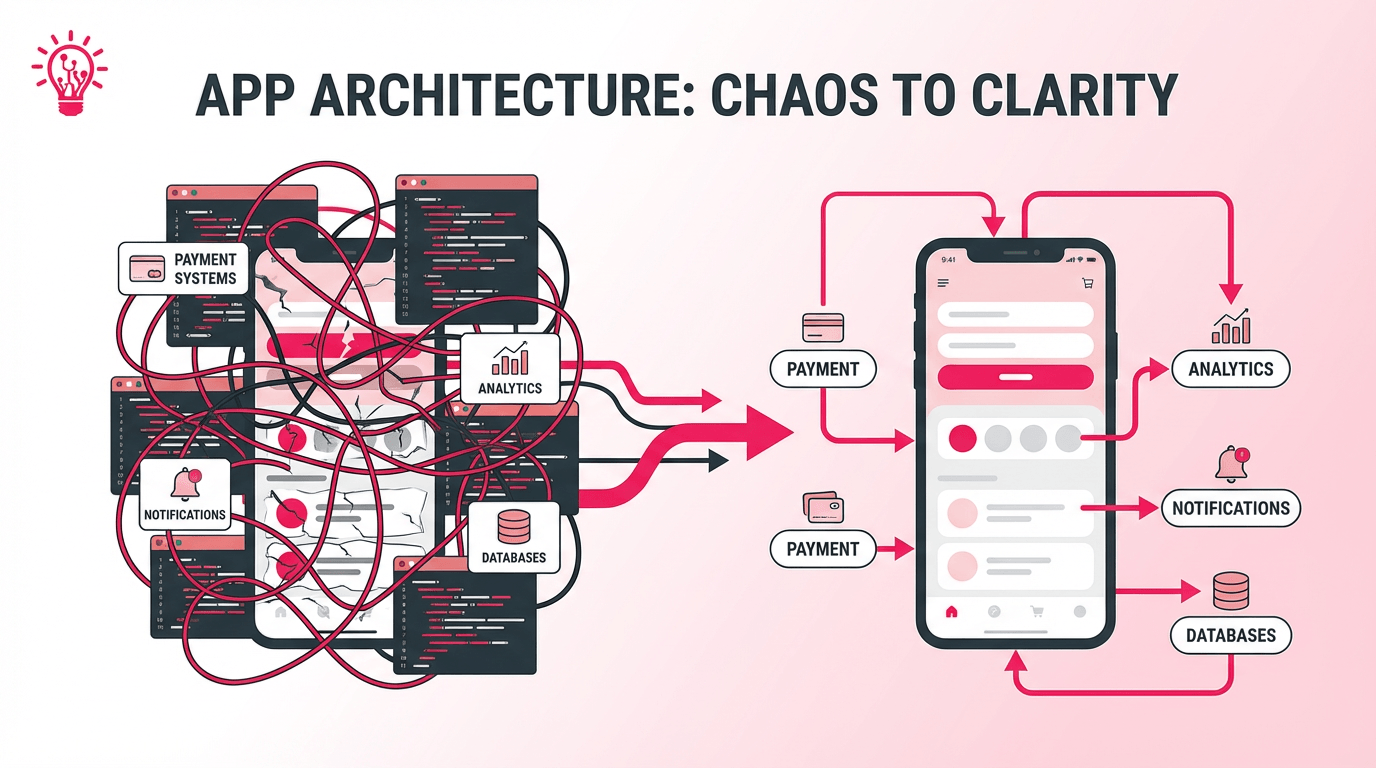
That is usually the moment teams run into hidden dependency chains. One “safe” update touches analytics, payments, notifications, or some other feature no one expected to be connected. What looked like one bug turns into a wider repair because the structure underneath the app is no longer trustworthy.

This is where technical debt starts showing its real cost. Stripe’s Developer Coefficient report found that developers spend an average of 17.3 hours per week on maintenance work tied to bad code, debugging, refactoring, and modifying existing systems. That helps explain why a two-day patch can quietly turn into a two-week cleanup job once the team starts pulling on the wrong thread.

The practical question is whether the codebase still has enough structure for patching to work. If the answer is no, a deeper refactor or rebuild often stops being overkill and starts becoming the shorter path back to stability.

What a Short Code Audit Should Clarify

Infographic showing tangled code signals being filtered through an audit and analysis process into safe to patch, needs deeper work, or major red flags.

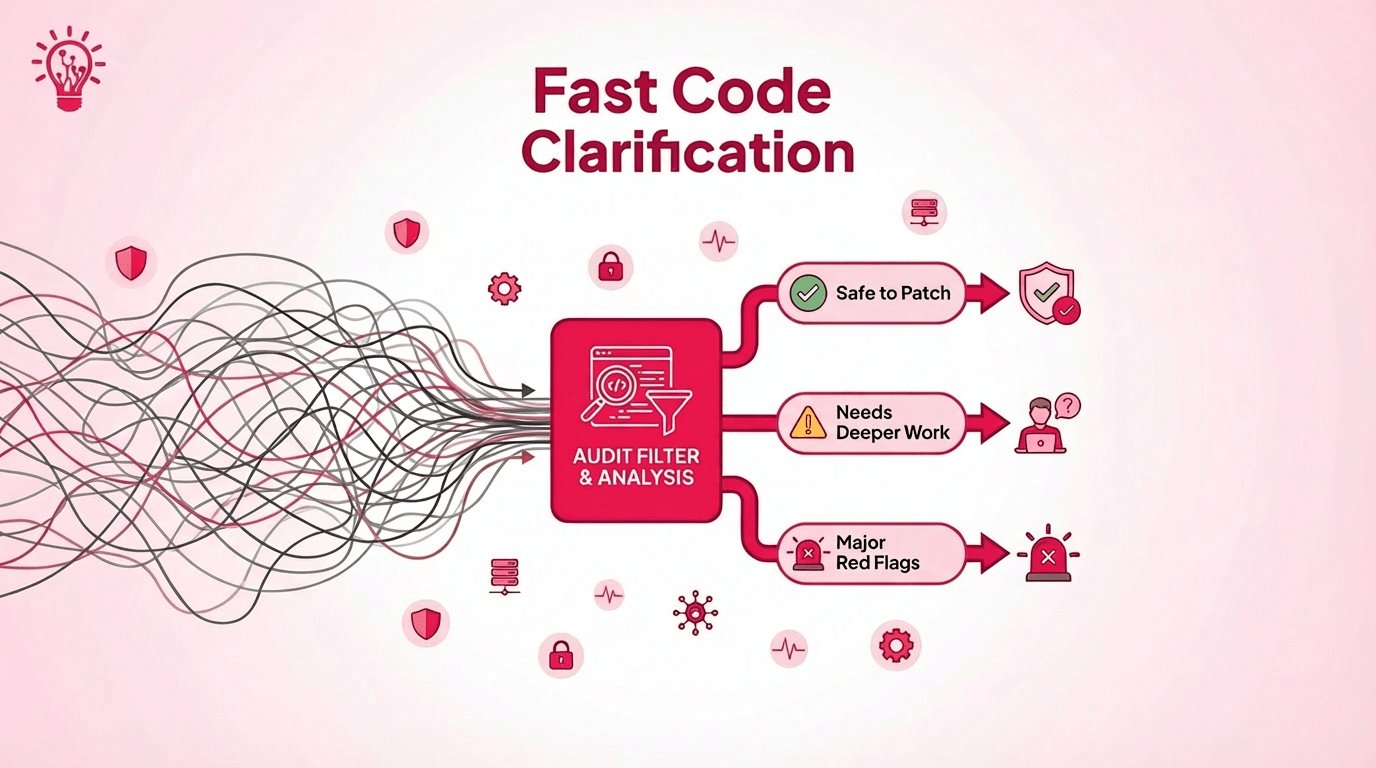
A short code audit is not there to impress you with technical jargon. Its job is to answer three practical questions fast: what is actually broken, what is safe to patch, and what signals a much longer repair.

In a typical small to mid-sized vibe-coded app, that audit usually takes 2 to 5 business days. By the end of it, you should have a clearer read on the architecture, code quality, data and integrations, and the release setup behind the app. The point is to narrow the problem enough that the next decision stops being a guess.

The most useful audits also surface the red flags early. 

If the app has no real architecture, business logic scattered everywhere, or core features leaning on a pile of fragile plugins, the timeline usually stops looking like a tune-up and starts looking like a larger rescue job. That is the kind of information that saves teams from approving a “quick fix” that was never going to stay quick.

A good audit should leave you with something simple, like a prioritized view of what can be fixed now, what needs deeper work, and what will keep stretching the timeline if no one addresses it properly.

What You Can Safely Fix Fast

Diagram showing the difference between surface-level app fixes, like UI cleanup, and deeper system-level risks involving authentication, payments, data models, and backend state.

Not every messy app problem needs a deep rebuild. Some fixes are still worth doing quickly, as long as they do not disturb the parts of the product that carry most of the risk.

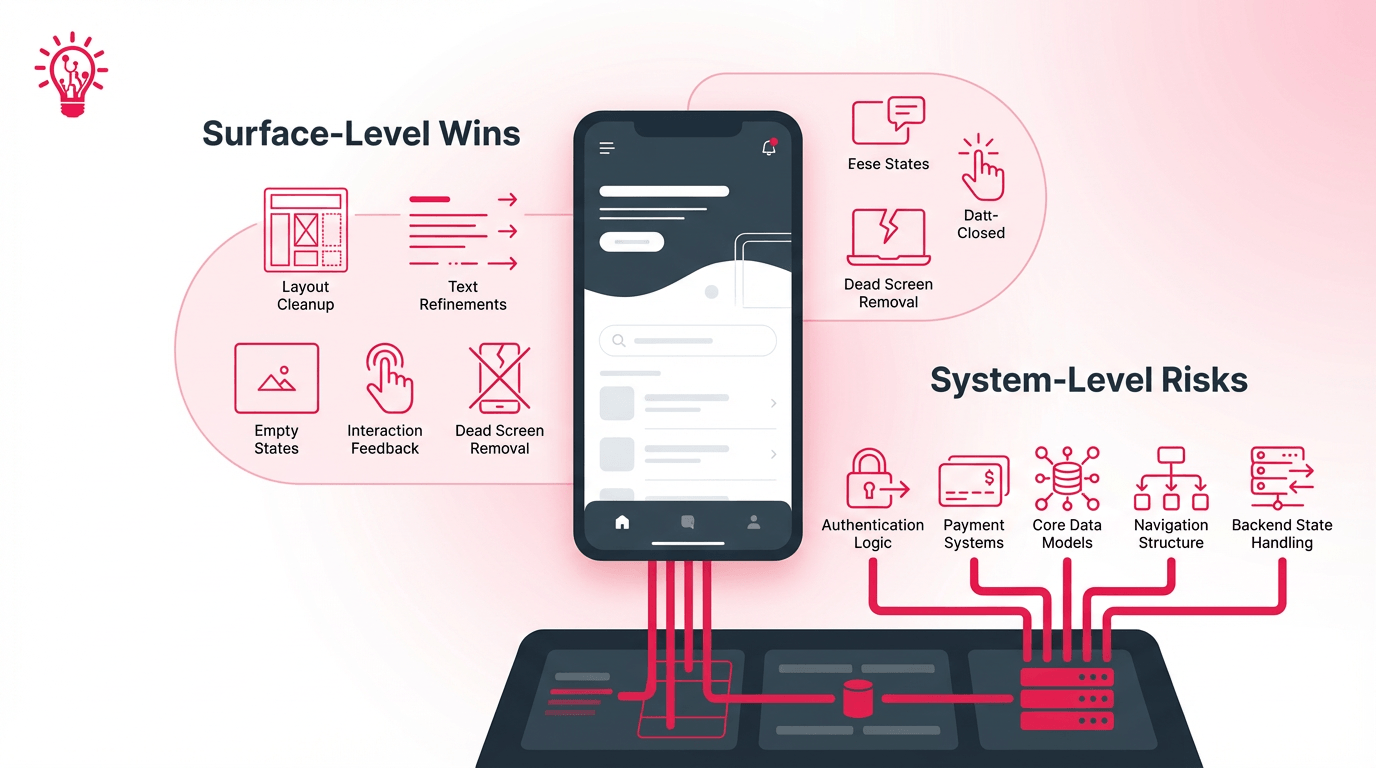
The safest fast wins are usually the ones that stay close to the surface and this includes with broken layouts, inconsistent spacing, weak empty states, rough copy, or one-off components that can be cleaned up without changing core data models, navigation, or business logic. These are the kinds of fixes that can improve the product fast without quietly creating new technical debt.

A quick fix only stays safe if it does not force the team to guess about deeper logic underneath it. Once the change starts touching payments, auth, state management, or anything tied to the app’s structure, it stops being a fast win and starts needing more caution.

The best short sprints are the ones that improve the experience while leaving the foundation alone. That is usually where quick cleanup creates visible progress without making the next repair harder.

Safe fast wins usually include:

  • UI cleanup
  • copy and labels
  • empty states
  • small interaction feedback
  • removing dead screens or duplicate actions

Not usually a fast win:

  • auth logic
  • payments
  • core data models
  • navigation structure
  • backend state handling

That is usually the smartest place to start: visible improvements, limited risk, and enough restraint not to turn one repair into the next problem.

Daniel Haiem

Daniel Haiem

Daniel Haiem has been in tech for over a decade now. He started AppMakersLA, one of the top development agencies in the US, where he’s helped hundreds of startups and companies bring their vision alive. He also serves as advisor and board member for multiple tech companies ranging from pre-seed to Series C.

Ready to Develop Your App?

Partner with App Makers LA and turn your vision into reality.
Contact us

Frequently Asked Questions (FAQ)

Usually, yes if the issue affects core flows, stability, or trust. Piling new work on top of an unstable build often slows the repair and makes the root cause harder to isolate.

Have access ready for the repo, hosting, analytics, crash logs, third-party services, and app store accounts. It also helps to share the bugs users are feeling most, recent releases, and anything the team already suspects is fragile.

Yes, but it is usually smoother if the current state is documented first. Without a clear handoff, the new team may spend extra time rediscovering the same issues before the real work resumes.

Ask for a short summary of what was fixed, what still looks risky, what was deferred, and what should be monitored next. That gives you a clearer line between containment, stabilization, and deeper follow-up work.

The best sign is not that one bug disappeared. It is that the app becomes easier to change without triggering new problems. Fewer regressions, cleaner releases, and more predictable behavior usually tell you the repair improved the foundation instead of just covering the symptom.

See more
Chevron-1

The Goal Is Not Just to Fix the Bug

A vibe-coded app does not usually get easier to fix by waiting. Small issues tend to stay small only when the structure underneath them is still solid. Once the app starts fighting every change, the real decision is no longer how fast you can patch it. It is how to stop the same class of problem from coming back.

The right move is not always the biggest one. Sometimes it is a contained fix. Sometimes it is a short refactor. Sometimes the faster path is to stop forcing an unstable foundation to carry more than it should. What matters is choosing the option that gives the product a cleaner path forward, not just a quieter week.

If the app is already costing you time every time something breaks, AppMakers USA can help assess what is actually causing the drag and whether the smarter next step is to fix, refactor, or rebuild.


Exploring Our App Development Services?

Share Your Project Details!

Vector-60
We respond promptly, typically within 30 minutes!
Tick-4
  We’ll hop on a call and hear out your idea, protected by our NDA.
Tick-4
  We’ll provide a free quote + our thoughts on the best approach for you.
Tick-4
  Even if we don’t work together, feel free to consider us a free technical
  resource to bounce your thoughts/questions off of.
Alternatively, contact us via phone +1 310 388 6435 or email [email protected].
    Copyright © 2026 AppMakers. All Rights Reserved
    Follow us on socials:
    linkedin facebook pinterest youtube rss twitter instagram facebook-blank rss-blank linkedin-blank pinterest youtube twitter instagram