Data pipelines for intelligent features sound like a buzzword until you try to ship your first AI-driven feature and watch it stumble on late, messy, or missing events. You might already have dashboards, a warehouse, and a few batch jobs, but that does not mean your data is ready to power recommendations, risk scores, or agents that respond in real time.
What becomes obvious fast is that analytics built for reporting will not survive the demands of intelligent features. The gap is not about models; it is about the pipeline underneath them.
This guide breaks down how teams move from “analytics that usually work” to pipelines built on purpose for intelligent features, and what to look for as your product grows.
How do you know if your pipelines are ready for intelligent features and not just “working on a good day”?
You measure maturity instead of trusting gut feel.
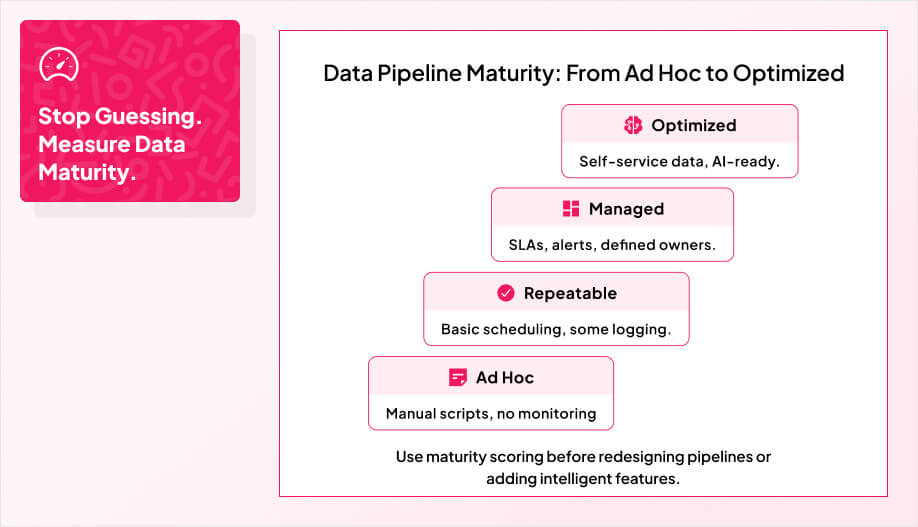
Start by scoring where you are today, not where you wish you were. Use established maturity models like CMM, TDWI, or DAMA-DMBOK to rate governance, data quality, and process discipline. Remember that data maturity spans strategy, people, processes, and technology, so your assessment must go beyond tools and platforms. A clean tool stack with messy ownership is still low maturity.
Layer in Gartner’s analytics maturity model to see if you are stuck in descriptive dashboards or actually enabling predictive and prescriptive use cases. In parallel, assess your data platform maturity on its own: storage, processing engines, orchestration, observability, and how easily new data products can be shipped.
Then examine operational reality: uptime, failure rates, recovery times, error and duplicate percentages, and how quickly stakeholders get insights. A structured data maturity assessment will also surface bottlenecks and misalignments in these metrics, creating a KPI-driven roadmap for improving analytics capabilities and business intelligence.
Then look at operational reality: uptime, failed runs, recovery times, error and duplicate rates, and how long it takes for stakeholders to get answers from raw data. A simple scorecard across these metrics will surface bottlenecks and give you a KPI-driven roadmap for raising the bar.
Close with a cross-functional review. Put business, data, and engineering leaders in the same room and map each domain from “ad hoc” to “managed” to “optimized.” The friction in that conversation is the point; it shows you where expectations and capabilities are out of sync.
Our team at AppMakers USA runs this kind of maturity assessment before touching architecture or AI features, so the roadmap lines up with where your data practice actually is today, not where a slide deck says it is.
Even if your analytics stack looks modern on paper, it will not deliver much value unless ingestion and connectivity match how data actually moves through your product. You want incremental ingestion with checkpoints so you process only what changed, recover cleanly from failures, and keep costs under control as volume and update frequency grow.
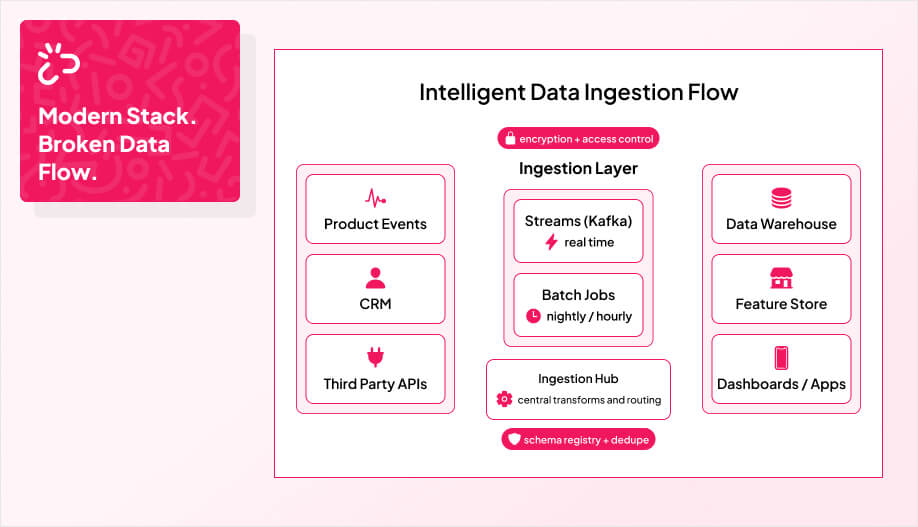
Pick patterns based on velocity and usage, not fashion. Use point to point or event driven streams for low latency features, batch jobs for heavy analytics, and hybrid designs when you care about both history and speed. On products that change often, the AppMakers USA team usually puts a central ingestion hub in front of everything. That hub decouples source systems from warehouses, lakes, and feature stores so you can evolve one side without constantly breaking the other. In practice that might mean Kafka streams for product events, nightly CRM batches, and partition based loads into your warehouse, which is the pattern we reach for on most builds. We also design with scalable architecture in mind to support growth and reliability across cloud environments.
From there you harden the plumbing. Schema registries keep producers and consumers in sync. Distributed processing and auto scaling handle spikes without manual tuning. Solid partitioning and window based deduplication stop duplicates from leaking into downstream models. You also need to enforce end‑to‑end encryption and strict access controls at the ingestion layer so privacy and compliance are baked into the pipeline instead of patched on later.
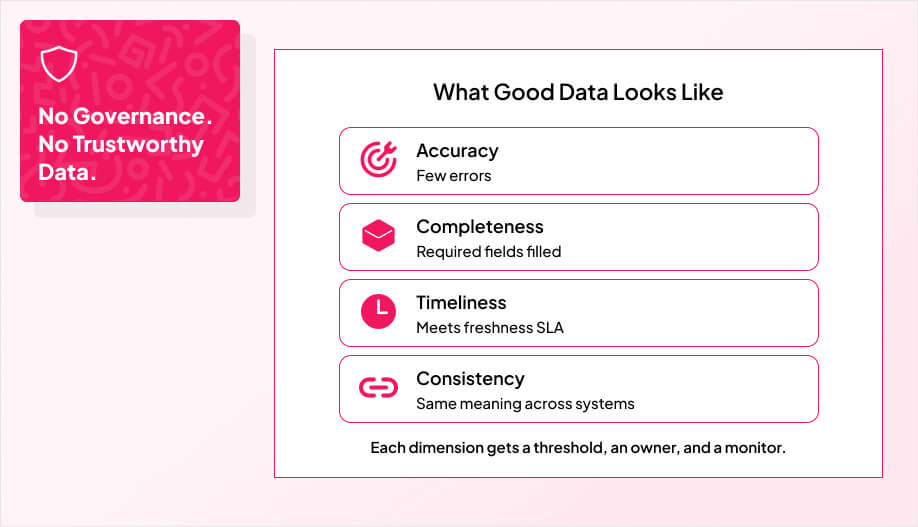
If you want intelligent features to behave reliably, your data needs to be boring: consistent, accurate, and predictable. That does not happen by accident. You lock in clear data quality standards, automate how policies are enforced, and catch anomalies in real time before they affect users.
You start with rigorous data profiling so you understand how your datasets behave in practice: where values are missing, how they drift, where duplicates creep in. You treat these guardrails like part of the pipeline’s design, not an afterthought, so your data stays trustworthy while volume and complexity grow. Grounding these controls in a clear data strategy keeps governance efforts aligned with real business outcomes. That’s why we prioritize automated governance that can keep pace as data volume and complexity scale.
The teams we work at AppMakers USA wire these guardrails in early ship intelligent features faster because they spend less time chasing hidden data problems.
Before you can trust any pipeline, you need clear data quality standards and governance guardrails that everyone agrees upon and follows. You start by defining what “good data” means for your business: relevance, accuracy, completeness, and timeliness. These standards should explicitly cover key dimensions such as completeness, consistency, and timeliness so they can be monitored and improved over time.
Make those dimensions measurable. Set thresholds for accuracy, completeness, and freshness so people know when data is actually usable for intelligent features. Clearly defined data governance roles ensure accountability for monitoring and enforcing these thresholds across teams.
Standardize structure as well as quality: data types, required versus optional fields, valid ranges, and reference values for every critical field. This level of standardization is what enables a single source of truth and makes ongoing audits far more straightforward. Document these in a data quality policy that doubles as the reference for audits and compliance reviews.
On real projects, the turning point is ownership. Once specific people are responsible for specific datasets and thresholds, data quality shifts from being a nice idea to something that is maintained day to day. The AppMakers USA team leans hard on that model, working directly with data owners so these standards show up in everyday workflows instead of sitting in a policy doc.
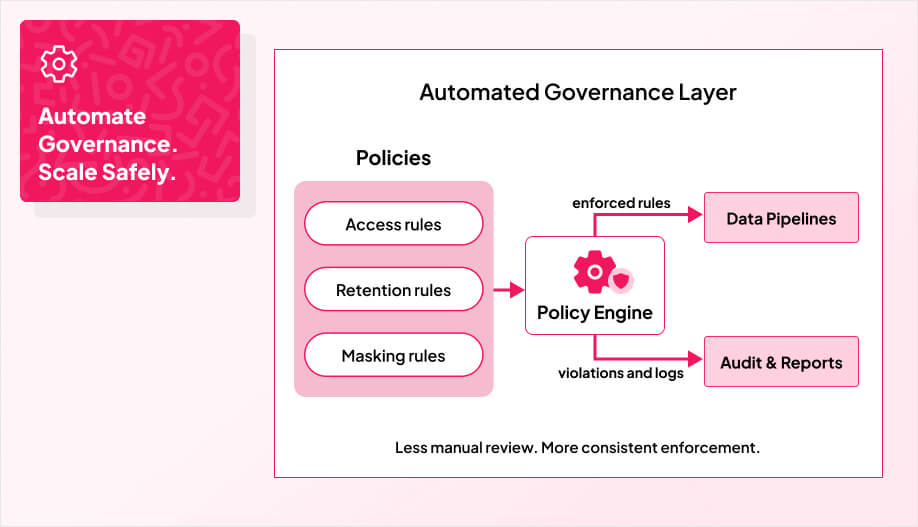
Once you define what “good data” looks like, the only way to keep it that way at scale is to automate how policies are applied and monitored.This includes implementing Active Data Governance to ensure policies are consistently enforced and auditable across all data domains. Our team’s experience delivering end-to-end solutions across multiple sectors shows automation reduces manual errors and speeds enforcement of policies, which is why we embed product roadmaps into governance designs.
You centralize rules in a unified policy center, gain single-pane visibility, and stop debating who owns which dataset. A transparent policy center with enforcement analytics helps you monitor compliance rates, policy violations, and the real business impact of your governance rules in real time. From there, you let the system do the heavy lifting. Automated checks block out of policy data from flowing downstream, flag violations, and produce audit trails. Dashboards show compliance rates, top recurring issues, and where policies are too strict or too loose. AI assisted classification can help tag sensitive fields, spot risky access patterns, and surface privacy risks early. Our approach draws on Bespoke software practices to ensure the governance tools match each organization’s needs.
From our AppMakers USA experience, the goal is to make governance feel like guardrails, not handcuffs. A well-defined data governance framework ensures data quality, security, and compliance are managed consistently across the organization while reducing risk and supporting future innovation. It should feel like safety rails, not handcuffs:
We design these guardrails to integrate cleanly with your stack today.
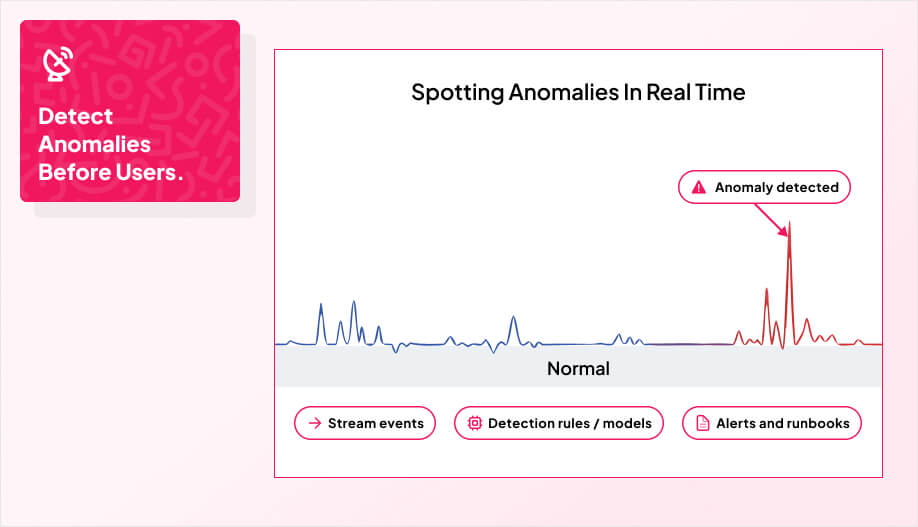
If your product depends on live data, you cannot wait until tomorrow’s report to discover something broke. Because these systems are built on event-driven architectures, they can handle growing data volumes while still supporting low-latency anomaly detection. Anomaly detection has to be part of the pipeline, watching streams in real time and flagging strange behavior before it hits users or models.
In practice, you stream events through a log or message bus, process them with a streaming engine, and apply lightweight algorithms that highlight unusual patterns: sudden spikes, sharp drops, or distributions that no longer match recent history. In our reference implementation, a Kafka-Spark pipeline with Isolation Forest and a Dash dashboard is containerized with Docker Compose to stream synthetic power plant energy data and flag anomalies in real time. Our team also emphasizes building scalable architecture so the pipeline grows with business needs.
The key is to treat anomalies as first class signals. Alerts should route to the right owners, include enough context to debug, and tie back to clear runbooks so incidents do not stall. Over time you tune the rules, retrain models on sliding windows, and scale compute so detection keeps pace with traffic.
Teams that invest in this early usually keep latency in the millisecond to second range and avoid the slow bleed of silent data issues, which has been the pattern across AppMakers USA projects. On Databricks, Delta Live Tables automates ingestion and transformation so real-time anomaly detection pipelines stay reliable with minimal operational overhead. It is cheaper to catch a bad stream in real time than to unwind a week of corrupted model outputs.

When you layer real time behavior on top of your data pipelines, the job stops being “move data from A to B” and becomes “react to important events as they happen.” That only works if three things are true at the same time: your event triggers are designed around real business moments, your streaming infrastructure can keep up under load, and you can plug AI into existing flows without breaking what already works. This is the point where pipelines start to feel like part of the product, not just plumbing behind a dashboard. Using Prefect's event-driven scheduling, these triggers can launch downstream flows immediately when files arrive instead of relying on inefficient polling.
On most client engagements, the AppMakers USA usually approach this in a joint design exercise with clients, mapping specific business events to triggers and sizing the streaming architecture to match real-world demand patterns. This approach depends on a robust, scalable, and fault-tolerant design to sustain low-latency processing even as data volume and event frequency increase. In platforms like Microsoft Fabric, such event-driven workflows can automatically trigger pipelines from OneLake file events, reducing unnecessary scheduled runs and enabling faster time-to-insight. We also ensure integration with cloud-based applications to support reliability and operational efficiency across deployments.

Batch pipelines still have their place, but intelligent features only feel “smart” when they fire off the right events at the right time. Behind each trigger flows a data pipeline that extracts events, transforms them and passes them on to the right consumers.
Each event should have a clear contract: payload shape, source, expected frequency, and which systems are allowed to react to it. From there, you route events through an event bus or streaming platform and into the services that need to know, like fraud scoring, notifications, fulfillment, or a vector database that stores recent context for AI features. This lines up well with event-driven architectures that decouple producers and consumers so triggers can scale independently as demand grows.

A simple rule keeps scope under control: if a trigger does not protect revenue or improve the customer experience, it probably belongs in a batch report, not in your real time path. The events that make the cut should feel concrete:
On new builds, the AppMakers USA team starts with a small, high impact set of events, wires them end to end, and only then expands. If you try to turn every log line into a trigger on day one, you just create noise and brittle pipelines. We design triggers with service orchestration in mind so they coordinate cleanly across systems and compliance, and we often pair them with vector databases so AI features can respond with real context instead of raw, isolated events.
Good triggers are useless if your streaming layer falls over during peak traffic. The goal is simple: keep latency low and behavior predictable while load and use cases grow. You get there by fanning events out cleanly, avoiding tight point to point dependencies, and making it easy to see when things start to drift. By emphasizing decentralized communication, you reduce point-to-point dependencies and improve reliability as traffic patterns evolve.
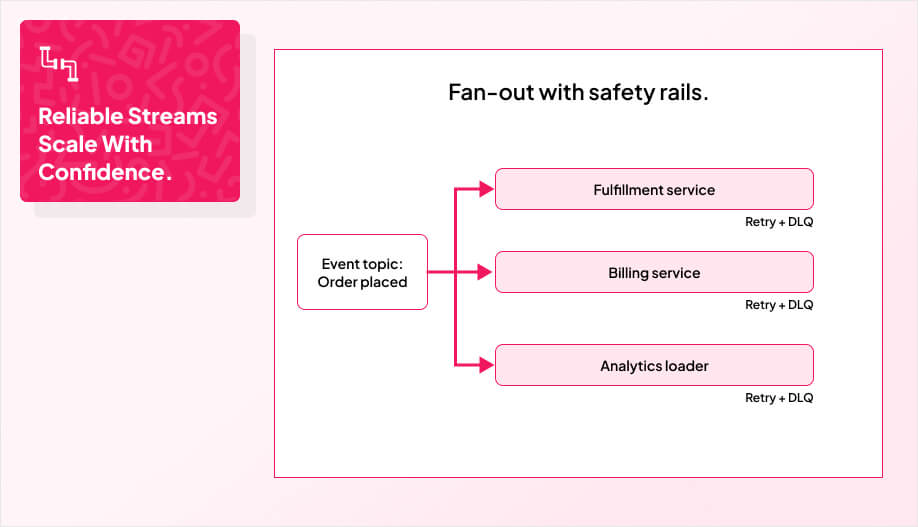
In practice, you take events like OrderPlaced and feed them to fulfillment, invoicing, and fraud checks in parallel. Each service processes work when it is ready instead of blocking others. Horizontal scaling and consumer groups let you dial capacity up independently. By separating event producers, brokers, and consumers through loose coupling, you preserve flexibility to add new real-time workflows without disrupting existing ones. Designing clear observability and tracing helps teams diagnose issues quickly and maintain throughput under load by exposing operational metrics. App Makers USA applies modern frameworks to ensure these observability pipelines integrate smoothly with application code.
You then push processing to the edge with real-time streams, replacing batch jobs with on-demand handlers that react when events arrive.
Reliability comes from the safety rails around that core path. Routing layers spread load across nodes. Dead letter queues, retries, and error handlers keep bad messages from poisoning throughput. Platforms like Apache Kafka give you durable storage so you can replay events after downstream failures instead of losing signal. Clear observability and tracing sit on top so teams can see lag, error rates, and throughput in one place instead of guessing.
Over time we have settled on a simple pattern at AppMakers USA: small, single purpose consumers, clear contracts per topic, and streaming metrics wired in from day one. That way you can scale traffic and features without turning your pipeline into a black box.
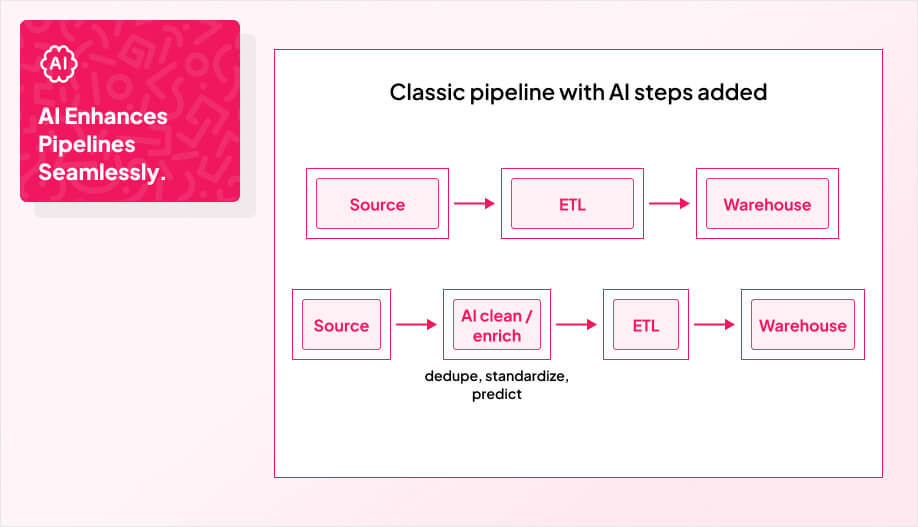
You do not need to rip out your existing pipelines to get value from AI. The faster move is to layer AI enhanced transformations on top of what you already have and let them handle messy parts like mappings, cleaning, and drift. By using no-code AI automation, teams without deep engineering expertise can configure and manage these intelligent transformations safely.
You plug models into your current ETL or ELT steps so they can learn field mappings, spot schema changes, and clean data in motion. As these models monitor production flows, they enable self-healing pipelines that automatically adjust to schema changes and data anomalies in real time. This approach also supports real-time monitoring so teams can respond to issues immediately and reduce downtime. A unified data layer gives these models consistent context so they are not guessing in isolation.
The security side has to grow with it. Modern AI integration platforms ship with role based access, row and column level controls, and audit logs that show who touched what, when, and how. That gives you a trail you can defend in front of auditors instead of a black box.
You feel the impact when:
Inside AppMakers USA, AI steps are treated as first class parts of the pipeline graph: observable, testable, and easy to roll back if they misbehave. They are just another tool in service of reliable data, not a magic box bolted on at the end.
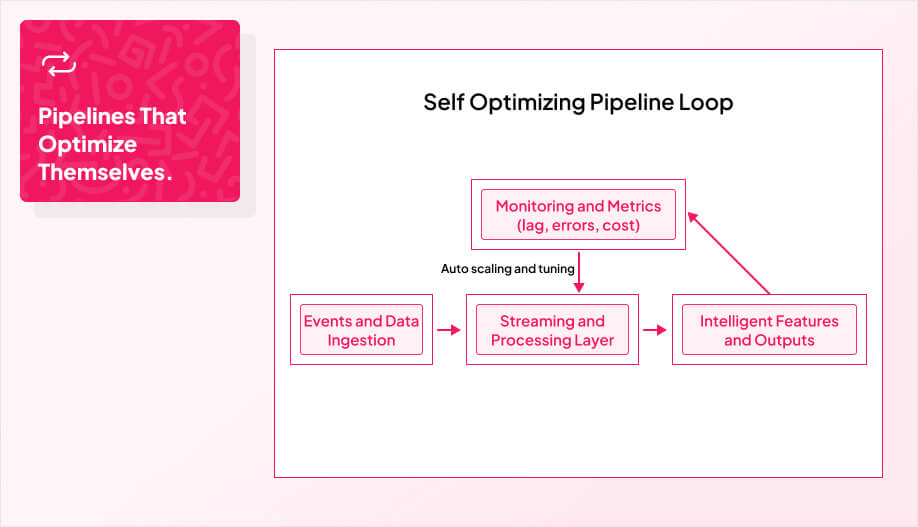
When you move from static data jobs to self optimizing pipeline architectures, you stop babysitting workflows and start letting the system adjust itself based on live feedback. Continuous monitoring and feedback loops let pipelines learn from historical runs to refine performance optimization decisions over time.
Instead of hard coding throughput, you let the pipeline tune partition sizes, parallelism, and resource allocation based on real metrics: lag, error rate, queue depth, and cost. That lines up with where modern platforms are going anyway, with stream processing and event driven patterns becoming the default instead of nightly sweeps.
In practice, Spark executors scale when bottlenecks show up, Kafka consumer groups rebalance when lag grows, and Kubernetes adds pods when custom metrics cross a threshold. You process only changed data instead of rescanning entire datasets, and you use microservices, serverless triggers, and Dockerized components so each stage can scale on its own. This kind of dynamic scaling ensures resources align with fluctuating workloads in real time.
On projects that need this level of elasticity, a modular, adaptive setup is usually what turns AI features from fragile demos into dependable capabilities. That is the same pattern we use in AppMakers USA cloud infrastructure services show how we architect environments that scale automatically and predictably.
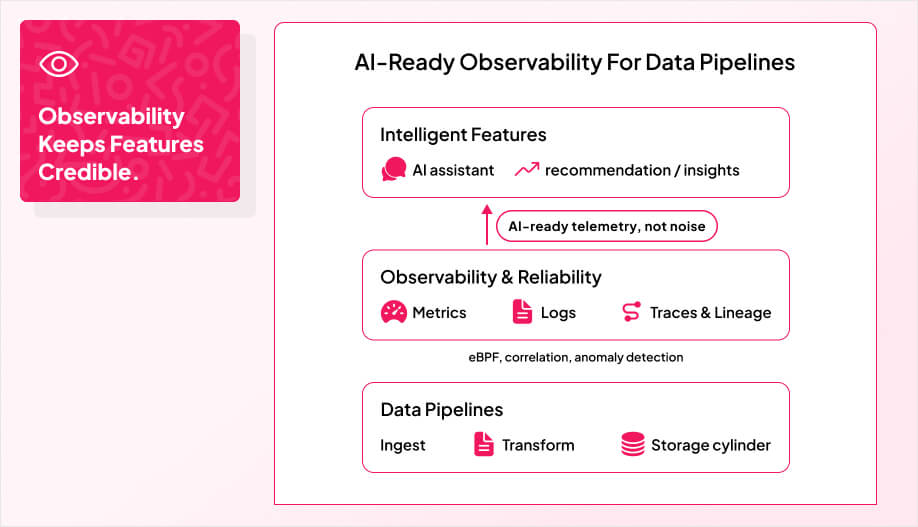
Intelligent features only stay credible if your observability, reliability, and recovery keep up with the complexity underneath. You do not need more dashboards. You need telemetry that AI and humans can actually act on.
At AppMakers USA, we have seen dense statistical summaries cut log volume by close to 90 percent while still preserving the signals engineers and AI agents need to debug real issues. With techniques like eBPF and correlation layers, you can stitch kernel events, metrics, and logs into one story that an AI system can reason over in real time.
By extending these techniques into your data layer, data pipeline observability gives you real-time insight into data quality and performance across every stage of the flow. By feeding your agents AI-ready observability data, you replace noisy raw logs with high-signal patterns they can act on autonomously.The AppMakers USA team designs these systems with personalized service and local business needs in mind. We also prioritize secure-by-design practices to keep sensitive data and compliance needs satisfied.
Platforms like Lakeflow and similar stacks give you centralized observability across jobs, pipelines, and historical runs so you can spot regressions in minutes instead of days.
The target state is simple: observability, alerts, and recovery should feel like control, not chaos:
You align intelligent pipeline investments with near-term ROI by defining clear KPIs, targeting six-month breakeven, prioritizing streaming and CX use cases, and partnering with experts like AppMakers USA to optimize automation and analytics turnaround.
Start with a simple maturity check: look at data quality, governance, and failure rates on your current jobs, then pick one concrete intelligent feature (for example, a real-time alert or recommendation) and design the ingestion + event path it needs. That forces you to upgrade only the parts of the stack that block that feature instead of “modernizing everything” at once.
You rarely need years of data. A few months of clean, representative events is usually enough to train a first useful model and prove value. The bigger problem is dirty or inconsistent data, which is why standards, profiling, and anomaly detection matter more than simply “more history.”
Treat schemas and events like public APIs: version them, add fields in a backward-compatible way, and deprecate slowly. Run dual pipelines or shadow traffic when you roll out changes, and rely on observability plus replayable streams to roll forward or back if something misbehaves.
If your team is strong on product but light on streaming, governance, or ML-in-production, it is usually cheaper to bring in a partner to design the backbone and hand it off than to spend a year learning by breaking things. That is where AppMakers USA typically comes in: we co-design the pipeline, wire in guardrails and observability, and leave you with something your team can operate, not a black box.
If you want intelligent features to behave like part of the product instead of a fragile experiment, the real work sits in the plumbing you cannot see. Maturity checks, real time ingestion, guardrails for quality, and observability are not side quests. They are the backbone that decides whether recommendations, risk scores, or agents actually ship and stay online.
The good news is you do not have to modernize everything to move forward. Pick one feature, trace the events and datasets it needs, and harden that path first. Then let those patterns spread into the rest of your stack.
That is the lens we use when we design pipelines for clients. The work starts with where data really moves today, then we sketch a realistic upgrade path that lines up with the product roadmap instead of fighting it. If you want a second set of eyes on whether your current setup can support the features you are planning, the AppMakers USA team can walk through it with you.